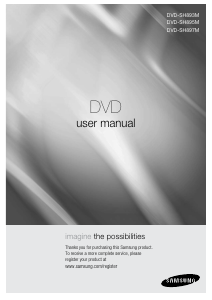
Manual Samsung DVD-SH853M DVD Player

Need a manual for your Samsung DVD-SH853M DVD Player? Below you can view and download the PDF manual for free in English. This product currently has 2 frequently asked questions, 0 comments and has 1 vote with an average product rating of 100/100. If this is not the manual you want, please contact us.

Is your product defective and the manual offers no solution? Go to a Repair Café for free repair services.

Manual

Loading…

Getting Started
English - 3
Precaution
Important Safety Instructions
Read these operating instructions carefully before using
the unit. Follow all the safety instructions listed below.
Keep these operating instructions handy for future
reference.
Read these instructions.
Keep these instructions.
Heed all warnings.
Follow all instructions.
Do not use this apparatus near water.
Clean only with dry cloth.
Do not block any ventilation openings, Install in
accordance with the manufacturers instructions.
Do not install near any heat sources such as radiators,
heat registers, stoves, or other apparatus (including
ampli ers) that produce heat.
Do not defeat the safety purpose of the polarized or
grounding- type plug. A polarized plug has two
blades with one wider than the other. A grounding-
type plug has two blades and a third grounding
prong. The wide blade or the third prong are
provided for your safety. If the provided plug does
not  t into your outlet, consult an electrician for
replacement of the obsolete outlet.
Protect the power cord from being walked on or
pinched particularly at plugs, convenience
receptacles, the point where they exit from the
apparatus.
Only use attachments/accessories speci ed by the
manufacturer.
Use only with the cart, stand, tripod, bracket, or table
speci ed by the manufacturer, or sold with the
apparatus. When a cart is used, use caution when
moving the cart/apparatus combination to avoid
injury from tip-over.
Unplug this apparatus during lightning storms or
when unused for long periods of time.
Refer all servicing to quali ed service personnel.
Servicing is required when the apparatus has been
damaged in any way, such as power-supply cord or
plug is damaged, liquid has been spilled or objects
have fallen into the apparatus, the apparatus has
been exposed to rain or moisture, does not operate
normally, or has been dropped.
1)
2)
3)
4)
5)
6)
7)
8)
9)
10)
11)
12)
13)
14)
Handling Cautions
Before connecting other components to this HDD &
DVD Recorder, be sure to turn them all o .
Do not move the HDD & DVD Recorder while a disc is
being played, or the disc may be scratched or broken,
the HDD & DVD Recorder internal parts may be
damaged.
Do not put a  ower vase  lled with water or any small
metal objects on the HDD & DVD Recorder.
Be careful not to put your hand into the disc tray.
Do not place anything other than the disc in the disc
tray.
Exterior interference such as lightning and static
electricity can a ect normal operation of this HDD &
DVD Recorder. If this occurs, turn the HDD & DVD
Recorder o and on again with the STANDBY/ON
button, or disconnect and then reconnect the AC
power cord to the AC power outlet. The HDD & DVD
Recorder will operate normally.
Be sure to remove the disc and turn o the HDD & DVD
Recorder after use.
Disconnect the AC power cord from the AC outlet
when you don’t intend to use the HDD & DVD Recorder
for long periods of time.
Clean the disc by wiping in a straight line from the
inside to the outside of the disc.
Apparatus shall not be exposed to dripping or splashing and
no objects  lled with liquids, such as vases, shall be placed on
the apparatus.
The Mains plug is used as a disconnect device and shall stay
readily operable at any time.
Maintenance of Cabinet
For safety reasons, be sure to disconnect the AC power
cord from the AC outlet.
Do not use benzene, thinner, or other solvents for
cleaning.
Wipe the cabinet with a soft cloth.
HDD (Hard Disk Drive)
The hard disk has a high storage density, which enables
long recording durations and quick access to written
data. However, it can easily be damaged by shock,
vibration or dust and should be kept away from magnets.
To avoid losing important data, observe the following
precautions.
Do not use the HDD & DVD Recorder in a place subject
to extreme changes in temperature.
01364A-SH853M-XEU-ENG-1~24.indd 301364A-SH853M-XEU-ENG-1~24.indd 3 2007-06-22 11:03:252007-06-22 오전 11:03:25
Download manual in English (PDF, 23.13 MB)
(Consider the environment and only print this manual if it is really necessary)

Loading…

Rating

Let us know what you think about the Samsung DVD-SH853M DVD Player by leaving a product rating. Want to share your experiences with this product or ask a question? Please leave a comment at the bottom of the page.
Are you satisfied with the Samsung DVD-SH853M DVD Player?
Yes No
100%
0%
1 vote

Join the conversation about this product

Here you can share what you think about the Samsung DVD-SH853M DVD Player. If you have a question, first carefully read the manual. Requesting a manual can be done by using our contact form.

More about this manual

We understand that it’s nice to have a paper manual for your Samsung DVD-SH853M DVD Player. You can always download the manual from our website and print it yourself. If you would like to have an original manual, we recommend you contact Samsung. They might be able to provide an original manual. Are you looking for the manual of your Samsung DVD-SH853M DVD Player in a different language? Choose your preferred language on our homepage and search for the model number to see if we have it available.

Specifications

Brand Samsung
Model DVD-SH853M
Category DVD Players
File type PDF
File size 23.13 MB

All manuals for Samsung DVD Players
More manuals of DVD Players

Frequently Asked Questions about Samsung DVD-SH853M DVD Player

Our support team searches for useful product information and answers to frequently asked questions. If you find an inaccuracy in our frequently asked questions, please let us know by using our contact form.

Can a DVD player also play CD's? Verified

Yes, almost all DVD players are capable of playing CD's.

This was helpful (199) Read more

Can I repair scratches on a DVD myself? Verified

Scratches prevent de laser from reading the disc correctly. When the scratches are only superficial it is possible to repair them yourself by polishing the disc with a slightly abrasive compound. Ideally you use a professional abrasive compound but it’s also possible to use regular toothpaste. After polishing the disc it needs to be washed and let to dry. There are specialised businesses that can do this.

This was helpful (92) Read more
Manual Samsung DVD-SH853M DVD Player

Related products

Related categories

×
Download