Manual Richard Solo JK001 Portable Charger

Need a manual for your Richard Solo JK001 Portable Charger? Below you can view and download the PDF manual for free in English. This product currently has 6 frequently asked questions, 0 comments and has 0 votes. If this is not the manual you want, please contact us.

Is your product defective and the manual offers no solution? Go to a Repair Café for free repair services.

Manual

Loading…
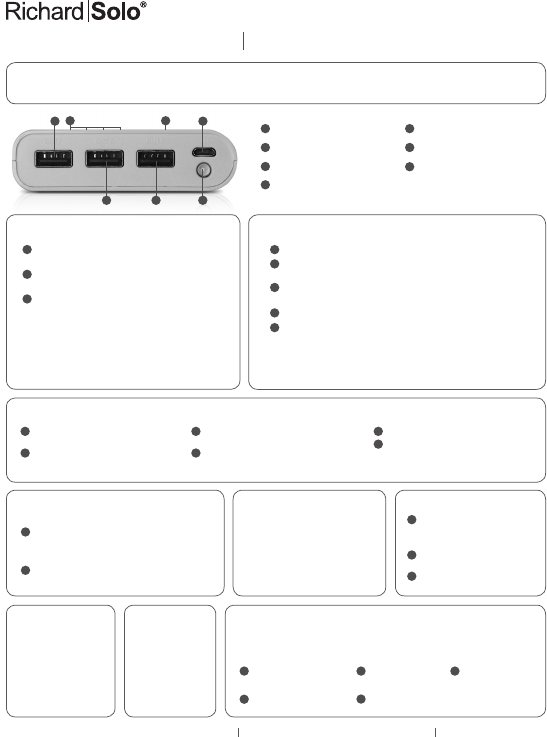
Thank you for purchasing the RichardSolo 20800 mAh 3-Port Power Bank. Please read these
instructions before operation and save for future reference.
Charge 20800 3-Port Power Bank:
Connect included USB/micro-USB cable to Power Bank
micro-USB input port (4).
Charge via any powered USB port. Use AC/USB adapter
(not included) for faster results.
LEDs (7) flash in 25% increments and remain solid when
corresponding capacity* is reached.
*Note: LEDs may not provide an accurate reading while
battery is recharging. For optimum performance, make sure
all LEDs have stopped flashing and remain solid to ensure
full charge capacity. Total recharge time from 0% - 100% =
+/- 14 hours.
Charge your device:
Connect USB charge cable included with your device to Port 1, Port 2, or Port 3.
Press power button (6) to begin charging. Monitor charge status via screen icon
on your device.
Use Port 1/Port 2 for iPhone, iPod, iPad Mini, smartphones, and smaller 1A
devices.
Use Port 3 for iPad and larger 2.1A devices.
To stop charging, remove cable from your device.
*Note: Power Bank LEDs remain lit while device is charging and show remaining
battery capacity. When no connection is detected for 20 seconds, Power Bank shuts
off. When device is fully charged, Power Bank will trickle charge device until Power
Bank is disconnected or completely discharged.
Tandem charge* (charge Power Bank/device simultaneously):
Connect your own USB cable from device
to Power Bank Port 1, Port 2, or Port 3.
Press power button (6) to begin charging.
Connect included USB/micro-USB cable from
AC/USB adapter to Power Bank input port (4).
Device charges first followed by Power Bank.
Monitor charge status for device on its screen.
Monitor charge status for Power Bank via 4
built-in LEDs (7).
Package
Contents
20800 mAh
3-Port
Li-ion battery
USB/micro-USB
charge cable
• Instructions
Check remaining charge capacity /
Use LED flashlight:
Press power button (6) once to check remaining
Power Bank charge capacity. 1 LED flashing = less than
25%; 1 LED solid = about 25%; 2 LEDs = about 50%;
3 LEDs = about 75%; 4 LEDs = about 75-100%.
Press power button (6) twice to illuminate built-in LED
flashlight (5). Press twice to switch off.
Specifications
Capacity: 20800 mAh
Cell Type: Li-ion battery
Input: DC 5V 1A
Port 1 Output: DC 5V 1A
Port 2 Output: DC 5V 1.5A
Port 3 Output: DC 5V 2.1A
Size: 0.87” x 3.15” x 6.3”
Weight: 15.1 oz. (429 gr)
USB Compatibility
Port 1 (1A): iPhone/iPod, smartphones,
MP3 players (standard charge)
Port 2 (1.5A): iPhone/iPod, smartphones,
MP3 players (slightly faster charge)
Port 3 (2.1A): iPad/tablets + iPhone/iPod,
smartphones, MP3 players (best for larger
devices)
Maintenance
Do not store in a depleted state —
battery power cells can be damaged.
Charge Power Bank at least once per
month when not in use.
Keep unit dry — avoid damp
conditions and corrosive materials.
Do not clean with harsh chemicals,
soaps or detergents.
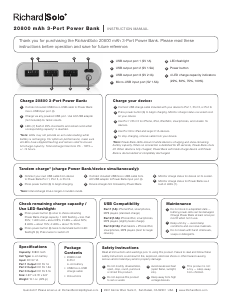
20800 mAh 3-Port Power Bank INSTRUCTION MANUAL
USB output port 1 (5V 1A)
USB output port 2 (5V 1.5A)
USB output port 3 (5V 2.1A)
Micro-USB input port (5V 1.5A)
LED flashlight
Power button
4 LED charge capacity indicators
(25%, 50%, 75%, 100%)
1
1
1
1
1 3 5
1
5
2
2
2
2
2 4
6
2
6
7
3
3
3
3
4
5
4
1
7
6
32 5
4
Safety Instructions
Read all instructions and warnings prior to using this product. Failure to read and follow these
safety instructions could result in fire, explosion, electrical shock or other hazard causing
serious and/or fatal injury and/or property damage.
Do not modify, disassemble,
open, drop, crush, puncture
or shred this product.
Do not expose this product
to rain or water.
Avoid excessive heat
(open flame, sunlight,
etc.).
Keep away from high
voltage devices.
This product is not
a toy — keep away
from children.
Questions? Please email us at: RichardSoloHelp@gmail.com 2301 Kerner Blvd. Suite C, San Rafael, CA 94901 USA www.RichardSolo.com
1 3 5
2
4
*Note: total recharge time is longer in tandem mode.
Download manual in English (PDF, 0.12 MB)
(Consider the environment and only print this manual if it is really necessary)

Loading…

Rating

Let us know what you think about the Richard Solo JK001 Portable Charger by leaving a product rating. Want to share your experiences with this product or ask a question? Please leave a comment at the bottom of the page.
Are you satisfied with the Richard Solo JK001 Portable Charger?
Yes No
Be the first to rate this product
0 votes

Join the conversation about this product

Here you can share what you think about the Richard Solo JK001 Portable Charger. If you have a question, first carefully read the manual. Requesting a manual can be done by using our contact form.

More about this manual

We understand that it’s nice to have a paper manual for your Richard Solo JK001 Portable Charger. You can always download the manual from our website and print it yourself. If you would like to have an original manual, we recommend you contact Richard Solo. They might be able to provide an original manual. Are you looking for the manual of your Richard Solo JK001 Portable Charger in a different language? Choose your preferred language on our homepage and search for the model number to see if we have it available.

Specifications

Brand Richard Solo
Model JK001
Category Portable Chargers
File type PDF
File size 0.12 MB

All manuals for Richard Solo Portable Chargers
More manuals of Portable Chargers

Frequently Asked Questions about Richard Solo JK001 Portable Charger

Our support team searches for useful product information and answers to frequently asked questions. If you find an inaccuracy in our frequently asked questions, please let us know by using our contact form.

How long does it take to fully charge my portable charger? Verified

This depends on model and capacity, but in general the charging of portable chargers is faster when connected to a power socket than when it is connect to a device through USB.

This was helpful (511) Read more

Is it normal that the light blinks while charging? Verified

Yes, with most portable chargers the small light blinks while charging. Often the light will remain lit constantly when the charging cycle is complete.

This was helpful (275) Read more

Is it normal for my portable charger to become warm while charging it? Verified

Yes, portable chargers can become warmer while charging them, this is perfectly normal.

This was helpful (96) Read more

How do I ensure that my portable charger lasts as long as possible? Verified

When using a portable charger it is best to use it until it is completely depleted and then fully recharge it. Intermediate charging will decrease the lifespan of the battery.

This was helpful (83) Read more

What does mAh mean? Verified

mAh stands for milliampère/hour and indicates the power of a battery. A battery of for example 2000mAh will supply 2000 milliampère per hour and is able to run a radio that uses 250mA per hour for 8 hours. A battery with a higher mAh will have a longer runtime.

This was helpful (58) Read more

How much power should my portable charger have? Verified

How much power a portable charger should have depends on what device it should charge. In general it can be said that to charge a smartphone or Mp3 player you need 2200-4000mAh, for tablets 5000-8000mAh and for laptops 10400-12000mAh.

This was helpful (56) Read more
Manual Richard Solo JK001 Portable Charger

Related products

Related categories

×
Download