G
THIS WARNING IS FOUND ON THE PRODUCT.
Electrical shock hazard.
Do not open. No user
servicable parts inside.
Refer servicing to qualied
service personnel.
WARNING
m
c
This safety message means that you could be
seriously hurt or killed if you open the product and
expose yourself to hazardous voltage.
THE SAFETY ALERT SYMBOL PRECEDES
EACH SAFETY MESSAGE IN THIS
INSTRUCTION MANUAL.
THIS SYMBOL INDICATES A POTENTIAL
PERSONAL SAFETY HAZARD THAT COULD
HURT YOU OR OTHERS, AS
WELL AS CAUSE PRODUCT DAMAGE
OR PROPERTY DAMAGE.
m
Safety instructions
YOUR SAFETY AS WELL AS THE SAFETY OF
OTHERS IS IMPORTANT TO ACCO BRANDS
EUROPE. IN THIS INSTRUCTION MANUAL AND
ON THE PRODUCT ARE IMPORTANT SAFETY
MESSAGES. READ THESE MESSAGES CAREFULLY.
m
WARNING: FOR YOUR PROTECTION DO
NOT CONNECT THE POUCH LAMINATOR
TO ELECTRICAL POWER UNTIL YOU READ
THESE INSTRUCTIONS COMPLETELY. KEEP
THESE INSTRUCTIONS IN A CONVENIENT
LOCATION FOR FUTURE REFERENCE. TO
GUARD AGAINST INJURY, THE FOLLOWING
BASIC SAFETY PRECAUTIONS MUST BE
OBSERVED IN THE SET-UP AND USE OF
THIS PRODUCT.
When using electrical appliances, basic precautions
should always be followed to reduce the risk of electric
shock and injury, including the following:
• Carefully read all instructions.
• Always unplug the appliance when not in use or
before cleaning.
• Extreme caution to be taken when appliance is used
by, or near to, children or invalids.
• To protect against risk of electrical hazards, do not
immerse power cord, plug, or appliance in water or
other liquids.
• Do not insert any metal objects, e.g. scissors, or
foreign objects into the entry or exit areas of the
machine. Do not laminate metallic objects.
• Do not operate the appliance with a damaged power
cord or plug, or after the appliance malfunctions, has
been dropped or is damaged in any manner.
• The plug on the power cord is the disconnect device.
• The equipment should be installed near the outlet
socket and the socket should be easily accessible.
• The machine must not be used outside.
m
Important safeguards
m
Specications
Rexel Academy A3 Laminator
A3
Credit card size (54x86mm)
Pouch sizes up to A7 =
2 x 75 micron (150 micron)
Pouch sizes above A7 =
2 x 250 micron (500 micron)
230V / 50Hz
600W
6.4 kg
7.49 kg
Maximum Pouch Size
Minimum Pouch Size
Minimum Pouch Thickness
Maximum Pouch Thickness
Power Supply
Maximum Power Consumption
Weight
Packed Weight
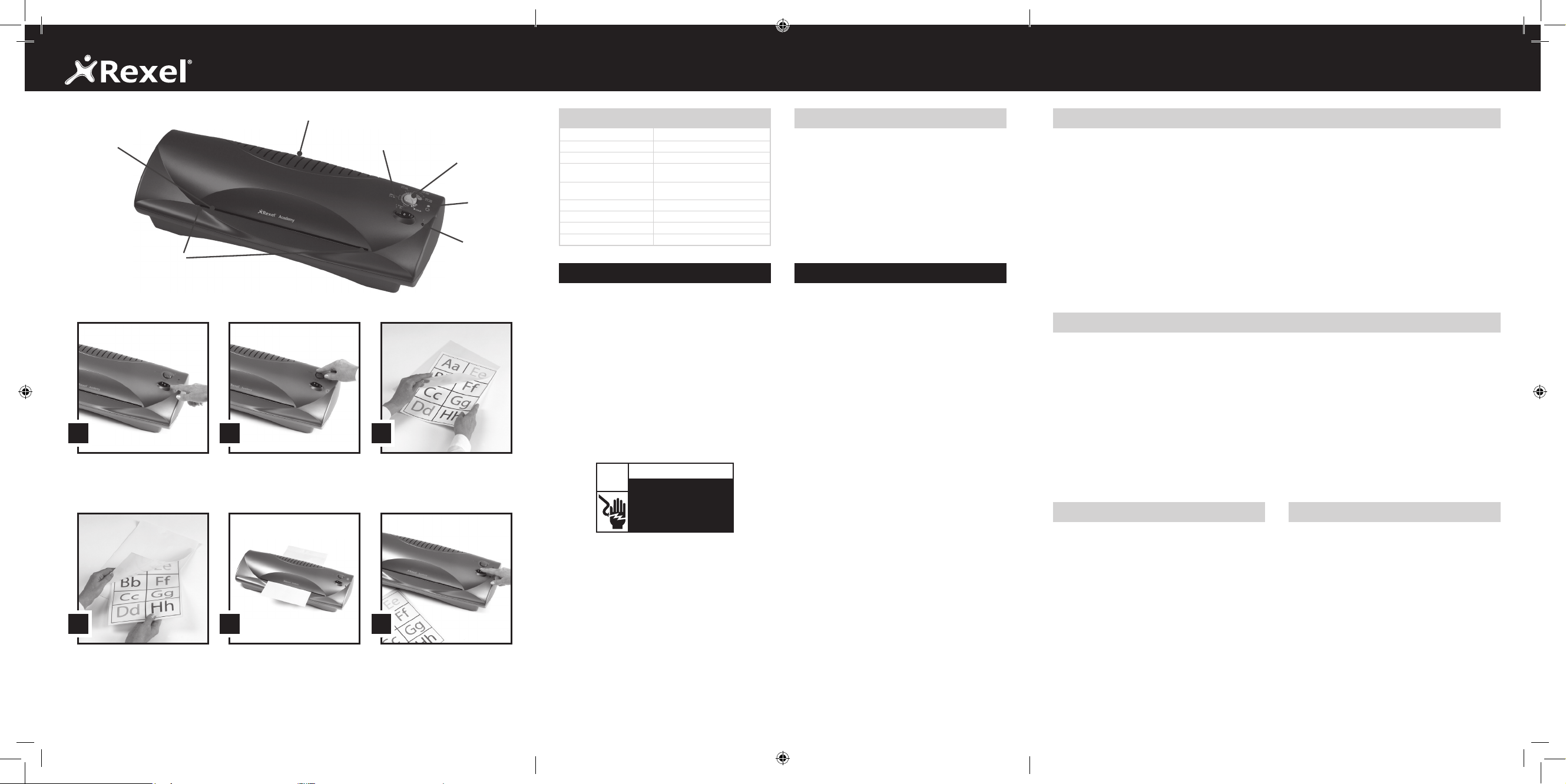
Location of controls
1
Power Switch / Reverse Switch
2
‘On’ light
3
‘Ready’ light
4
Pouch/temperature setting
5
Entry Slot
6
Entry Guides
7
Exit slot
1 32
Switch on the power switch (1,
position I). The red light (2) will
illuminate to indicate that the
power is on.
Select the appropriate temperature/
pouch setting (4) according to the
pouch thickness. The laminator will
pre-heat for approx. 4 minutes.
Place the item to be laminated
centrally into the correct size pouch,
leaving the sealed edge intact,
allowing a border of 3mm.
4 65
Place the lled pouch centrally in
the carrier.
When the green light (3) has come
on, insert the lled carrier (stitched
edge rst) between the entry guides
(6) into the front of the laminator
until the carrier engages with the
automatic feed rollers.
Always turn down the temperature
(4) and switch OFF (1, position
O
)
the laminator after use.
Photo laminating
1
Photographs have a sealed plastic surface that
does not absorb the adhesive from the inside of
a standard laminating pouch. The result can be
disappointing as the adhesive will show as bubbles
on the surface of the photograph.
2
Heavily coloured inkjet copies and varnished
printed pages can also present problems.
3
These problems can be avoided by using Rexel/
GBC Photo Pouches which have a special
construction.
4
Use Rexel/GBC ‘Photo pouches’ (available in
standard photo sizes and A4) and process as
normal.
Reverse function
CAUTION: Do not try to force the carrier into
the laminator or try to pull the carrier out. This
will damage (and could break) the laminator as
well as not allowing for proper processing of the
laminating pouch.
There is a reverse feature included on the on/o button
(1) of the machine. If you need to retrieve a document
during lamination:
1
Press the reverse button.
2
With the other hand gently hold the carrier and
document.
3
If the carrier has gone completely into the machine
and is not sticking out of the front or back, there is
nothing you can do. Do not try to open the machine.
This can be dangerous and will invalidate the
warranty.
m
Hot laminating
1
Plug the laminator into a convenient power socket.
2
Switch on the power switch ( I ) , the Red light will
illuminate to indicate that the power is on.
3
Select the appropriate temperature/pouch setting
for the thickness of pouch.
4
The laminator will pre-heat for approximately 4
minutes.
5
Whilst the laminator is pre heating, you can prepare
your item to be laminated by placing it centrally into
the correct sized pouch, leaving the sealed edge
intact. Then place the pouch in the carrier.
6
When the required temperature is reached the
Green light will come on.
7
Gently insert the lled carrier between the entry
guides into the front of the laminator, stitched edge
rst, until it engages with automatic feed rollers.
8
The carrier will move through the unit and exit at
rear.
9
During the laminating process the Green light may
go o as heat is absorbed by the laminate. Always
wait until the Green light is on before laminating
your next document.
J
Turn temperature to cold and turn your laminator
OFF after use (
O
).
Special notice
Thank you, for your recent purchase of a Rexel Pouch
Laminator. Your new laminator may emit
a slight odour during the initial stage of operation.
It is normal and will diminish after several hours of
operation.
THIS MACHINE MUST BE USED WITH A
CARRIER.
A carrier is included with the sample pack of
laminating pouches. The carrier is a folded piece
of siliconised board stitched along one end. A
carrier protects the laminate as it goes through
the machine for best quality results.
Before you use your Academy Laminating machine for
the rst time, it is recommended that you familiarise
yourself with the machine’s operation and controls.
Check the results using a range of sample sheets
of paper before laminating your valuable original
documents.
IMPORTANT
• It is important to always use a carrier with this
machine. Not using a carrier will result in the
laminator becoming jammed or failing to run.
This is an operator fault and is not covered by
a manufacturer’s warranty.
• Do not attempt to laminate items which are too
thick for your laminator i.e. the total thickness
including the carrier must not exceed 1.4mm.
m
m
5
6
7
1
4
3
2


Join the conversation about this product
Here you can share what you think about the Rexel Academy A3 Laminator. If you have a question, first carefully read the manual. Requesting a manual can be done by using our contact form.