Manual Pioneer FH-X840DAB Car Radio

Need a manual for your Pioneer FH-X840DAB Car Radio? Below you can view and download the PDF manual for free in English. This product currently has 4 frequently asked questions, 5 comments and has 6 votes with an average product rating of 83/100. If this is not the manual you want, please contact us.

Is your product defective and the manual offers no solution? Go to a Repair Café for free repair services.

Manual

Loading…
4En
* When this units blue/white lead is connected to the vehicle’s auto-antenna relay control terminal,
the vehicle’s antenna extends when this unit’s source is turned on. To retract the antenna, turn the
source off.
Display indication
The microprocessor must be reset in the following situations:
Before using this unit for the first time after installation
If the unit fails to operate properly
When strange or incorrect messages appear on the display
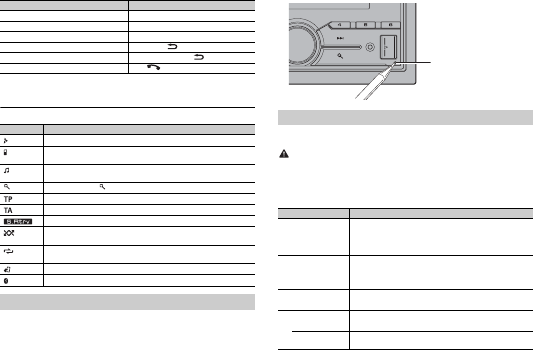
1 Press the RESET button with a pen tip or other pointed instrument.
Adjust the volume Turn the M.C. dial.
Select a source Press SRC/OFF rep
eatedly.
Change the display information Press DISP rep
eatedly.
Return to the previous display/list Press BAND/ .
Return to the normal display from the menu Press and hold BAND/ .
Answering/ending a call Press .
Indication Description
Appears when a lower tier of the menu or folder exists.
Appears when a Bluetooth telephone is connected to this unit by HFP
(Hands Free Profile) (page 8) and flashes while the telephone is on hold.
Appears when a Bluetooth audio player is connected to this unit by A2DP
(Ad
vanced Audio Distribution Profile) (page 8).
Appears when the button is pressed.
Appears when a traffic program is received.
Appears when the TA (traffic announcements) function is set (page 15).
Appears when the sound retriever function is set (page 15).
Appears when random/shuffle play is set (except when BT AUDIO is
sel
ected as the source).
Appears when repeat play is set (except when BT AUDIO is selected as the
sou
rce).
Appears when the iPod control function is set (page 8).
Appears when a Bluetooth connection is made (page 8).
Resetting the microprocessor
Purpose Operation
When you turn the ignition switch to ON after installation, the setup menu appears in
the display.
WARNING
Do not use the unit in standard mode when a speaker system for network mode is connected to the
unit. Do not use the unit in network mode when a speaker system for standard mode is connected to
the unit. This may cause damage to the speakers.
1 Turn the M.C. dial to select the options, then press to confirm.
To proceed to the next menu option, you need to confirm your selection.
Setup menu
Menu Item Description
LANGUAGE Select the language to display the text information from a
com
pressed audio file.
[ENG](English),
[РУС](Russi
an),
[TUR](Turkish)
CLOCK SET Set the clock.
1 Turn the M.C
. dial to adjust the hour, then press to confirm.
The indicator moves to the minute setting automatically.
2 Turn the M.
C. dial to adjust the minute, then press to confirm.
FM STEP Select the FM tuning step from 100 kHz or 50 kHz.
[100], [50]
DAB ANT PW Supply power to a DAB antenna. Select this when using the
opti
onal DAB antenna (AN-DAB1, sold separately) with the unit.
[ON]
[OFF] No power is supplied to a DAB antenna. Select this when using a
pas
sive antenna with no booster.
RESET button
Download manual in English (PDF, 18.17 MB)
(Consider the environment and only print this manual if it is really necessary)

Loading…

Rating

Let us know what you think about the Pioneer FH-X840DAB Car Radio by leaving a product rating. Want to share your experiences with this product or ask a question? Please leave a comment at the bottom of the page.
Are you satisfied with the Pioneer FH-X840DAB Car Radio?
Yes No
83%
17%
6 votes

Join the conversation about this product

Here you can share what you think about the Pioneer FH-X840DAB Car Radio. If you have a question, first carefully read the manual. Requesting a manual can be done by using our contact form.

Detlef 20-02-2020
I had this Pioneer built in with DAB .. everything works great. I have 2 small DAB receivers in my apartment, these devices have more transmitters ??? How can I get so many stations on the Pioneer, above all I wanted to receive the station "BOB" in the car .. Would appreciate an answer very much...

reply | This was helpful (0) (Translated by Google)
rene mora 30-09-2020
hello ... How to display the station (RFM NOSTAL ect) on the screen of the PIONEER FH S 820 DAB radio. thank you all

reply | This was helpful (0) (Translated by Google)
Antonio Fumu 31-10-2021
How can I get the Italian manual of the pioneer FH S820DAB

reply | This was helpful (0) (Translated by Google)
Gallo 09-01-2022
I bought this product in 2016, in reality I wanted an Alpine but it wasn't available ... and so I opted for Pioneer that I already know anyway and as a brand I have always liked. After 6 years I must say that I am very satisfied ... many functions including the possibility of managing every holy and blessed channel of the speakers mounted in the car and personalizing the listening in a very painstaking way. What can I say after 6 years ... overwhelmed and still going great.

reply | This was helpful (0) (Translated by Google)
Valerio 14-02-2022
I have a problem with spotify

reply | This was helpful (0) (Translated by Google)

More about this manual

We understand that it’s nice to have a paper manual for your Pioneer FH-X840DAB Car Radio. You can always download the manual from our website and print it yourself. If you would like to have an original manual, we recommend you contact Pioneer. They might be able to provide an original manual. Are you looking for the manual of your Pioneer FH-X840DAB Car Radio in a different language? Choose your preferred language on our homepage and search for the model number to see if we have it available.

Specifications

Brand Pioneer
Model FH-X840DAB
Category Car Radios
File type PDF
File size 18.17 MB

All manuals for Pioneer Car Radios
More manuals of Car Radios

Frequently Asked Questions about Pioneer FH-X840DAB Car Radio

Our support team searches for useful product information and answers to frequently asked questions. If you find an inaccuracy in our frequently asked questions, please let us know by using our contact form.

What is DAB+? Verified

DAB+ is the successor of the FM signal and stands for Digital Audio Broadcasting. It is a digital signal that allows for more channels within the same bandwidth and allows for easier switching between channels.

This was helpful (638) Read more

What is the difference between FM and AM? Verified

FM and AM are both forms of modulation used to transmit a signal. FM stands for Frequency Modulation and AM stands for Amplitude Modulation. AM is the oldest form of modulation. The biggest difference is that the FM signal is much stronger than the AM signal.

This was helpful (409) Read more

There is a CD stuck in my car radio, what is should I do? Verified

Some car radios have a feature to eject stuck CDs. Turn the car off and press the 'on' and 'eject' button simultaneously for 10 seconds. If this does not work, start the car and try again.

This was helpful (390) Read more

What size car radio fits my car? Verified

There are two standard car radio sizes, 1-DIN and 2-DIN. 1-DIN is the standard slim versin and 2-DIN is double that height. 2-DIN car radios often have room for a screen to display navigational information or play movies.

This was helpful (328) Read more
Manual Pioneer FH-X840DAB Car Radio

Related products

Related categories

×
Download