Playable discs and files
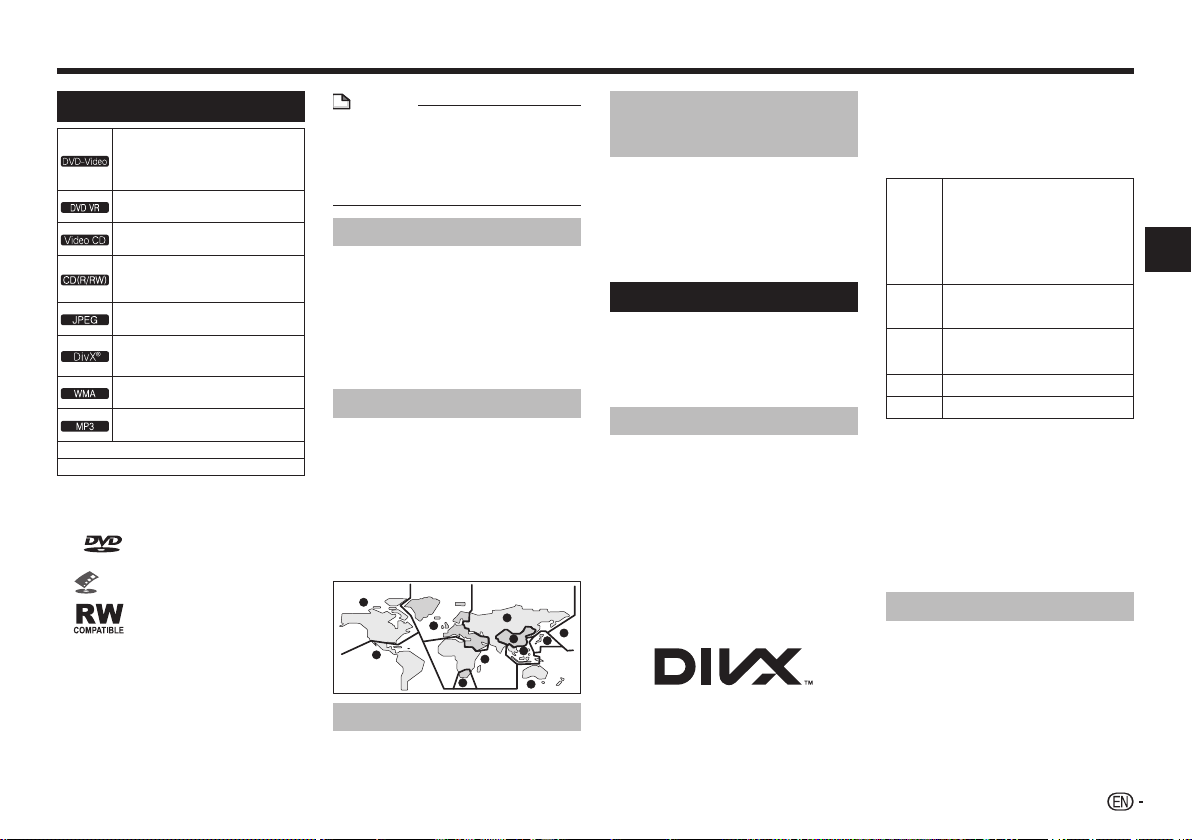
Playable discs
䎃䎃
• DVD-Video discs
• DVD-R/-RW/-R DL and
DVD+R/+RW/+R DL discs recorded in
the Video mode
䎃䎃
DVD-R/-RW/-R DL discs recorded in the
VR mode
䎃䎃
Video CDs (including Super VCDs)
䎃䎃
• Audio CDs
• CD-R/-RW/-ROM discs containing
music recorded in the CD-DA format
䎃䎃
JPEG files recorded on DVD-R/-RW/-R
DL discs, CD-R/-RW/-ROM discs
DivX video files recorded on
DVD-R/-RW/-R DL discs, CD-R/-RW/-
ROM discs
䎃䎃
WMA files recorded on DVD-R/-RW/-R DL
discs, CD-R/-RW/-ROM discs
䎃䎃
MP3 files recorded on DVD-R/-RW/-R DL
discs, CD-R/-RW/-ROM discs
FUJICOLOR-CD
KODAK Picture CD
• Only the discs that have been finalized can be
played.
• is a trademark of DVD Format/Logo
Licensing Corporation.
• is a trademark of FUJIFILM Corporation.
•
This label indicates playback compatibility with
DVD-RW discs recorded in VR format (Video
Recording format).
However, for discs recorded with a record-only-
once encrypted program, playback can only be
achieved using a CPRM compatible device.
• This unit does not support CPRM.
NOTE
• This player does not support multisession discs or
multiborder recording.
• Multisession/multiborder recording is a method in
which data is recorded on a single disc in two or
more sessions/borders. A “session” or “border” is
one recording unit, consisting of a complete set of
data from lead-in to lead-out.
Discs that cannot be played
• Blu-ray discs
• HD DVDs
• AVCHD
• AVCREC
• DVD-Audio discs
• DVD-RAM discs
• SACDs
• CD-G
• Discs recorded with packet writing
• Programs that can be recorded only once and that
are (already) recorded on a DVD-R/-RW/-R DL
About region numbers
All DVD-Video discs carry a region mark (number) on
the case. The mark (number) denotes the region(s) of
the world in which the disc is compatible. Your DVD
player also has a region mark (number), which you can
find on the rear panel.
If you try to play a disc of an incompatible region,
“Incompatible disc region number Can’t play disc”
will be displayed on the screen and you will not be able
to play the disc. Discs marked “ALL” can be played
in any player.
The diagram below shows the various DVD regions
of the world.
3
1
2
2
5
5
6
2
1
4
4
3
Regarding copy protected CDs
This player is designed to conform to the specifications
of the audio CD format. This player does not support
the playback or function of discs that do not conform to
these specifications.
Playing discs created on
computers or BD/DVD
recorders
• The player may not be able to play discs recorded
using a computer. Record discs in a format
playable on this player. For details, contact the
dealer.
• The player may not be able to play discs recorded
using a computer or a BD/DVD recorder, if burn
quality is not good due to characteristics of
the disc, scratches, dirt on the disc, dirt on the
recorder’s lens, etc.
Playable files
• Only discs recorded in ISO9660 Level 1, Level 2
and Joliet can be played.
• Files protected by DRM (Digital Rights
Management) cannot be played.
• Files other than the ones below (WMV, MPEG4-
AAC, etc.) are not guaranteed to play.
Supported video file formats
DivX
• ABOUT DIVX VIDEO: DivX
®
is a digital video
format created by DivX, LLC, a subsidiary of Rovi
Corporation. This is an official DivX Certified
®
device that plays DivX video. Visit divx.com for
more information and software tools to convert your
files into DivX videos.
• ABOUT DIVX VIDEO-ON-DEMAND: This DivX
Certified
®
device must be registered in order to
play purchased DivX Video-on-Demand (VOD)
movies. To obtain your registration code, locate the
DivX VOD section in Options settings. Go to vod.
divx.com for more information on how to complete
your registration.
• DivX
®
, DivX Certified
®
and associated logos are
trademarks of Rovi Corporation or its subsidiaries
and are used under license.
Displaying external subtitle files
• The font sets listed below are available for external
subtitle files. You can see the proper font set on-
screen by setting the Subtitle Language on page
10 to match the subtitle file.
• This player supports the following language
groups:
Group 1
Afrikaans (af), Basque (eu), Catalan
(ca), Danish (da), Dutch (nl), English
(en), Faroese (fo), Finnish (fi), French
(fr), German (de), Icelandic (is), Irish
(ga), Italian (it), Norwegian (no),
Portuguese (pt), Rhaeto-Romanic
(rm), Scottish (gd), Spanish (es),
Swedish (sv)
Group 2
Albanian (sq), Croatian (hr), Czech (cs),
Hungarian (hu), Polish (pl), Romanian
(ro), Slovak (sk), Slovenian (sl)
Group 3
Bulgarian (bg), Byelorussian (be),
Macedonian (mk), Russian (ru), Serbian
(sr), Ukrainian (uk)
Group 4
Hebrew (iw), Yiddish (ji)
Group 5
Turkish (tr)
• Some external subtitle files may be displayed
incorrectly or not at all.
• For external subtitle files the following subtitle
format filename extensions are supported (please
note that these files are not shown within the disc
navigation menu): .srt, .sub, .ssa, .smi
• The filename of the movie file has to be repeated
at the beginning of the filename for the external
subtitle file.
• The number of external subtitle files which can
be switched for the same movie file is limited to a
maximum of 10.
Supported image file formats
JPEG
• Resolution: Up to 3 072 x 2 048 pixels
• This player supports baseline JPEG.
• This player supports Exif Ver.2.2.
• This player does not support progressive JPEG.
Playback
5


Join the conversation about this product
Here you can share what you think about the Pioneer DV-2242 DVD Player. If you have a question, first carefully read the manual. Requesting a manual can be done by using our contact form.