Manual Pioneer DV-2242 DVD Player

Need a manual for your Pioneer DV-2242 DVD Player? Below you can view and download the PDF manual for free in English. This product currently has 2 frequently asked questions, 0 comments and has 1 vote with an average product rating of 100/100. If this is not the manual you want, please contact us.

Is your product defective and the manual offers no solution? Go to a Repair Café for free repair services.

Manual

Loading…
Before you start
Loading the batteries in the
remote control
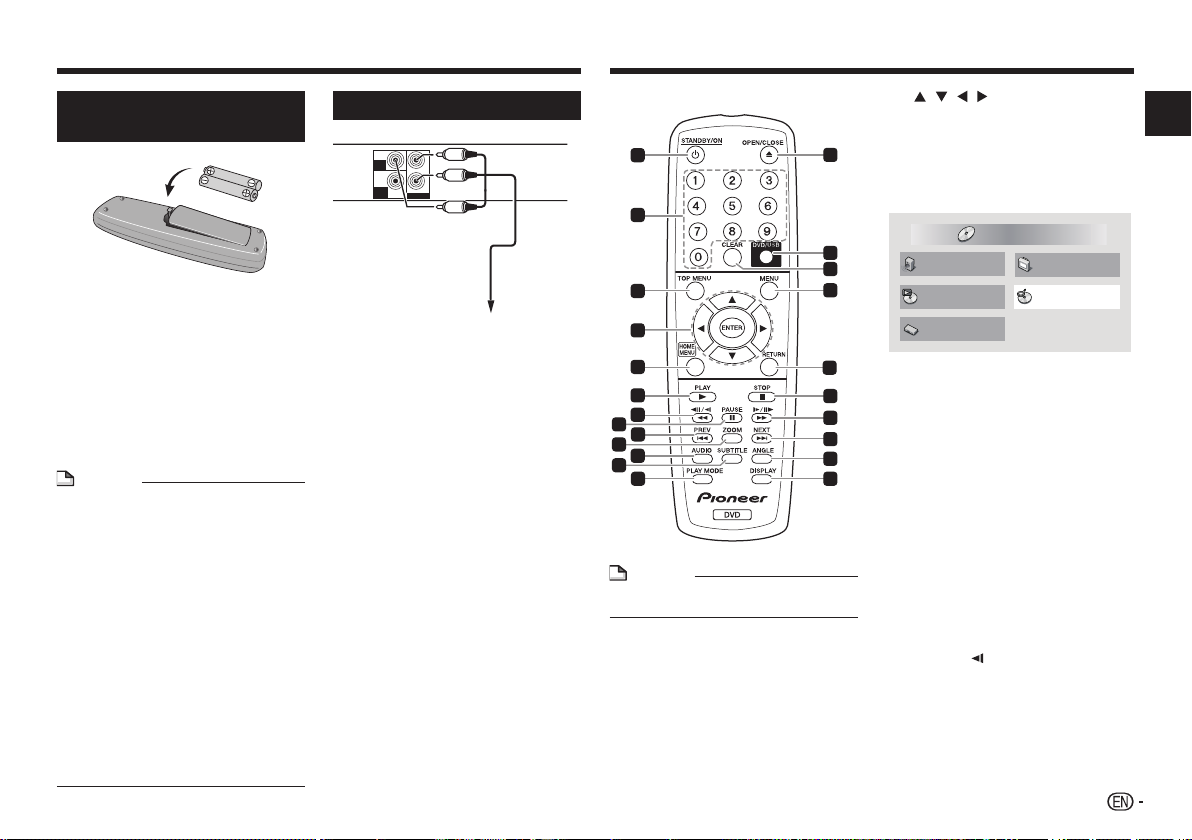
1 Open the battery compartment.
2 Insert 2 batteries (AAA/R03 size
battery) with correct polarity ( / )
as indicated.
3 Close the battery compartment.
WARNING
Do not use or store batteries in direct sunlight or other
excessively hot place, such as inside a car or near
a heater. This can cause batteries to leak, overheat,
explode or catch fire. It can also reduce the life or
performance of batteries.
NOTE
When inserting the batteries, make sure not to
damage the springs on the battery’s () terminals.
Do not use any batteries other than the ones
specified. Also, do not use a new battery together
with an old one.
When loading the batteries into the remote control,
set them in the proper direction, as indicated by the
polarity marks ( and ).
Do not heat batteries, disassemble them, or throw
them into flames or water.
Batteries may have different voltages, even if they
are the same size and shape. Do not use different
types of batteries together.
To prevent leakage of battery fluid, remove the
batteries if you do not plan to use the remote
control for a long period of time (1 month or more).
If the fluid should leak, wipe it carefully off the
inside of the case, then insert new batteries. If a
battery should leak and the fluid should get on your
skin, flush it off with large quantities of water.
When disposing of used batteries, please comply
with governmental regulations or environmental
public institution’s rules that apply in your country/
area.
Connections
Player’s rear panel
VIDEO
OUT
COAXIAL
L
R
AUDIO OUT
DIGITAL
OUT
Yellow
White
Red
Audio/videocable
(commercially
available)
TV or AV receiver
Be sure to turn off the power and unplug the power
cord from the power outlet whenever making or
changing connections.
Connect the power cord after all the connections
between devices have been completed.
Connecting using commercially available
cables
The player can be connected to an AV amplifier,
etc., using commercially available digital audio
cables and component video cables.
Part names and functions
3
2
11
4
5
1
6
7
8
9
10
11
12
11
13
14
15
16
17
18
19
20
21
22
23
Remote Control
DV-2242
NOTE
The illustrations used in this operating instructions
are DV-2242.
1 STANDBY/ON
Press to turn the power on and off.
2 Number buttons (0 to 9)
Use these to specify and play the title, chapter,
track or file. Also use to select items on MENU
screens, etc.
3 TOP MENU
Press to display the top menu of the DVD-Video.
4 / / /
Use these to select items, change settings and
move the cursor.
ENTER
Use this to implement the selected item or enter
a setting that you have changed.
5 HOME MENU
Press to display/hide HOME MENU.
Audio Settings
Play Mode Disc Navigator
Initial Settings
Video Adjust
HOME MENU
DVD
Audio Settings (page 7)
Video Adjust (page 7)
Play Mode
A-B Repeat
The specified section within a single title
or track is played repeatedly.
Repeat
Plays titles, chapters, tracks or files
repeatedly.
Random
Plays titles, chapters or tracks in random
order.
Program
See page 6 for details.
Search Mode
Plays the specified number or time within
the title, chapter, track or file.
The Play Mode function may not work for some
discs or files.
Disc Navigator (see MENU on page 4)
Initial Settings (page 6)
6 PLAY
Press to start playback.
7 / /
Press during playback to fast-reverse.
Press in the pause mode to move backward
frame-by-frame.
Press and hold in the pause mode to play
back slowly (reverse).
DV-2242
Introduction
3
Download manual in English (PDF, 22.57 MB)
(Consider the environment and only print this manual if it is really necessary)

Loading…

Rating

Let us know what you think about the Pioneer DV-2242 DVD Player by leaving a product rating. Want to share your experiences with this product or ask a question? Please leave a comment at the bottom of the page.
Are you satisfied with the Pioneer DV-2242 DVD Player?
Yes No
100%
0%
1 vote

Join the conversation about this product

Here you can share what you think about the Pioneer DV-2242 DVD Player. If you have a question, first carefully read the manual. Requesting a manual can be done by using our contact form.

More about this manual

We understand that it’s nice to have a paper manual for your Pioneer DV-2242 DVD Player. You can always download the manual from our website and print it yourself. If you would like to have an original manual, we recommend you contact Pioneer. They might be able to provide an original manual. Are you looking for the manual of your Pioneer DV-2242 DVD Player in a different language? Choose your preferred language on our homepage and search for the model number to see if we have it available.

Specifications

Brand Pioneer
Model DV-2242
Category DVD Players
File type PDF
File size 22.57 MB

All manuals for Pioneer DVD Players
More manuals of DVD Players

Frequently Asked Questions about Pioneer DV-2242 DVD Player

Our support team searches for useful product information and answers to frequently asked questions. If you find an inaccuracy in our frequently asked questions, please let us know by using our contact form.

Can a DVD player also play CD's? Verified

Yes, almost all DVD players are capable of playing CD's.

This was helpful (199) Read more

Can I repair scratches on a DVD myself? Verified

Scratches prevent de laser from reading the disc correctly. When the scratches are only superficial it is possible to repair them yourself by polishing the disc with a slightly abrasive compound. Ideally you use a professional abrasive compound but it’s also possible to use regular toothpaste. After polishing the disc it needs to be washed and let to dry. There are specialised businesses that can do this.

This was helpful (92) Read more
Manual Pioneer DV-2242 DVD Player

Related products

Related categories

×
Download