Manual Pioneer CD-R55 Remote Control

Need a manual for your Pioneer CD-R55 Remote Control? Below you can view and download the PDF manual for free in English. This product currently has 6 frequently asked questions, 0 comments and has 0 votes. If this is not the manual you want, please contact us.

Is your product defective and the manual offers no solution? Go to a Repair Café for free repair services.

Manual

Loading…
Owners Manual
Mode demploi
Remote control
Télécommande
CD-R55
PIONEER CORPORATION
4-1, MEGURO 1-CHOME, MEGURO-KU
TOKYO 153-8654, JAPAN
PIONEER ELECTRONICS (USA) INC.
P.O. Box 1540, Long Beach, California 90801-1540, U.S.A.
TEL: (800) 421-1404
PIONEER EUROPE NV
Haven 1087, Keetberglaan 1, B-9120 Melsele, Belgium
TEL: (0) 3/570.05.11
PIONEER ELECTRONICS ASIACENTRE PTE. LTD.
253 Alexandra Road, #04-01, Singapore 159936
TEL: 65-6472-7555
PIONEER ELECTRONICS AUSTRALIA PTY. LTD.
178-184 Boundary Road, Braeside, Victoria 3195, Australia
TEL: (03) 9586-6300
PIONEER ELECTRONICS OF CANADA, INC.
300 Allstate Parkway, Markham, Ontario L3R OP2, Canada
TEL: 1-877-283-5901
PIONEER ELECTRONICS DE MEXICO, S.A. de C.V.
Blvd.Manuel Avila Camacho 138 10 piso
Col.Lomas de Chapultepec, Mexico, D.F. 11000
TEL: 55-9178-4270
: 台北 4413
: (02) 2521-3588
9901-6
: (0852) 2848-6488
Published by Pioneer Corporation.
Copyright © 2006 by Pioneer Corporation.
All rights reserved.
Publié par Pioneer Corporation. Copyright
© 2006 par Pioneer Corporation. Tous
droits réservés.
Printed in China
Imprimé en Chine
<CZR5072-A> E
<KMMZX> <06K00000>
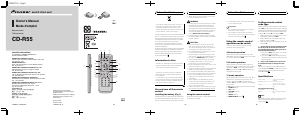
Fi
g
.
1
a
2
3
k
l
j
f
g
h
4
d
e
c
b
8
6
5
7
i
1
9
Fi
g
.
2
En
If you want to dispose this product, do not mix it
with general household waste. There is a sepa-
rate collection system for used electronic pro-
ducts in accordance with legislation that requires
proper treatment, recovery and recycling.
Private households in the 25 member states of
the EU, in Switzerland and Norway may return
their used electronic products free of charge
to designated collection facilities or to a retai-
ler (if you purchase a similar new one).
For countries not mentioned above, please
contact your local authorities for the correct
method of disposal.
By doing so you will ensure that your disposed
product undergoes the necessary treatment,
recovery and recycling and thus prevent po-
tential negative effects on the environment
and human health.
Information to User
Alteration or modifications carried out without
appropriate authorization may invalidate the
users right to operate the equipment.
This device complies with part 15 of the FCC
Rules. Operation is subject to the following
two conditions:
(1) This device may not cause harmful interfer-
ence, and (2) this device must accept any inter-
ference received, including interference that
may cause undesired operation.
Use and care of the remote
control
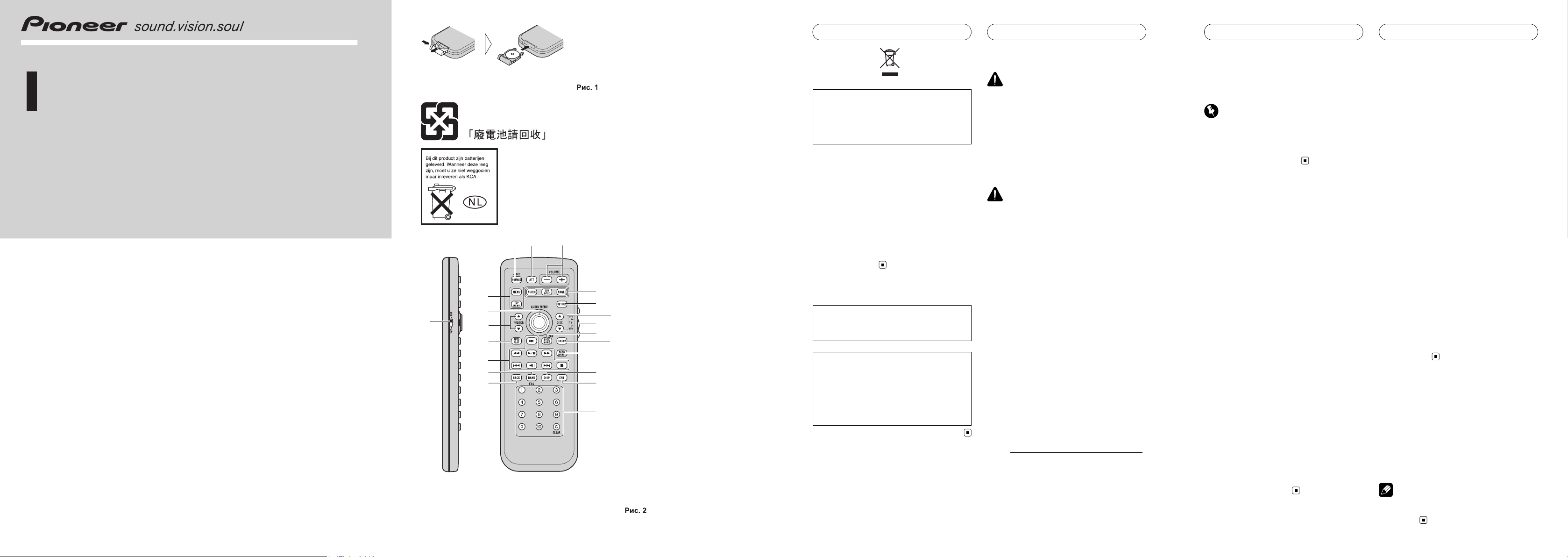
Installing the battery (Fig. 1)
Slide the tray out on the back of the remote con-
trol and insert the battery with the plus (+) and
minus () poles pointing in the proper direction
.
! When using for the first time, pull out the
film protruding from the tray.
WARNING
! Handling the cord on this product or cords as-
sociated with accessories sold with the pro-
duct may expose you to chemicals listed on
proposition 65 known to the State of California
and other governmental entities to cause can-
cer and birth defects or other reproductive
harm. Wash hands after handling.
! Keep the battery out of the reach of children.
Should the battery be swallowed, immediately
consult a doctor.
CAUTION
! Do not allow this unit to come into contact
with liquids. Electrical shock could result.
Also, this unit damage, smoke, and overheat
could result from contact with liquids.
! Do not disassemble or modify this unit. To do
so may cause a malfunction.
! Always keep the volume low enough so that
you can hear sounds from outside the vehicle.
! Use only one CR2025 (3 V) lithium battery.
! Always check carefully that you are loading
the battery with its plus (+) and minus ()
poles facing in the proper directions.
! Remove the battery if the remote control is not
used for a month or longer.
!
Danger of explosion if battery is incorrectly replaced.
Replace only with the same or equivalent type.
! Do not handle the battery with metallic tools.
!
Do not store the battery with metallic materials.
! In the event of battery leakage, wipe the re-
mote control completely clean and install a
new battery.
! When disposing of used batteries, please
comply with governmental regulations or en-
vironmental public institutions rules that
apply in your country/area.
!
Perchlorate Material special handling may apply.
See
www.dtsc.ca.gov/ hazardouswaste/perchlorate.
(Applicable to California, U.S.A.)
Using the remote control
Point the remote control in the direction of the
front panel to operate.
Before You Start
En
! The remote control may not function prop-
erly in direct sunlight.
Important
! Do not store the remote control in high tem-
peratures or direct sunlight.
! Do not let the remote control fall onto the
floor, where it may become jammed under the
brake or accelerator pedal.
Using the remote control
operation mode switch
There are three remote control operation
modes on the remote control.
AVH mode operation
When operating an AV Receiver (e.g., AVH-
P5900DVD) with this remote control, the mode
is normally switched to AVH.
DVD mode operation
When operating a Pioneer DVD player (e.g.,
XDV-P6) with this remote control, the mode is
switched to DVD. If you switch the mode to
DVD, the joystick and 0 to 10 operations are
changed for DVD player.
TV mode operation
When operating a Pioneer TV tuner (e.g., GEX-
P5700TV (P)) with this remote control, the
mode is switched to TV. If you switch the
mode to TV, the joystick operation is changed
for TV tuner.
In TV
mode, only buttons shown below can be used.
! SOURCE button
! ATT button
! VOLUME buttons
! Joystick
! DIRECT button
! REAR SOURCE button
Setting remote control
code type
When the remote control operation mode switch is
set to DVD, changing the remote control code type
enables you to operate the Pioneer DVD player with
this remote control. There are three remote codes,
code type A, code type B and code type AVH.
! When operating an AV Receiver (e.g., AVH-
P5900DVD), select code AVH.
! When operating a multi-DVD player (e.g.,
XDV-P6), select code A.
! When operating a DVD navigation unit, se-
lect code B.
1 Set the remote control selection switch
on the left side of the remote control to
the appropriate position with a pen tip or
other pointed instrument .
! If you select AVH mode, there is no need to
take the following procedure.
! If you select A/B mode, take the following
procedure and change the code type to the
appropriate type.
2 Press 0 and CLEAR on the remote con-
trol simultaneously to change the code
type.
Initially, the code type is set to A. Each time
you press 0 and CLEAR simultaneously on the
remote control the code type switches be-
tween A and B.
Specifications
Power source ............................. 3 V DC (Lithium battery;
CR2025)
Dimensions (W × H × D) ... 54 × 149 × 13 mm
(2-1/8 × 5-7/8 × 1/2 in.)
Weight .......................................... 59 g (2 oz) (including bat-
tery)
Infrared remote control
Wavelength ................................. 945 nm
Output ........................................... typ; 10 mw/sr per Infrared
LED
Note
Specifications and the design are subject to pos-
sible modifications without notice due to im-
provements.
Before You Start
En
CZR5072-A - Page1-
Download manual in English (PDF, 0.54 MB)
(Consider the environment and only print this manual if it is really necessary)

Loading…

Rating

Let us know what you think about the Pioneer CD-R55 Remote Control by leaving a product rating. Want to share your experiences with this product or ask a question? Please leave a comment at the bottom of the page.
Are you satisfied with the Pioneer CD-R55 Remote Control?
Yes No
Be the first to rate this product
0 votes

Join the conversation about this product

Here you can share what you think about the Pioneer CD-R55 Remote Control. If you have a question, first carefully read the manual. Requesting a manual can be done by using our contact form.

More about this manual

We understand that it’s nice to have a paper manual for your Pioneer CD-R55 Remote Control. You can always download the manual from our website and print it yourself. If you would like to have an original manual, we recommend you contact Pioneer. They might be able to provide an original manual. Are you looking for the manual of your Pioneer CD-R55 Remote Control in a different language? Choose your preferred language on our homepage and search for the model number to see if we have it available.

Specifications

Brand Pioneer
Model CD-R55
Category Remote Controls
File type PDF
File size 0.54 MB

All manuals for Pioneer Remote Controls
More manuals of Remote Controls

Frequently Asked Questions about Pioneer CD-R55 Remote Control

Our support team searches for useful product information and answers to frequently asked questions. If you find an inaccuracy in our frequently asked questions, please let us know by using our contact form.

How do I connect a universal remote control to my television? Verified

To connect your universal remote control, you need the model number and brand name of both the remote control and the television. There is a list of codes for brands and model numbers in the manual of the remote control .

This was helpful (7983) Read more

Why are there letters next to the numbers on the remote control? Verified

Certain television settings may require you to enter letters. There are usually three letters or other characters on a button. When letter input is required, you can press that button once for the first letter, press twice for the second letter and press 3 times for the third letter. This way, text can be written with a minimum number of buttons.

This was helpful (682) Read more

Will my remote control also work on other television models of the same brand? Verified

Often a remote control of a television will also work on similar models of the same brand. However, it is unusual that it will work on all models of that brand. Universal remote controls are more suited to do this.

This was helpful (524) Read more

What is the average range of an infrared remote control? Verified

An average infrared remote control had a range of around 3 to 6 meters. Also, the further away the device is, the harder it will be to aim.

This was helpful (412) Read more

A battery in my device is oxidized, can I still safely use it? Verified

Ja, the device can still be safely used. Firstly, remove the oxidizd battery. Never use bare hands to do this. Then clean the battery compartment with a cotton swab dipped in vinegar or lemon juice. Let it dry and insert new batteries.

This was helpful (371) Read more

Can I leave a replacable battery in a device for a long time? Verified

Replacable batteries can remain in a device for a long time if the device is in use. When a device is being stored for a long time it is advisable to remove the batteries to prevent oxidation.

This was helpful (271) Read more
Manual Pioneer CD-R55 Remote Control

Related products

Related categories

×
Download