
ENGLISH
Introduction
Congratulations on your purchase and welcome
to Philips! To fully benet from the support that
Philips offers, register your product at
www.philips.com/welcome.
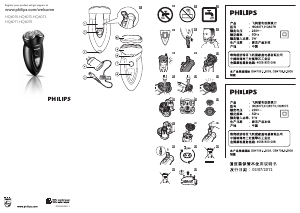
General description (Fig. 1)
1 Trimmer
2 Trimmer release button
3 Socket for small plug
4 Adapter
5 Small plug
6 Battery symbol
7 On/off button
8 Shaving unit release button
9 Shaving unit
10 Protection cap
11 Pouch (not shown)
Important
Read this user manual carefully before you use
the appliance and save it for future reference.
Danger
- Warning: Keep the adapter dry.
- This symbol means: Forbidden to rinse the
adapter under a running tap (Fig. 2).
Warning
- The adapter contains a transformer. Do not cut
off the adapter to replace it with another plug,
as this causes a hazardous situation.
- This symbol means: Forbidden to use in the
shower (Fig. 3).
- Warning: Do not use this appliance close to
a bathtub, shower or other containers lled
with water.
- This appliance is not intended for use by
persons (including children) with reduced
physical, sensory or mental capabilities, or lack
of experience and knowledge, unless they
have been given supervision or instruction
concerning use of the appliance by a person
responsible for their safety.
- Children should be supervised to ensure that
they do not play with the appliance.
Caution
- Do not use the shaver or the adapter if it
is damaged.
- Only use the adapter supplied.
- If the adapter is damaged, always have it
replaced with one of the original type in order
to avoid a hazard.
- Charge, use and store the shaver at a
temperature between 5°C and 35°C.
- Warning: Remove the detachable cord from
the handheld part before cleaning this part
in water.
- Be careful with hot water. Always check if
the water is not too hot, to avoid burning
your hands.
- Water may leak from the socket at the
bottom of the appliance when you rinse it.
This is normal and not dangerous because all
electronics are enclosed in a sealed power unit
inside the shaver.
- Do not immerse the shaver in water or
another liquid
- Do not use the shaver in combination with
pre-shave lotions, creams, foams, gels or other
cosmetic products.
General
- This shaver can be safely cleaned under the tap.
- This symbol means: Suitable to be cleaned
under a running tap (Fig. 4).
- The adapter transforms 100-240 volts to a safe
low voltage of less than 24 volts.
Compliance with standards
- This Philips appliance complies with all
standards regarding electromagnetic elds
(EMF). If handled properly and according to the
instructions in this user manual, the appliance
is safe to use based on scientic evidence
available today.
- This shaver complies with the applicable IEC
safety standards.
Charging
Make sure the appliance is switched off before you
start to charge it.
You can recharge the shaver between shaves, even
if the battery is not empty. This does not damage
the battery and prevents the battery from running
low during shaving.
Charging normally takes approx. 8 hours.
Do not leave the appliance connected to the
mains for more than 24 hours.
Charge indications
Charging
, When you start charging the shaver, the
battery symbol lights up (Fig. 5).
Battery running low
, HQ6076/HQ6075/HQ6073: When the
battery runs low, the red battery symbol
lights up. When you switch off the shaver, the
red battery symbol starts ashing. (Fig. 5)
, HQ6071/HQ6070: There is no indication that
the battery is low. The appliance switches off
automatically when the battery is completely
empty.
Charging the appliance
Charge the appliance when the red battery symbol
lights up or ashes (HQ6076/HQ6075/HQ6073)
or when the motor stops or starts running more
slowly (HQ6071/HQ6070).
1 Put the appliance plug in the shaver (Fig. 6).
2 Put the adapter in the wall socket.
3 When the battery is fully charged, remove
the adapter from the wall socket and pull the
appliance plug out of the shaver.
Cordless shaving time
A fully charged shaver has a cordless shaving time
of up to 40 minutes.
Using the appliance
Shaving
1 Press the on/off button once to switch on the
shaver.
The light ring lights up.
2 Move the shaving heads quickly over your
skin, making both straight and circular
movements (Fig. 7).
Shaving on a dry face gives the best results.
Your skin may need 2 or 3 weeks to get
accustomed to the Philips shaving system.
3 Press the on/off button once to switch on
the shaver.
4 To prevent damage to the shaving unit, put
the protection cap on the shaver after every
use (‘click’) (Fig. 8).
Trimming
For grooming sideburns and moustache.
1 Open the trimmer by pushing the slide
upwards (Fig. 9).
The trimmer can be activated while the motor
is running.
Cleaning and maintenance
Regular cleaning guarantees better shaving
performance.
The easiest and most hygienic way to clean the
appliance is to rinse the shaving unit and the hair
chamber with hot water every time you have used
the appliance.
For thorough cleaning of the shaving heads, we
advise you to use Philips Shaving Head Cleaning
Spray HQ110.
Every day: shaving unit and hair
chamber
Warning: Remove the detachable cord from the
handheld part before cleaning this part in water.
Be careful with hot water. Always check if the
water is not too hot, to prevent your hands from
getting burnt.
1 Switch off the shaver, remove the adapter
from the wall socket and pull the appliance
plug out of the shaver.
2 Press the release button (1) and open the
shaving unit (2) (Fig. 10).
3 Clean the shaving unit and the hair chamber
by rinsing them under a hot tap for some
time (Fig. 11).
Make sure the inside of the shaving unit and the
hair chamber have been cleaned properly.
4 Rinse the outside of the appliance (Fig. 12).
5 Close the shaving unit and shake off excess
water.
Never dry the shaving unit with a towel or tissue,
as this may damage the shaving heads.
6 Open the shaving unit again and leave it open
to let the appliance dry completely (Fig. 13).
You can also clean the hair chamber without water
by using the brush supplied.
Every six months: shaving heads
1 Open the shaving unit.
You can also pull the shaving unit off the shaver for
easier cleaning.
2 To remove the shaving heads, do the
following.
- HQ6076/HQ6075: Remove the retaining
frame and take out the shaving heads. (Fig. 14)
- HQ6073/HQ6071/HQ6070: Open the shaving
unit, turn the wheel anticlockwise (1) and
remove the retaining frame (2). Then take out
the shaving heads (Fig. 15).
3 Clean the cutters and guards with the brush
supplied (your shaving heads may differ from
the one shown in the gure) (Fig. 16).



Join the conversation about this product
Here you can share what you think about the Philips HQ6071 Shaver. If you have a question, first carefully read the manual. Requesting a manual can be done by using our contact form.