Manual Philips EXP2301 Discman

Need a manual for your Philips EXP2301 Discman? Below you can view and download the PDF manual for free in English. This product currently has 1 frequently asked question, 0 comments and has 0 votes. If this is not the manual you want, please contact us.

Is your product defective and the manual offers no solution? Go to a Repair Café for free repair services.

Manual

Loading…
English
CONTROLS
Supplied Accessories:
1 x headphones HE035
1 x AC/DC adapter AY3162 (not for all versions)
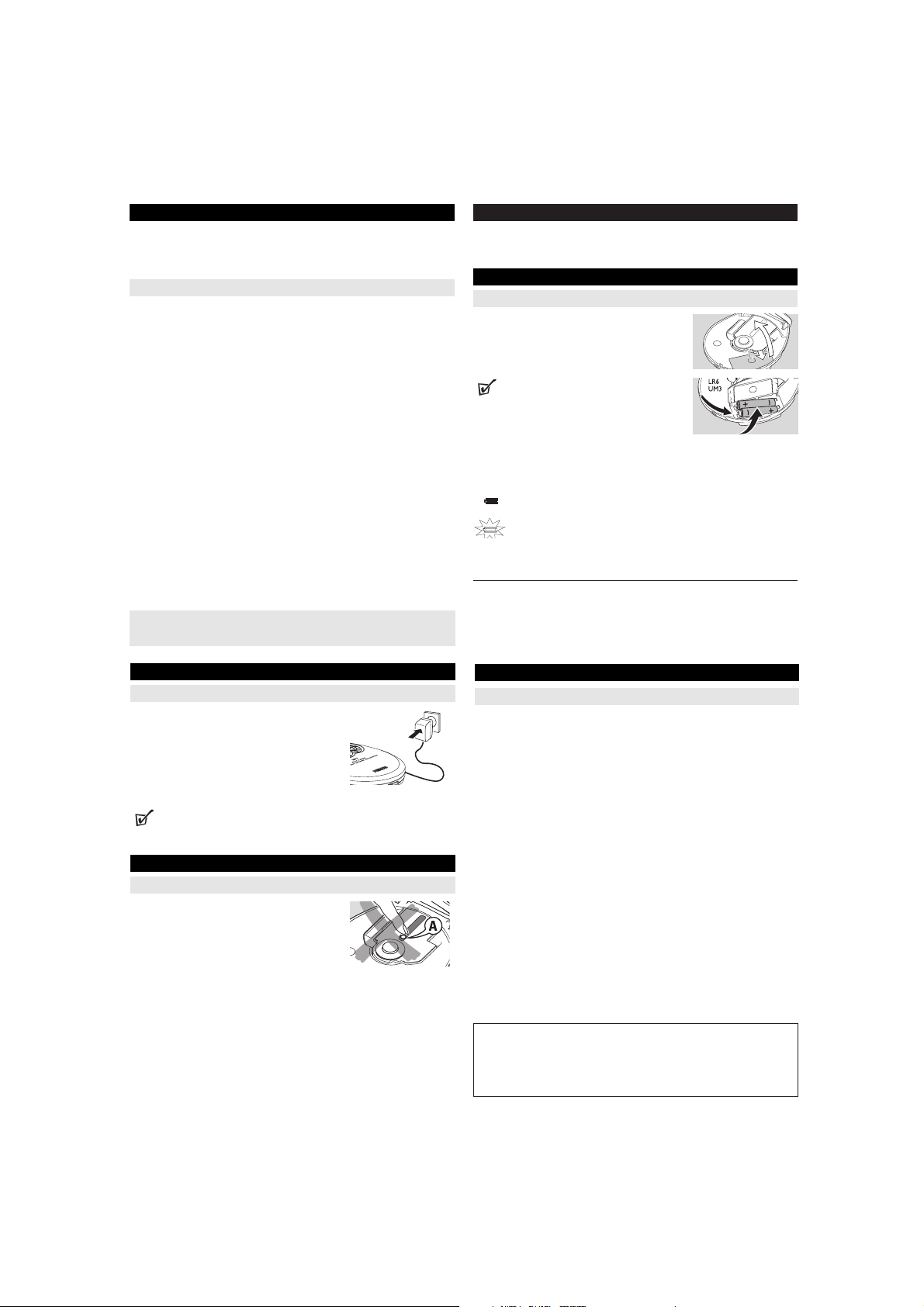
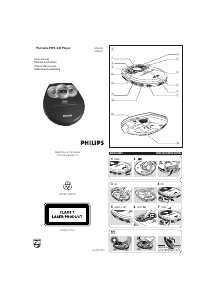
CONTROLS ( see figure 1)
1 VOL
E
.........adjusts the volume.
2 OPEN 2.............opens the CD lid.
3 9 ........................stops playback/clears programmed tracks/ switches off the
set.
4 MODE................selects playback options (e.g. SHUFFLE, REPEAT).
5
-/+
....................MP3 only: skips forward/backward albums.
6 PROG.................programs tracks and reviews the program.
7 ...........................display
8 2;......................switches the player on, starts playback and pauses playback.
9 EQ ......................selects from 4 different equalization settings
0 /§................skips and searches tracks backward/forward.
! ESP ....................selects between the battery powersave mode and Electronic
Skip Protection (ESP). ESP prevents playback interruptions
caused by shocks.
@ OFF.....................switches HOLD off.
HOLD .................locks all buttons.
# p / LINE OUT....3.5mm headphone jack;
jack to connect the player to another audio input of an
additional appliance.
This set complies with the radio interference requirements of the
European Union.
CONTROLS
$ 4.5V DC ...............jack for external power supply.
% .............................typeplate
POWER SUPPLY
Batteries (not included)
Inserting AA (LR6, UM3) batteries
1 Open the battery compartment.
2 Insert 2 x AA batteries as shown into the battery
compartment.
3 Close the battery compartment.
Helpful Hints:
Old and new or different types of batteries should not
be combined.
Remove batteries if they are empty or if the player is not going to be used for a
long time.
Battery indication
The battery level is shown in the display screen as follows:
Battery usable
Battery empty
Average playing time of batteries under normal conditions
Battery type Power Save
Audio CD MP3-CD
Alkaline AA 18 hours 28 hours
Batteries contain chemical substances, so they should be disposed of properly.
2.
1.
POWER SUPPLY
Power adapter (supplied or optionally available)
Only use AY3162 adapter (4.5V/450mA DC, positive
pole to the center pin). Any other product may damage
the player.
1 Make sure local voltage corresponds to the power
adapter's voltage.
2 Connect the power adapter to the 4.5V DC socket of
the player and to the wall socket.
Helpful Hints:
Always disconnect the adapter when you are not using it.
GENERAL INFORMATION
CD player and CD handling
Do not touch the lens A of the CD player.
Do not expose the unit, batteries or CDs to humidi-
ty, rain, sand or excessive heat (caused by heating
equipment or direct sunlight).
You can clean the CD player with soft, slightly
dampened, lint-free cloth. Do not use any cleaning
agent as it may have a corrosive effect.
To clean the CD, wipe it in a straight line from the center toward the edge
using soft, lint-free cloth. The cleaning agent may damage the disc! Never
write on a CD or attach a sticker to it.
The lens may cloud over when the unit is moved suddenly from cold to warm
surroundings. In that case, playing a CD is not possible. Leave the CD player in
a warm environment until the moisture has evaporated.
Active mobile phones in the vicinity of the CD player may cause malfunctions.
Avoid dropping the unit as this may cause damage.
GENERAL INFORMATION
ENVIRONMENTAL INFORMATION
All redundant packing material has been omitted. We have done our utmost to
make the packaging easily separable into two mono materials: cardboard (box)
and polyethylene (bags, protective foam sheet).
Your set consists of materials which can be recycled if disassembled by a spe-
cialized company. Please observe the local regulations regarding the disposal
of packing materials, dead batteries and old equipment.
Apparatus shall not be exposed to dripping or splashing.
Do not place any sources of danger on the apparatus
(e.g. liquid filled objects, lighted candles)
Download manual in English (PDF, 2.11 MB)
(Consider the environment and only print this manual if it is really necessary)

Loading…

Rating

Let us know what you think about the Philips EXP2301 Discman by leaving a product rating. Want to share your experiences with this product or ask a question? Please leave a comment at the bottom of the page.
Are you satisfied with the Philips EXP2301 Discman?
Yes No
Be the first to rate this product
0 votes

Join the conversation about this product

Here you can share what you think about the Philips EXP2301 Discman. If you have a question, first carefully read the manual. Requesting a manual can be done by using our contact form.

More about this manual

We understand that it’s nice to have a paper manual for your Philips EXP2301 Discman. You can always download the manual from our website and print it yourself. If you would like to have an original manual, we recommend you contact Philips. They might be able to provide an original manual. Are you looking for the manual of your Philips EXP2301 Discman in a different language? Choose your preferred language on our homepage and search for the model number to see if we have it available.

Specifications

Brand Philips
Model EXP2301
Category Discmans
File type PDF
File size 2.11 MB

All manuals for Philips Discmans
More manuals of Discmans

Frequently Asked Questions about Philips EXP2301 Discman

Our support team searches for useful product information and answers to frequently asked questions. If you find an inaccuracy in our frequently asked questions, please let us know by using our contact form.

Can I repair scratches on a CD myself? Verified

Scratches prevent de laser from reading the disc correctly. When the scratches are only superficial it is possible to repair them yourself by polishing the disc with a slightly abrasive compound. Ideally you use a professional abrasive compound but it’s also possible to use regular toothpaste. After polishing the disc it needs to be washed and let to dry. There are specialised businesses that can do this.

This was helpful (38) Read more
Manual Philips EXP2301 Discman

Related products

Related categories

×
Download