Manual Panasonic TV-55Z95BP OLED Television

Need a manual for your Panasonic TV-55Z95BP OLED Television? Below you can view and download the PDF manual for free in English. This product currently has 9 frequently asked questions, 0 comments and has 0 votes. If this is not the manual you want, please contact us.

Is your product defective and the manual offers no solution? Go to a Repair Café for free repair services.

Manual

Loading…
3
English
Important Notice
Installing environment
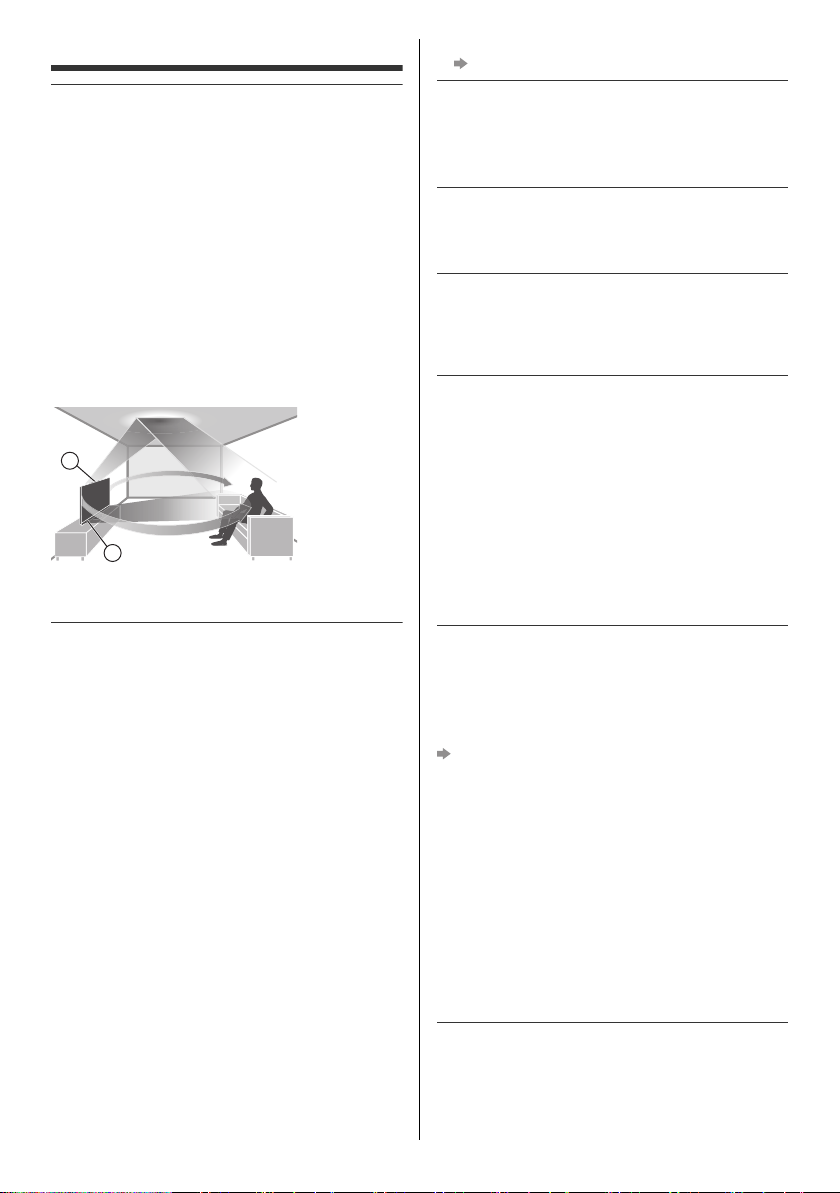
This TV has “Space Tune” function which can adjust the
sound quality automatically according to TV and viewer’s
position. Using the line array speaker settings, it is also
possible to adjust the position that the sound reaches to
match the viewing position and circumstances. You can
enjoy a three-dimensional acoustic space by using the
upward-firing speakers, which reflect sound from the
ceiling, the line array speakers, and the left and right
speakers. The adjustment of the “Space Tune” function
automatically starts when the TV is turned on for the first
time after installing this TV and connecting with the
external equipment. Follow the on-screen instructions for
setting.
If automatic adjustment is selected, loud sounds are
emitted while adjusting Space Tune.
<Example>
A: Upward-firing speakers
B: Line array speakers
Do not display any still part of the image for a
long period
In such cases the still part of the image remains dimly on
the screen (“image retention”). This is not considered a
malfunction and is not covered by the warranty.
Typical still image parts:
Still images shown continuously on the same area
(ex. channel number, channel logo, other logos or
title image, etc.)
Still or moving pictures viewed in 4:3 or 16:9 aspect
ratio, etc.
Video games
Set [Logo Luminance Control] to [Max] to avoid image
retention.
[Panasonic eHELP] (Search by Purpose > Watching >
For best picture > Screen Settings)
To avoid image retention, the screen may become dim
when the motionless image is displayed. This is not a
malfunction. The brightness of the screen returns to
the previous level when the active image is displayed.
Be sure to turn the TV off with the remote control or
Power button to perform the panel maintenance.
During the panel maintenance, LED turns to orange.
(p. 13) The maintenance works as necessary.
Set aspect ratio to [4:3 Full] for 4:3 image. For details,
refer to [Panasonic eHELP] (Search by Purpose >
Watching > For best picture > Aspect).
For more information
“Panel maintenance” (p. 13)
Internet apps, voice control function are provided by their
respective service providers, and may be changed,
interrupted, or discontinued at any time.
Panasonic assumes no responsibility and makes no
warranty for the availability or the continuity of the services.
This equipment is designed to operate in North America
and other countries where the broadcasting system and
AC house current are exactly the same as in North
America.
Panasonic does not guarantee operation and
performance of peripheral devices made by other
manufacturers; and we disclaim any liability or damage
arising from operation and/or performance from usage of
such other maker’s peripheral devices.
Damages
Excepting cases where responsibility is recognized by
local regulations, Panasonic accepts no responsibility
for malfunctions caused by misuse or use of the
product, and other problems or damages caused by
use of this product.
Panasonic accepts no responsibility for the loss, etc.,
of data caused by disasters.
External devices separately prepared by the customer
are not covered by the warranty. Care for the data
stored in such devices is the responsibility of the
customer. Panasonic accepts no responsibility for
abuse of this data.
Handling of customer information
Customer’s personal information may be recorded on
this TV by broadcasting organization or application
provider. Before repairing, transferring or discarding this
TV, erase all the information recorded on this TV
according to the following procedure.
[Reset to Factory Defaults] (p. 16)
Customer information may be collected by provider via
application provided by third parties on this TV or
website. Please confirm the terms and conditions etc. of
provider in advance.
Panasonic will not be held responsible for collecting or
using customer information via application provided by
third party on this TV or website.
When entering your credit card number, name, etc.,
pay special attention to the trustworthiness of the
provider.
Registered information may be registered in the server
etc. of provider. Before repairing, transferring or
discarding this TV, be sure to erase the information
according to the terms and conditions etc. of provider.
The recording and playback of content on this or any
other device may require permission from the owner of
the copyright or other such rights in that content.
Panasonic has no authority to and does not grant you
that permission and explicitly disclaims any right, ability
or intention to obtain such permission on your behalf. It is
A
B
TV-55_65_77Z95BP_X41G77MV03716A_eng_lsp.book 3 ページ 025年3月18 火曜日 午後7時19
Download manual in English (PDF, 6.17 MB)
(Consider the environment and only print this manual if it is really necessary)

Loading…

Rating

Let us know what you think about the Panasonic TV-55Z95BP OLED Television by leaving a product rating. Want to share your experiences with this product or ask a question? Please leave a comment at the bottom of the page.
Are you satisfied with the Panasonic TV-55Z95BP OLED Television?
Yes No
Be the first to rate this product
0 votes

Join the conversation about this product

Here you can share what you think about the Panasonic TV-55Z95BP OLED Television. If you have a question, first carefully read the manual. Requesting a manual can be done by using our contact form.

More about this manual

We understand that it’s nice to have a paper manual for your Panasonic TV-55Z95BP OLED Television. You can always download the manual from our website and print it yourself. If you would like to have an original manual, we recommend you contact Panasonic. They might be able to provide an original manual. Are you looking for the manual of your Panasonic TV-55Z95BP OLED Television in a different language? Choose your preferred language on our homepage and search for the model number to see if we have it available.

Specifications

Brand Panasonic
Model TV-55Z95BP
Category OLED Televisions
File type PDF
File size 6.17 MB

All manuals for Panasonic OLED Televisions
More manuals of OLED Televisions

Frequently Asked Questions about Panasonic TV-55Z95BP OLED Television

Our support team searches for useful product information and answers to frequently asked questions. If you find an inaccuracy in our frequently asked questions, please let us know by using our contact form.

I want to connect a speaker to my OLED television with HDMI, which port should I use? Verified

You need to use the HDMI-ARC port, which is specifically made for connecting audio equipment.

This was helpful (273) Read more

Does it matter to which HDMI port I connect my device? Verified

In general you can connect a device like a blu-ray player or game console to any HDMI port. The device can then be used by selecting the corresponding HDMI channel on your television.

This was helpful (126) Read more

What is the optimal viewing distance for my television? Verified

This partially depends on personal preference, but as a rule of thumb the optimal viewing distance is about 3x the diagonal screen size of the television. For a television of 60 inch (152cm) the optimal viewing distance would be 180 inch or about 4.5 meter.

This was helpful (50) Read more

What is OLED? Verified

OLED stands for Organic LED. The pixels of an OLED screen consist of organic materials that light up when a current is run through them. Contrary to LCD and LED, OLED does not need any backlighting, since every pixel emits its own light.

This was helpful (42) Read more

Why are there letters next to the numbers on the remote control? Verified

Certain television settings may require you to enter letters. There are usually three letters or other characters on a button. When letter input is required, you can press that button once for the first letter, press twice for the second letter and press 3 times for the third letter. This way, text can be written with a minimum number of buttons.

This was helpful (37) Read more

What is the contrast ratio? Verified

The contrast ratio tells how far the whitest white is from the blackest black. A contrast ratio of for example 400:1 means that the blackest black on screen is 400 times darker than the whitest white. A high contrast ratio contributes to the sharpness of the image.

This was helpful (31) Read more

What does HDMI stand for? Verified

HDMI stands for High-Definition Multimedia Interface. HDMI is a connection to send high quality video and audio from one device to another.

This was helpful (30) Read more

Will my remote control also work on other television models of the same brand? Verified

Often a remote control of a television will also work on similar models of the same brand. However, it is unusual that it will work on all models of that brand. Universal remote controls are more suited to do this.

This was helpful (29) Read more

How do I measure the inches of my OLED television? Verified

Measuring the inches on your OLED television is done by measuring the diagonal distance between for example the upper left corner and the lower right corner of the screen (not the edge). One inch equals 2,54 centimeter, so when you measure 99 centimeter, this means your OLED television is 39 inches.

This was helpful (25) Read more

Manual Panasonic TV-55Z95BP OLED Television

Related products

Related categories

×
Download