Manual Panasonic TH-50PZ70B Viera Plasma Television

Need a manual for your Panasonic TH-50PZ70B Viera Plasma Television? Below you can view and download the PDF manual for free in English. This product currently has 12 frequently asked questions, 0 comments and has 0 votes. If this is not the manual you want, please contact us.

Is your product defective and the manual offers no solution? Go to a Repair Café for free repair services.

Manual

Loading…
4 5
Safety Precautions
Warning & Caution
Notes
Display panel
Cabinet
Mains plug
Regular care: Gently wipe the surface clean of dirt by using a soft cloth.
Major contamination: Wipe the surface clean using a soft cloth
dampened with clean water or diluted neutral detergent by
100 times of water. Then, using a soft dry cloth, evenly wipe the
surface clean until it is dry.
Regular care: Wipe the surface clean using a soft dry cloth.
Major contamination: Dampen a soft cloth with clean water or
water containing a small amount of neutral detergent. Then,
wring the cloth and wipe the surface clean with it. Finally, wipe
the surface clean with a dry cloth.
Wipe the mains plug with a dry cloth at regular intervals.
(Moisture and dust may lead to fire or electrical shock.)
First, remove the mains plug from the socket outlet.
Caution
The surface of the display panel has been specially treated
and may be easily damaged.
Do not tap or scratch the surface with your fingernail or other
hard object.
Use care not to subject the surface to insect repellent, solvent,
thinner, or other volatile substances
(this may degrade surface quality).
Caution
Use care not to subject the TV’s surfaces to detergent.
(A liquid inside the TV could lead to product failure.)
Use care not to subject surfaces to insect repellent, solvent,
thinner, or other volatile substances
(this may deteriorate the surface by peeling the paint).
Do not allow the cabinet to make contact with a rubber or PVC
substance for a long time.
Maintenance
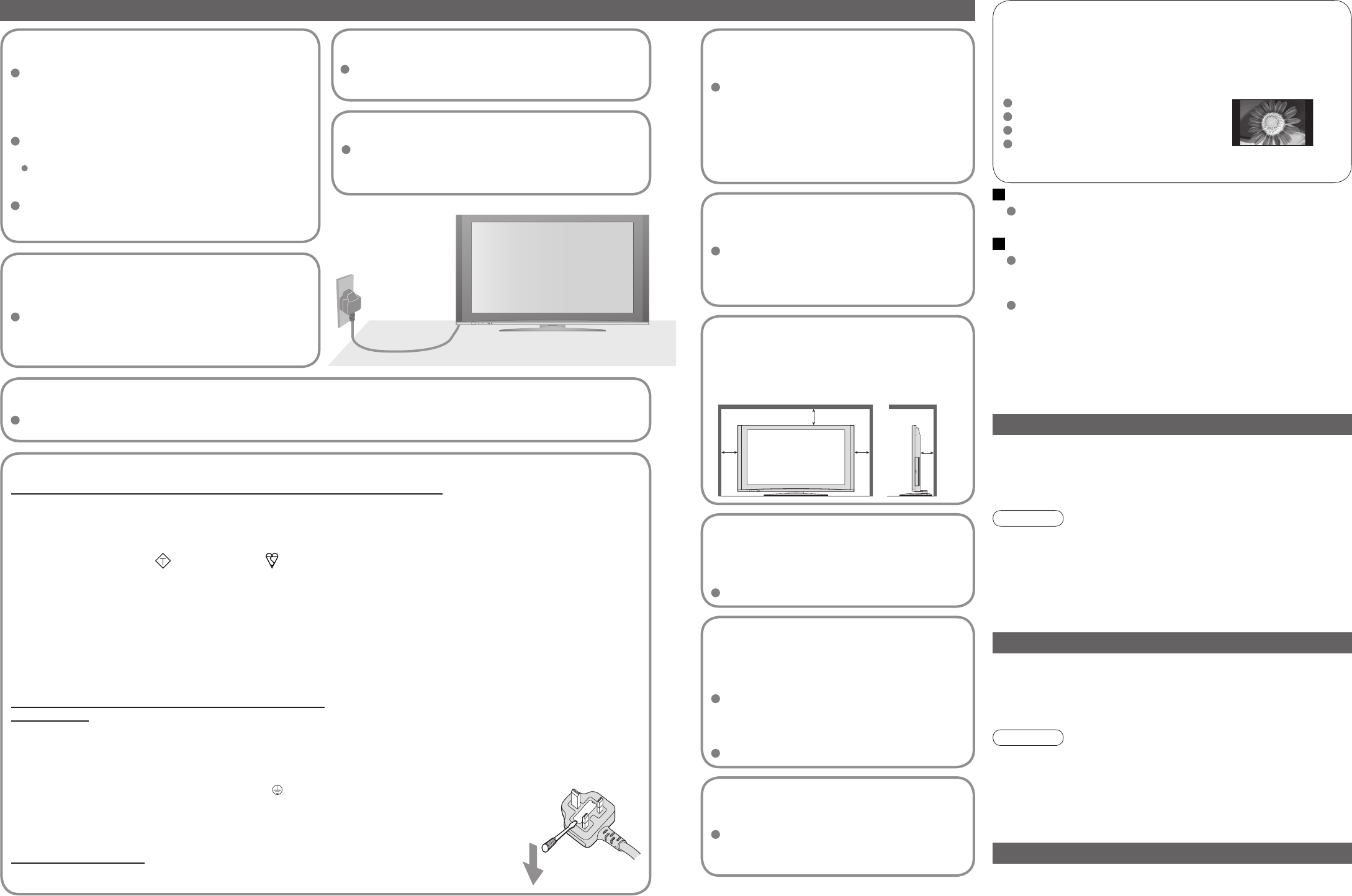
Do not block the rear
ventilation openings
Ventilation should not be impeded by
covering the ventilation openings with
items such as newspapers, tablecloths and
curtains.
Use only the dedicated
stands / mounting
equipment
Using an unauthorized stand or other
fixtures may make the TV shaky, risking
injury. Be sure to ask your local Panasonic
dealer to perform setup.
Use optional stands / mounts (p. 6).
Do not place the TV
on sloped or unstable
surfaces
The TV may fall off or tip over.
Do not expose to rain or
excessive moisture
To prevent damage which might result in
electric shock or fire, do not expose this TV
to rain or excessive moisture.
This TV must not be exposed to dripping or
splashing water and objects filled with liquid,
such as vases, must not be placed on top of
or above the TV.
Do not allow children to
handle SD card
As with a small object, SD card can be
swallowed by young children. Please
remove SD card immediately after use.
AC 220-240 V
50 / 60 Hz
Handling the mains plug
Ensure that the mains plug is easily accessible at
all times. The On / Off switch on this model does
not fully disconnect the TV from the mains supply.
Remove the mains plug from the wall socket when
the TV is not used for a prolonged period of time.
Ensure the grounding pin on the mains plug is
securely connected to prevent electrical shock.
An apparatus with CLASS I construction shall be
connected to a mains socket outlet with a protective
earthing connection.
Do not use any mains lead other than that provided
with this TV. (This may cause fire or electrical shock.)
Do not expose to direct sunlight
and other sources of heat
Avoid exposing the TV to direct sunlight and other
sources of heat. To prevent fire never place any type
of candle or naked flame on top or near the TV.
Power source
This TV is designed to operate on 220-240 V,
50 / 60 Hz AC.
Do not remove the cover
Do not remove the rear cover as live parts are
accessible when it is removed. There are no user
serviceable parts inside.
Transport only in upright position
Transporting the TV with its display panel facing upright or downward may cause damage to the internal circuitry.
IMPORTANT: THE MOULDED MAINS PLUG
FOR YOUR SAFETY, PLEASE READ THE FOLLOWING TEXT CAREFULLY.
The wire which is coloured GREEN-AND-YELLOW must be connected to the terminal in the mains plug which is
marked with the letter E or by the Earth symbol or coloured GREEN or GREEN-AND-YELLOW.
The wire which is coloured BLUE must be connected to the terminal in the mains plug
which is marked with the letter N or coloured BLACK.
The wire which is coloured BROWN must be connected to the terminal in the mains plug
which is marked with the letter L or coloured RED.
How to replace the fuse.
Open the fuse compartment with a screwdriver and replace the fuse.
As the colours of the wire in the mains lead of this appliance may not correspond with the coloured markings
identifying the terminals in your mains plug, proceed as follows.
WARNING: – THIS APPARATUS MUST BE EARTHED.
IMPORTANT: – The wires in this mains lead are coloured in accordance with the following code: –
Green-and-Yellow: Earth
Blue: Neutral
Brown: Live
If a new mains plug is to be fitted, please observe the wiring code as shown below.
If in any doubt, please consult a qualified electrician.
If the fitted moulded mains plug is unsuitable for the socket outlet in your home, then the fuse shall be
removed and the mains plug cut off and disposed of safety. There is a danger of severe electrical shock
if the cut off mains plug is inserted into any 13 amp socket.
If the mains plug contains a removable fuse cover, you must ensure that it is refitted when the fuse is replaced.
If you lose the fuse cover the mains plug must not be used until a replacement cover is obtained.
A replacement fuse cover may be purchased from your local Panasonic Dealer.
This appliance is supplied with a moulded three pin mains plug for your safety and convenience. A 5 amp
(TH-42PZ70BA, TH-42PZ70B) / 10 amp (TH-50PZ70B) fuse is fitted in this mains plug. Shall the fuse need to be
replaced, please ensure that the replacement fuse has a rating of 5 amps (TH-42PZ70BA, TH-42PZ70B) / 10 amps
(TH-50PZ70B) and that it is approved by ASTA or BSI to BS1362.
Check for the ASTA mark
ASA
or the BSI mark on the body of the fuse.
Electronic equipment
In particular, do not place video equipment near the TV
(electromagnetic interference may distort images / sound).
Equipment with an infrared sensor
Keep the TV away from these equipment
If no signal is received and no operation is performed in Analogue TV
mode for 30 minutes, the TV will automatically go to standby mode.
Auto power standby function
Do not display a still picture for a long time
This causes the image to remain on the plasma screen
(“image retention”).
This is not considered a malfunction and is not covered by the
warranty.
To prevent image retention, contrast is lowered automatically after a few
minutes if no signals are sent or no operations are performed. (p. 51)
Typical still images
Channel number and other logos
Image displayed in 4:3 mode
Video game
Computer image
This TV also emits infrared rays (this may affect operation of
other equipment).
Allow sufficient space
around the TV for radiated
heat
10
10
10
7
(cm)
Minimum distance
Download manual in English (PDF, 18.86 MB)
(Consider the environment and only print this manual if it is really necessary)

Loading…

Rating

Let us know what you think about the Panasonic TH-50PZ70B Viera Plasma Television by leaving a product rating. Want to share your experiences with this product or ask a question? Please leave a comment at the bottom of the page.
Are you satisfied with the Panasonic TH-50PZ70B Viera Plasma Television?
Yes No
Be the first to rate this product
0 votes

Join the conversation about this product

Here you can share what you think about the Panasonic TH-50PZ70B Viera Plasma Television. If you have a question, first carefully read the manual. Requesting a manual can be done by using our contact form.

More about this manual

We understand that it’s nice to have a paper manual for your Panasonic TH-50PZ70B Viera Plasma Television. You can always download the manual from our website and print it yourself. If you would like to have an original manual, we recommend you contact Panasonic. They might be able to provide an original manual. Are you looking for the manual of your Panasonic TH-50PZ70B Viera Plasma Television in a different language? Choose your preferred language on our homepage and search for the model number to see if we have it available.

Specifications

Brand Panasonic
Model TH-50PZ70B Viera
Category Plasma Televisions
File type PDF
File size 18.86 MB

All manuals for Panasonic Plasma Televisions
More manuals of Plasma Televisions

Frequently Asked Questions about Panasonic TH-50PZ70B Viera Plasma Television

Our support team searches for useful product information and answers to frequently asked questions. If you find an inaccuracy in our frequently asked questions, please let us know by using our contact form.

I want to connect a speaker to my plasma television with HDMI, which port should I use? Verified

You need to use the HDMI-ARC port, which is specifically made for connecting audio equipment.

This was helpful (166) Read more

How do I connect a universal remote control to my television? Verified

To connect your universal remote control, you need the model number and brand name of both the remote control and the television. There is a list of codes for brands and model numbers in the manual of the remote control .

This was helpful (113) Read more

How can I prevent my Plasma television from burning in? Verified

The burning in of a Plasma television happens when the same image stays on the screen for a longer time. To prevent burning in, never keep the same image on the screen for longer than 2 minutes.

This was helpful (63) Read more

How do I measure the inches of my Plasma television? Verified

Measuring the inches on your Plasma television is done by measuring the diagonal distance between for example the upper left corner and the lower right corner of the screen (not the edge). One inch equals 2,54 centimeter, so when you measure 99 centimeter, this means your Plasma television is 39 inches.

This was helpful (48) Read more

Does it matter to which HDMI port I connect my device? Verified

In general you can connect a device like a blu-ray player or game console to any HDMI port. The device can then be used by selecting the corresponding HDMI channel on your television.

This was helpful (47) Read more

Can I repair a dead pixel myself? Verified

There is a difference between a dead pixel and a stuck pixel. A stuck pixel is still coloured and might be fixed by applying light pressure exactly onto the pixel until it restores itself. A dead pixel is always black or white and can't be repaired by yourself.

This was helpful (27) Read more

What does HDMI stand for? Verified

HDMI stands for High-Definition Multimedia Interface. HDMI is a connection to send high quality video and audio from one device to another.

This was helpful (22) Read more

Will my remote control also work on other television models of the same brand? Verified

Often a remote control of a television will also work on similar models of the same brand. However, it is unusual that it will work on all models of that brand. Universal remote controls are more suited to do this.

This was helpful (16) Read more

How can I properly clean my plasma television? Verified

Turn off the television and wipe dust and dirt off the screen with a microfiber cloth. Do not use paper, this can cause scratches. Do not apply too much pressure or you might cause damage to pixels. Use a specialized detergent or make one by mixing 1 part vinegar with 1 part water. Moisten the cloth with the detergent and clean the screen. Make sure the cloth is not too wet. Remove stains by making rotating movements. Dry the screen with a second microfiber cloth to prevent stripes.

This was helpful (15) Read more

What is the contrast ratio? Verified

The contrast ratio tells how far the whitest white is from the blackest black. A contrast ratio of for example 400:1 means that the blackest black on screen is 400 times darker than the whitest white. A high contrast ratio contributes to the sharpness of the image.

This was helpful (15) Read more

What is the optimal viewing distance for my television? Verified

This partially depends on personal preference, but as a rule of thumb the optimal viewing distance is about 3x the diagonal screen size of the television. For a television of 60 inch (152cm) the optimal viewing distance would be 180 inch or about 4.5 meter.

This was helpful (11) Read more

Why are there letters next to the numbers on the remote control? Verified

Certain television settings may require you to enter letters. There are usually three letters or other characters on a button. When letter input is required, you can press that button once for the first letter, press twice for the second letter and press 3 times for the third letter. This way, text can be written with a minimum number of buttons.

This was helpful (11) Read more
Manual Panasonic TH-50PZ70B Viera Plasma Television

Related products

Related categories

×
Download