3
7
1
5
2
6
4
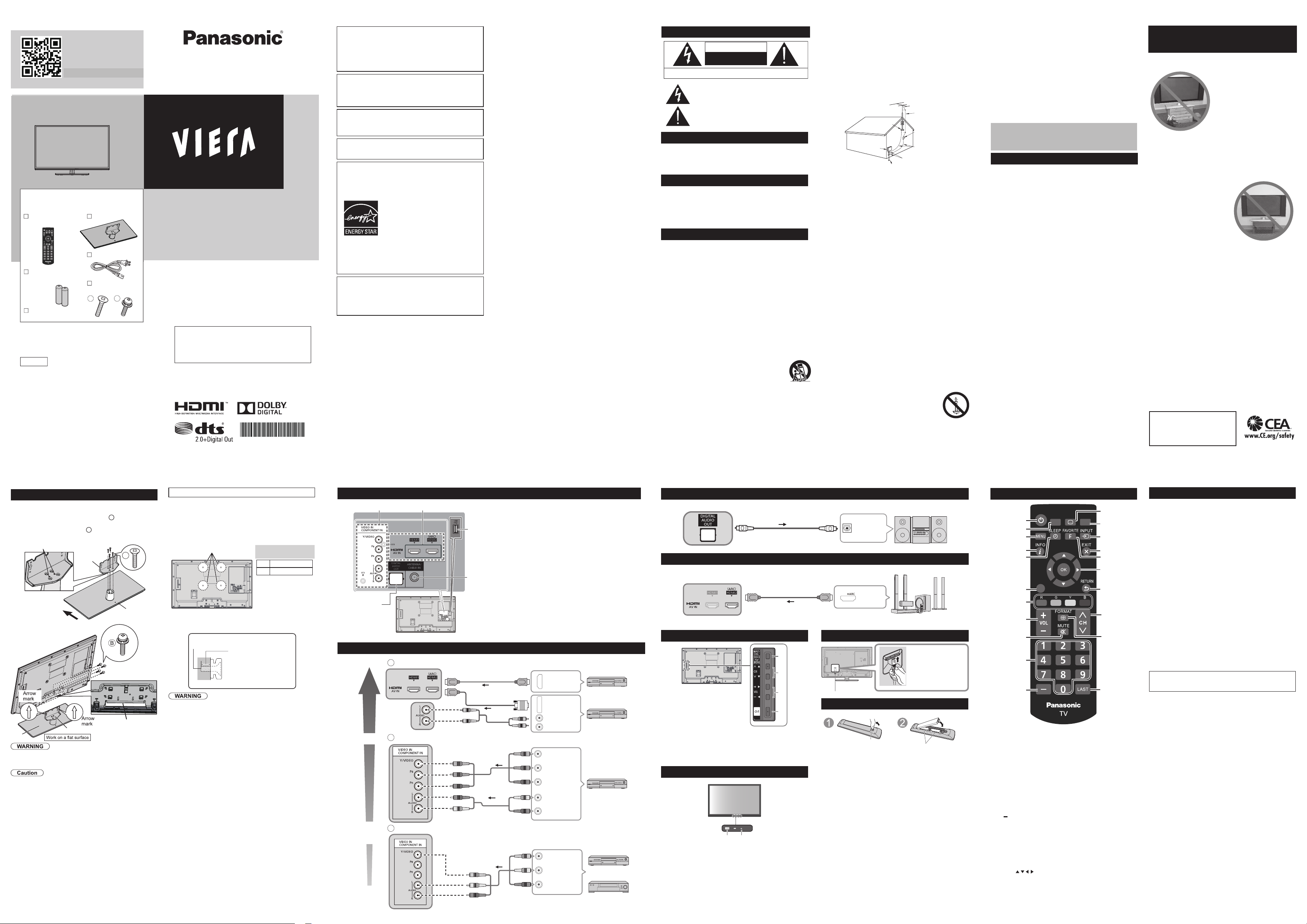
Safety Precautions
CAUTION
RISK OF ELECTRIC SHOCK
DO NOT OPEN
WARNING: To reduce the risk of electric shock, do not remove cover or back.
No user-serviceable parts inside. Refer servicing to qualified service personnel.
The lightning flash with arrowhead within a triangle is
intended to tell the user that parts inside the product
are a risk of electric shock to persons.
The exclamation point within a triangle
is intended to tell the user that important operating
and servicing instructions are in the papers with the
appliance.
Note to CATV System Installer
This reminder is provided to direct the CATV system installer’s
attention to Article 820-40 of the NEC that provides guidelines for
proper grounding and, in particular, specifies that the cable ground
shall be connected to the grounding system of the building, as close to
the point of cable entry as practical.
Secure Ventilation
Slots and openings in the cabinet and the back or bottom are provided for
ventilation, and to ensure reliable operation of the LCD TV and to protect it
from overheating. These openings must not be blocked or covered. There
should be at least 10 cm of space around the TV. The openings should
never be blocked by placing the LCD TV on a bed, sofa, rug or other similar
surface. This LCD TV should not be placed in a built-in installation such as
a bookcase unless proper ventilation is provided.
Important Safety Instructions
1) Read these instructions.
2) Keep these instructions.
3) Heed all warnings.
4) Follow all instructions.
5) Do not use this apparatus near water.
6) Clean only with dry cloth.
7) Do not block any ventilation openings. Install in accordance with the
manufacturer’s instructions.
8) Do not install near any heat sources such as radiators, heat
registers, stoves or other apparatus (including ampliers) that
produce heat.
9) Do not defeat the safety purpose of the polarized or grounding-type
plug. A polarized plug has two blades with one wider than the other.
A grounding type plug has two blades and a third grounding prong.
The wide blade or the third prong are provided for your safety. If the
provided plug does not t into your outlet, consult an electrician for
replacement of the obsolete outlet.
10) Protect the power cord from being walked on or pinched particularly
at plugs, convenience receptacles, and the point where they exit
from the apparatus.
11) Only use attachments / accessories specied by the manufacturer.
12) Use only with the cart, stand, tripod, bracket or table
specied by the manufacturer, or sold with the apparatus.
When a cart is used, use caution when moving the cart /
apparatus combination to avoid injury from tip-over.
13) Unplug this apparatus during lightning storms or when unused for
long periods of time.
14) Refer all servicing to qualied service personnel. Servicing is
required when the apparatus has been damaged in any way, such
as power-supply cord or plug is damaged, liquid has been spilled
or objects have fallen into the apparatus, the apparatus has been
exposed to rain or moisture, does not operate normally, or has
been dropped.
15) Operate only from the type of power source indicated on the
marking label. If you are not sure of the type of power supplied to
your home consult your television dealer or local power company.
16) Follow all warnings and instructions marked on the LCD TV.
17) Never push objects of any kind into this LCD TV through cabinet
slots as they may touch dangerous voltage points or short out
parts that could result in a re or electric shock. Never spill liquid
of any kind on the LCD TV.
18) If an outside antenna is connected to the television equipment,
be sure the antenna system is grounded so as to provide some
protection against voltage surges and built up static charges.
In the U.S. Section 810-21 of the National Electrical Code
provides information with respect to proper grounding of the mast
and supporting structure, grounding of the lead-in wire to an
antenna discharge unit, size of grounding conductors, location of
antenna discharge unit, connection to grounding electrodes, and
requirements for the grounding electrode.
ANTENNA
LEAD-IN WIRE
ANTENNA
DISCHARGE UNIT
(NEC SECTION 810-20)
GROUNDING
CONDUCTORS
(NEC SECTION 810-21)
GROUND CLAMPS
POWER SERVICE GROUNDING
ELECTRODE SYSTEM
(NEC ART 250, PART H)
ELECTRIC
SERVICE
EQUIPMENT
GROUND CLAMP
GROUNDING AS PER
(NEC) NATIONAL
ELECTRICAL
CODE
19)
An outside antenna system should not be located in the vicinity of
overhead power lines, other electric light, power circuits, or where it
can fall into such power lines or circuits. When installing an outside
antenna system, extreme care should be taken to keep from
touching such power lines or circuits as contact with them might be
fatal.
20) Unplug this LCD TV from the wall outlet and refer servicing to
qualied service personnel under the following conditions:
a. When the power cord or plug is damaged or frayed.
b. If liquid has been spilled into the LCD TV.
c. If the LCD TV has been exposed to rain or water.
d.
If the LCD TV does not operate normally by following the
operating instructions.
Adjust only those controls that are covered by the operating
instructions as improper adjustment of other controls may
result in damage and will often require extensive work by
a qualied technician to restore the LCD TV to normal
operation.
e. If the LCD TV has been dropped or the cabinet has been
damaged.
f. When the LCD TV exhibits a distinct change in performance
- this indicates a need for service.
21) When replacement parts are required, be sure the service
technician uses replacement parts specied by the manufacturer
that have the same characteristics as the original parts.
Unauthorized substitutions may result in re, electric shock, or
other hazards.
22) WARNING: TO REDUCE THE RISK OF FIRE OR ELECTRIC
SHOCK, DO NOT EXPOSE THIS APPARATUS TO RAIN,
MOISTURE, DRIPPING OR SPLASHING. DO NOT PLACE
LIQUID CONTAINERS (FLOWER VASES, CUPS, COSMETICS,
ETC.) ABOVE THE SET (INCLUDING ON SHELVES ABOVE,
ETC.).
23) WARNING: SMALL PARTS CAN PRESENT CHOKING
HAZARD IF ACCIDENTALLY SWALLOWED. KEEP SMALL
PARTS AWAY FROM YOUNG CHILDREN. DISCARD
UNNEEDED SMALL PARTS AND OTHER OBJECTS,
INCLUDING PACKAGING MATERIALS AND PLASTIC
BAGS/SHEETS TO PREVENT THEM FROM BEING PLAYED
WITH BY YOUNG CHILDREN, CREATING THE
POTENTIAL RISK OF SUFFOCATION.
24) WARNING:
To prevent the spread of re, keep
candles or other open ames away
from this product at all times.
25) WARNING: A warning that batteries (battery pack
or batteries installed) shall not be exposed to
excessive heat such as sunshine, re or the like.
Model No.
Operating Instructions
LCD TV
Batteries for the
Remote Control (2)
• (AA)
Operating
Instructions
Pedestal
Check that you have the accessories and
items shown
Standard accessories
Assembly screws
(
4 of each)
Remote Control
N2QAYB000820
U.S. and Canada only
TC-L39EM60/TC-39LEM64
TC-L50EM60/TC-50LEM64
MEDIA
PLAYER
CC SAP
OPTION
Power cord
HDA70F3900I
English
Thank you for purchasing this Panasonic product.
Please read these instructions before operating your set
and retain them for future reference. The images shown
in this manual are for illustrative purposes only.
Register online at
www.panasonic.com/register
(U.S.customers only)
Scan, watch and discover
how to get the most out of
your TV
http://SCN.BY/9T9AB0HTW8JBKI
B
A
26) CAUTION: The Power switch on this unit will not completely
shut off all power from AC outlet. Since the power cord serves as
the main disconnect device for the unit, you will need to unplug it
from the AC outlet to shut down all power. Therefore, make sure
the unit has been installed so that the power cord can be easily
unplugged from AC outlet in case of an accident. To avoid re
hazard, the power cord should also be unplugged from the AC
outlet when left unused for a long period of time (for example,
when on vacation).
27) CAUTION: TO PREVENT ELECTRIC SHOCK, DO NOT USE
THIS PLUG WITH A RECEPTACLE OR OTHER OUTLET
UNLESS THE BLADES CAN BE FULLY INSERTED TO
PREVENT BLADE EXPOSURE.
28) CAUTION: USE WITH OTHER STAND MAY RESULT IN
INSTABILITY POSSIBLY CAUSING INJURY.
29) CAUTION: DANGER OF EXPLOSION IF BATTERY IS
INCORRECTLY REPLACED. REPLACE ONLY WITH THE
SAME OR EQUIVALENT TYPE.
NOTE:
z
This equipment is designed to operate in North America
and other countries where the broadcasting system and AC
house current are exactly the same as in North America.
FCC STATEMENT
This equipment has been tested and found to comply with the
limits for a Class B digital device, pursuant to Part 15 of the
FCC Rules. These limits are designed to provide reasonable
protection against harmful interference in a residential
installation. This equipment generates, uses and can radiate radio
frequency energy and, if not installed and used in accordance
with the instructions, may cause harmful interference to radio
communications. However, there is no guarantee that interference
will not occur in a particular installation. If this equipment does
cause harmful interference to radio or television reception, which
can be determined by turning the equipment off and on, the user is
encouraged to try to correct the interference by one or more of the
following measures:
• Reorient or relocate the receiving antenna.
• Increase the separation between the equipment and receiver.
• Connect the equipment into an outlet on a circuit different
from that to which the receiver is connected.
•
Consult the dealer or an experienced radio/TV technician for help.
This device complies with Part 15 of the FCC Rules. Operation
is subject to the following two conditions: (1) This device may
not cause harmful interference, and (2) this device must accept
any interference received, including interference that may cause
undesired operation.
FCC Caution:To assure continued compliance, follow
the attached installation instructions and use only
shielded interface cables when connecting to computer
or peripheral devices. Any changes or modifications not
expressly approved by Panasonic Corp. of North America
could void the user’s authority to operate this device.
Models: TC-L39EM60/TC-39LEM64/
TC-L50EM60/TC-50LEM64
Responsible
Party:
Panasonic Corporation of North America
One Panasonic Way, Secaucus, NJ 07094
Contact
Source:
Panasonic Consumer Marketing Company of
North America
1-877-95-VIERA (958-4372)
Attaching the pedestal to TV
Set-up
z
Fix securely with assembly screws
A
. (Total 4 screws)
z
Tighten screws firmly.
z
Tighten assembly screws
B
(total 4 screws) loosely at
first, then tighten them firmly to fix securely.
A
Bracket
Front
Base
Protrusion of Neck (Bottom)
Rear side
Base
Hole for pedestal
installation
Bracket
Do not disassemble or modify the pedestal.
z
Otherwise the TV may fall over and become damaged, and
personal injury may result.
Do not use any pedestal other than that provided with this TV.
z
Otherwise the TV may fall over and become damaged, and
personal injury may result.
Do not use the pedestal if it becomes warped or physically
damaged.
z
If you use the pedestal when it is physically damaged,
personal injury may result. Contact your nearest Panasonic
Dealer immediately.
During set-up, make sure that all screws are securely tightened.
z
If sufficient care is not taken to ensure screws are properly
tightened during assembly, the pedestal will not be strong
enough to support the TV, and it might fall over and become
damaged, and personal injury may result.
Optional accessories
Wall-hanging bracket (not supplied)
Use the screws that are threaded into the stand-mounting inserts
on the back of your LCD TV to secure it to a Wall Mounting kit.
It is safe to use long screws for this product.
When using long screws, the two bottom screws may loosen, but
the top two will remain tightly in place to secure the mounted TV.
Wall Mounting Inserts
VESA standard
interface
39” 200 x 200 mm
50” 400 x 200 mm
Mounting screws
measurements:
M6 x 4
Please contact your nearest Panasonic dealer to purchase the
recommended wall-hanging bracket. For additional details, please
refer to the wall-hanging bracket installation manual.
Screw for fixing the TV onto the
wall-hanging bracket
(not supplied with the TV)
(View from the side)
M6
Depth of screw:
39” Minimum: 0.75 ” (19.0 mm)
39” Maximum: 0.79 ” (20.0 mm)
50” Minimum: 0.71 ” (18.0 mm)
50” Maximum: 0.79 ” (20.0 mm)
z
Customer assumes liability if mounting the unit themselves or if a
Panasonic bracket is not used. Any damage resulting from not having
a professional installer mount your unit will void your warranty.
z
Always be sure to ask a qualified technician to perform any necessary
set-up. Incorrect fitting may cause equipment to fall, resulting in injury
and product damage.
z
Do not mount the unit directly below ceiling lights (such as spotlights,
floodlights or halogen lights) which typically give off high heat. Doing
so may warp or damage plastic cabinet parts.
z
Take care when fixing wall brackets to the wall. Always ensure that
there are no electrical cables or pipes in the wall before hanging
bracket.
z
When using an angled-type wall hanging bracket, please ensure that
there is sufficient space for the connecting cables so that they do not
press against the wall when the TV is tilted forward.
z
For safety reasons, remove units no longer being used from their wall-
mounted locations.
Connection Panels
Back of the TV
5
4
3
1 Video IN / COMPONENT IN
2 HDMI 1 - 2
3 USB port
4 ANTENNA / CABLE IN
5 DIGITAL AUDIO OUT
Note:
z
When using a Cable box, external equipment and
video cables shown in this manual are not supplied
with the TV.
z
For additional assistance, visit us at:
www.panasonic.com/help
www.panasonic.ca
AV cable connection
Best
Good
Basic
(Not
HD)
A
L
R
L
R
HDMI
AV OUT
HDMI-DVI
Conversion cable
DVI OUT
AUDIO OUT
e.g. Blu-ray Disc
player
e.g. Blu-ray Disc
player
AV Equipment
AV Equipment
B
L
R
Y
P
B
P
R
AUDIO
OUT
AUDIO
OUT
COMPONENT
VIDEO OUT
white
red
green
blue
red
red
white
white
red
green
blue
red
e.g. Blu-ray Disc
player
AV Equipment
C
L
R
COMPOSITE
VIDEO OUT
white
yellow
white
red
yellow
white
red
or
e.g. DVD Recorder
AV Equipment
e.g. VCR
To use HDMI terminals
To use COMPONENT input terminals
To use VIDEO input terminals
yellow
red
red
blue
green
AUDIO
OUT
Audio connection
z
Listen to your TV through your stereo
DIGITAL
AUDIO IN
e.g. Amplifier
Optical cable
Audio ARC connection
z
Listen to your TV through your HDMI AMP
HDMI cable
HDMI
TV OUT
Amplifier with
Speaker system
CHILD SAFETY:
It Makes A Difference How and Where
You Use Your Flat Panel Display
Congratulations on your purchase! As you enjoy your new
product, please keep these safety tips in mind:
THE ISSUE
• The home theater entertainment
experience is a growing trend
and larger flat panel displays
are popular purchases.
However, flat panel displays
are not always supported on
the proper stands or installed
according to the manufacturer’s
recommendations.
• Flat panel displays that are improperly situated on
dressers, bookcases, shelves, desks, speakers, chests
or carts may fall over and cause injury.
THIS MANUFACTURER CARES!
• The consumer electronics industry is committed to
making home entertainment enjoyable and safe.
TUNE INTO SAFETY
• One size does NOT fit all.
Follow the manufacturer’s
recommendations for the safe
installation and use of your flat
panel display.
• Carefully read and understand
all enclosed instructions for
proper use of this product.
• Don’t allow children to climb on
or play with furniture and television sets.
• Don’t place flat panel displays on furniture that can easily
be used as steps, such as a chest of drawers.
• Remember that children can become excited while
watching a program, especially on a “larger than life” flat
panel display. Care should be taken to place or install
the display where it cannot be pushed, pulled over, or
knocked down.
• Care should be taken to route all cords and cables
connected to the flat panel display so that they cannot be
pulled or grabbed by curious children.
WALL MOUNTING: IF YOU DECIDE TO WALL MOUNT
YOUR FLAT PANEL DISPLAY, ALWAYS:
• Use a mount that has been recommended by the display
manufacturer and/or listed by an independent laboratory
(such as UL, CSA, ETL).
• Follow all instructions supplied by the display and mount
manufacturers.
• If you have any doubts about your ability to safely
install your flat panel display, contact your retailer about
professional installation.
• Make sure that the wall where you are mounting the
display is appropriate.
Some wall mounts are not designed to be mounted to
walls with steel studs or old cinder block construction. If
you are unsure, contact a professional installer.
• A minimum of two people are required for installation. Flat
panel displays can be heavy.
The American Academy of
Pediatrics discourages media
viewing for children younger
than 2 years. For more details,
see www.aap.org
USA Only: Disposal may be regulated in your
community due to Environmental considerations.
For disposal or recycling information, please visit
Panasonic website: http://www.panasonic.com/
environmental or call 1-888-769-0149.
Safety Precautions .............................................. 2
Note to CATV System Installer ............................ 2
Secure Ventilation ............................................... 2
Important Safety Instructions .............................. 2
FCC STATEMENT ................................................ 3
CHILD SAFETY ................................................... 3
Attaching the pedestal to TV ............................... 4
Connection Panels .............................................. 5
AV cable connection ........................................... 5
Audio connection ................................................ 6
Audio ARC connection........................................ 6
Using Controls on the TV .................................... 6
Indicators on the TV ............................................ 6
Power cord connection ....................................... 6
Installing the remote’s batteries .......................... 6
Remote control .................................................... 7
First Time Setup .................................................. 7
Watching TV ........................................................ 8
Listen with SAP
(Secondary Audio Programming)
...8
Closed Caption ................................................... 8
Displaying information ........................................ 8
Display the “Options menu” ................................ 8
Call up a Favorite channel .................................. 8
Password setting/entering .................................. 8
Set the “Sleep timer” ........................................... 8
How to Use Menu Functions ............................... 9
Using Media player ........................................... 11
Specifications ................................................... 13
Supported file format in Media Player ............... 14
Customer Services Directory
(for U.S.A. and Puerto Rico) ............................. 15
Accessory Purchases
(United States and Puerto Rico) ....................... 15
Using Controls on the TV
1
2
3
4
1 Changes the input mode
z
Chooses menu and submenu entries. (Press and hold down
for MENU function)
2 Channel up/down
3 Volume up/down
4 Power button
Indicators on the TV
1 Remote control signal receiver
z
Remote control sensor range is about 23 feet (7 meters) in
front of the TV set
2 Power LED
z
ON:
red
z
OFF:
no light
Note:
z
The TV consumes a small amount of electric energy even
when turned off.
z
Do not place any objects between the TV remote control
sensor and remote control.
Power cord connection
Insert the power cord plug
(included) firmly into place.
●
When disconnecting the power
cord, be absolutely sure to
disconnect the power cord plug
from the wall outlet first.
●
The included power cord is for
use with this unit only.
Installing the remote’s batteries
Hook
Note the correct polarity
(+ or -).
Close
Caution:
z
Incorrect installation may cause battery leakage and
corrosion, resulting in damage to the remote control.
z
Do not mix old and new batteries.
z
Do not mix different battery types (such as alkaline and
manganese batteries).
z
Do not use rechargeable (Ni-Cd) batteries.
z
Do not burn or break batteries.
Remote control
MEDIA
PLAYER CC SAP
OPTION
3
4
6
7
8
11
9
10
2
5
13
15
12
14
18
17
16
20
21
1
19
1無
POWER - Switches TV On or Off
.
2無
MEDIA PLAYER - Viewing media contents from a USB.
3無
MENU - Press to display the menu screen .
4無
INFO
-
Displays TV status information as well as
program details.
5無
SLEEP - Accesses the sleep timer.
6無
OPTION
- Displays Options menu for special functions
(when available)
7無
COLOR KEY -
Red/Green/Yellow/Blue key for various
function.
8無
Volume Up / Down (VOL+ / - ) - Press to decrease or
increase the audio volume.
9無
MUTE - Turns off/on the sound.
10無
Channel Numbers - Directly tune channels.
11無
- Use for digital channels.
12無
CC - Switches the Closed Caption mode On or Off.
13無
SAP - Select the Audio mode for watching TV. (SAP :
Secondary Audio Programming).
14無
INPUT -
Select input sources “ANT/Cable in”, ”HDMI 1”,
”HDMI 2”, ”Component”, ”Video” by pressing INPUT button
on Remote Control.
15無
EXIT - Exit from the menu screen.
16無
FAVORITE - Accesses the favorite channels.
17無
OK /
- Selects/OK/Change.
18無
RETURN - Press to return to previous menu.
19無
Channel Up / Down (CH
V
/
V
) - Press to switch to the
last or next channel.
20無
FORMAT - To cycle through the aspect ratio modes.
21無
LAST - Switches to previously viewed channel or input.
First Time Setup
First time setup screen is only displayed automatically after
the power cord is inserted into a wall outlet and the TV is
turned on for the first time.
Turn the TV On with the “POWER” button
Select your language
English/Español/Français
Set viewing mode
1無
Select your viewing mode (Be sure to select “Home use”)
2無
Please confirm your selection (Home use) before pressing
the OK button.
z
If you select “ Store demonstration” by mistake in “Set viewing
mode”, confirmation screen will be displayed.
• Select “No” and return to previous screen “Set viewing
mode”.
• If you select “Yes”, screen enters the store
demonstration mode.
z
To display the “Set viewing mode” screen again as shown
above and select “
Home use
”, perform “
Reset to defaults
”
in the “
Setup
” menu.
• If you perform “Reset to defaults”, please do not unplug
the AC Cord while the TV is being reset.
ANT/Cable setup (Auto channel setup)
1無
Select signal type “Over-the-Air” or “Cable service”.
2無
Select “Auto program” and start scanning, the channel
scanning starts.
Finished First time setup.
Congratulations! Setup is complete.
To watch TV via a Cable box, Satellite receiver, or any other
source (DVD, DVR, gaming device, etc.), press the INPUT
button and select the appropriate input.
Note:
z
If you turn the TV off before completing “First time setup”, the
initial setup will not launch again the next time you power on
the unit.
z
You can repeat “First time setup” by selecting “Reset to
defaults” in the “Setup” menu.
z
After “First time setup”, you can also change “Language”
and “ANT/Cable setting” from the “Setup” and “TV” menus
respectively.
z
About broadcasting systems
Analog (NTSC): Conventional broadcasting
Digital (ATSC): Digital TV Standards include digital high-
definition television (HDTV), standard-definition television
(SDTV), data broadcasting, multi-channel surround sound
audio and interactive television.
Contents
This product incorporates some kinds of open source
software. The software is distributed in the hope that it
will be useful, but WITHOUT ANY WARRANTY, without
even the implied warranty of MERCHANTABILITY or
FITNESS FOR A PARTICULAR PURPOSE. Please refer
to the detailed terms and conditions thereof shown in the
"License" menu on this product.
Panasonic does not guarantee operation and performance
of peripheral devices made by other manufacturers; and
we disclaim any liability or damage arising from operation
and/or performance from usage of such other maker’s
peripheral devices.
HDMI, the HDMI logo and High- Definition Multimedia
Interface are trademarks or registered trademarks of
HDMI Licensing LLC in the United States and other
countries.
Manufactured under license from Dolby Laboratories.
Dolby and the double-D symbol are trademarks of Dolby
Laboratories.
Energy Star is a joint program of the
US Environmental Protection Agency
and the U.S. Department of Energy. It
is administered in Canada by Natural
Resources Canada (NRC) through
the Office of Energy Efficiency (OEE).
This program is helping to protect
the environment and save money
through energy efficient products and
practices. This product qualifies for
ENERGY STAR in the “Home Use”
setting and this is the setting in which
energy savings will be achieved. Any
modifications to the “Home Use” setting
or other factory default settings could
result in greater energy consumption
beyond levels that meet ENERGY STAR
qualifications.
Manufactured under license under U.S. Patent Nos:
5,956,674; 5,974,380; 6,487,535 & other U.S. and
worldwide patents issued & pending. DTS, the Symbol, &
DTS and the Symbol together are registered trademarks
& DTS 2.0+Digital Out is a trademark of DTS, Inc. Product
includes software. © DTS, Inc. All Rights Reserved.


Join the conversation about this product
Here you can share what you think about the Panasonic TC-L39EM60 Viera LCD Television. If you have a question, first carefully read the manual. Requesting a manual can be done by using our contact form.