This unit is a Wireless LAN Range Extender. It expands the coverage area
of your wireless LAN network when used with an ALL
TM
wireless speaker.
Place this unit to extend the signal coverage of your wireless LAN
network.
(It has no wireless broadband router or access point capabilities.)
Accessories
≥ The supplied DC cable is for use with this system only. Do not use it with other
equipment. Also, do not use cords from other equipment with this system.
This unit is a device intended to be connected to an ALL
TM
wireless speaker.
Its encryption method is the same as that used in ALL
TM
wireless speakers.
For details, refer to the operating instructions for your ALL
TM
wireless
speaker.
For further dedicated help, support and advice about your ALL
TM
Connected
Audio product please visit:
http://panasonic.jp/support/global/cs/audio/ALL/index.html
(This site is in English only.)
∏ 1 AC adaptor
(VSK0815L)
∏ 1 DC cable
(TPBAA043)
Precautions
Unit
≥ To reduce the risk of fire, electric shock or product damage,
– Do not expose this unit to rain, moisture, dripping or splashing.
– Do not place objects filled with liquids, such as vases, on this unit.
– Use only the recommended accessories.
– Do not remove covers.
– Do not repair this unit by yourself. Refer servicing to qualified service personnel.
– Do not let metal objects fall inside this unit.
– Do not place any item on top of this unit.
AC adaptor
≥ To reduce the risk of fire, electric shock or product damage,
– Ensure that the power supply voltage corresponds to the voltage printed on this unit.
– Insert the mains plug fully into the socket outlet.
– Do not pull, bend, or place heavy items on the lead.
– Do not handle the plug with wet hands.
– Hold onto the mains plug body when disconnecting the plug.
– Do not use a damaged mains plug or socket outlet.
≥ The socket outlet shall be installed near the equipment and shall be easily accessible.
Unit
≥ This unit may receive radio interference caused by mobile telephones during use. If such interference
occurs, please increase separation between this unit and the mobile telephone.
Placement
≥ Place this unit on an even surface.
≥ To reduce the risk of fire, electric shock or product damage,
– Do not expose this unit to direct sunlight, high temperatures, high humidity, and excessive vibration.
LAN cable
Use category 7 or above straight LAN cables (STP) when connecting to peripheral devices.
The symbols on this product (including the accessories) represent the following:
WARNING
CAUTION
AC
DC
Class II equipment (The construction of the product is double-insulated.)
Sales and Support Information
Customer Communications Centre
≥ For customers within the UK: 0344 844 3899
≥ For customers within Ireland: 01 289 8333
≥ Monday–Friday 9:00 am – 5:00 pm (Excluding public holidays).
≥ For further support on your product, please visit our website:
www.
panasonic.co.uk
Direct Sales at Panasonic UK
≥ Order accessory and consumable items for your product with ease and
confidence by phoning our Customer Communications Centre Monday–
Friday 9:00 am – 5:00 pm (Excluding public holidays).
≥ Or go on line through our Internet Accessory ordering application at
www.pas-europe.com
.
≥ Most major credit and debit cards accepted.
≥ All enquiries transactions and distribution facilities are provided directly by
Panasonic UK.
≥ It couldn’t be simpler!
≥ Also available through our Internet is direct shopping for a wide range of
finished products. Take a browse on our website for further details.
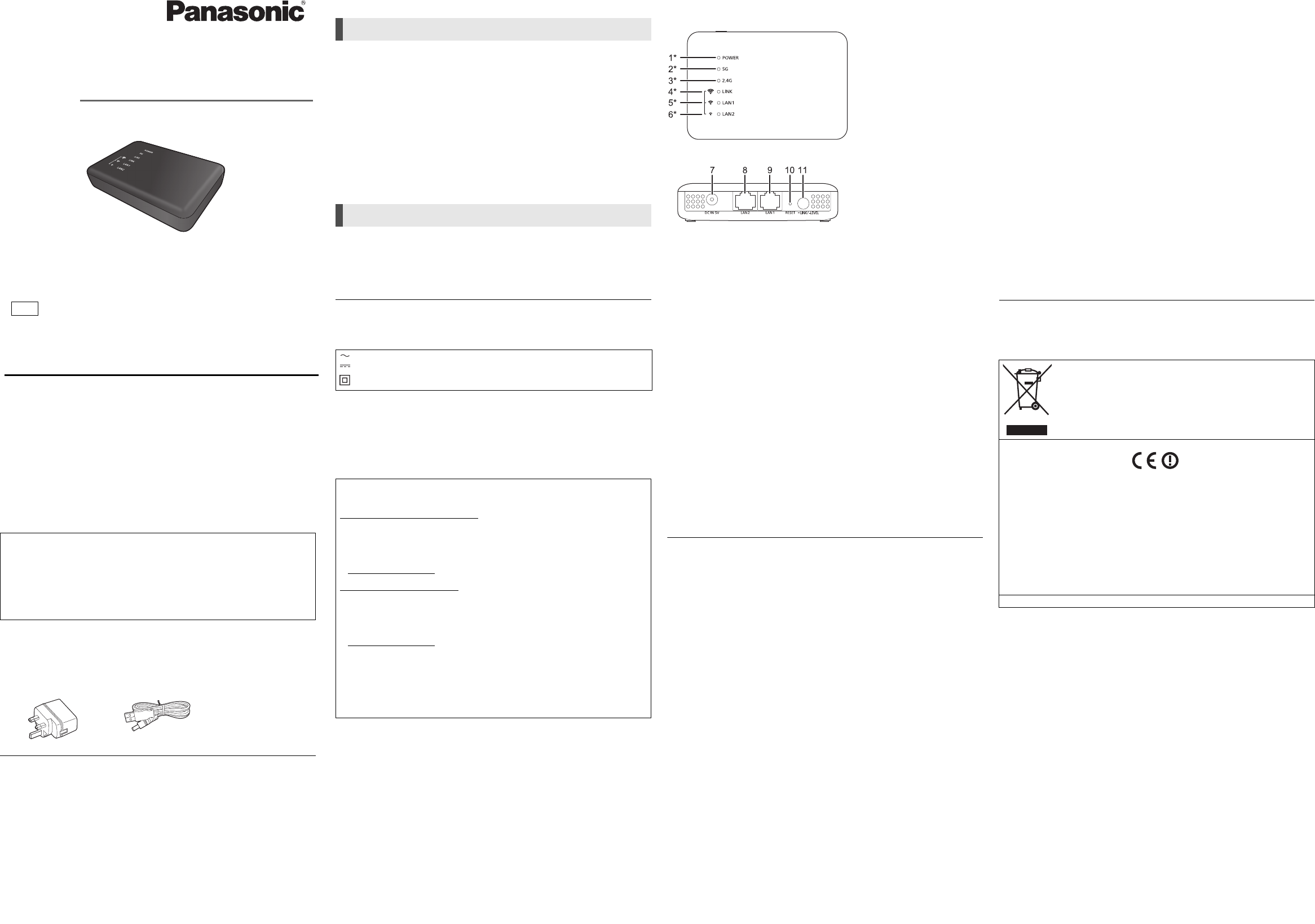
Control reference guide
Top
Rear
1 Power indicator
The unit is in the standby condition when the AC adaptor is connected. The primary
circuit is always “live” as long as the AC adaptor is connected to an electrical outlet.
2 5 G indicator
3 2.4 G indicator
4 LINK / Wireless LAN Signal Strength (Strong) indicator*
2
5 LAN1 / Wireless LAN Signal Strength (Normal) indicator*
2
6 LAN2 / Wireless LAN Signal Strength (Weak) indicator*
2
7 DC IN terminal
8 LAN2 terminal
9 LAN1 terminal
10 RESET button
Use a paper clip or similar to press this button when this unit is not working correctly,
for example.
11 LINK / LEVEL button
The function varies depending on the length of time it is pressed or pressed and held.
≥Press and hold for about 3 to 6 seconds to connect to a 2.4 GHz network.
≥Press and hold for more than about 6 seconds to connect to a 5 GHz network.
≥Press for a very short time (less than about 1 second) to check the strengh of signal
received from the wireless broadband router.
*1 Lights up or flashes when the corresponding function is in operation.
*2 Indicates the wireless LAN signal strength of the wireless broadband router.
≥ When this unit is not working correctly, disconnect and reconnect the AC adaptor first.
If the problem persists, press and hold the [RESET] button with a paper clip or similar
object for at least 5 seconds until the LINK indicator lights up, and then release the
button.
1
1
1
1
1
1
Specifications
∫ WIRELESS LAN SECTION
∫ TERMINALS SECTION
∫ ACCESSORIES SECTION
∫ GENERAL
*1 When wireless LAN network activated (5 GHz or 2.4 GHz), and LAN terminals
disconnected.
*2 When wireless LAN network activated (5 GHz or 2.4 GHz), and LAN terminals
connected.
≥ Specifications are subject to change without notice.
WLAN Standard IEEE802.11a/b/g/n
Frequency band 2.4 GHz band
5 GHz band
Channel 2.4 GHz 1 to 13 ch
5 GHz W52: 36 ch, 40 ch, 44 ch, 48 ch
LAN port 2
10 Base-T/100 Base-TX
DC IN 5 V 1.8 A
AC Adaptor AC 110 V to 240 V, 50 Hz/60 Hz, 0.25 A
DC Cable 1.2 m (USB A to DC plug)
Power consumption Approx. 3.0 W
Power consumption in
“Network standby mode”
*
1
Approx. 2.3 W
Power consumption in
“Network standby mode”
*
2
Approx. 2.5 W
Dimensions (WkHkD) Approx. 100.0 mmk23.0 mmk67.2 mm
Mass Approx. 81.0 g
Operating temperature range 0
o
C to r40
o
C
Operating humidity range 10 % to 80 % RH (no condensation)
This symbol indicates separate collection of waste electrical
and electronic equipment.
More detailed information is contained in “Operating
Instructions <Full version>”.
Declaration of Conformity (DoC)
Hereby, “Panasonic Corporation” declares that this product is in compliance with the essential
requirements and other relevant provisions of Directive 1999/5/EC.
Customers can download a copy of the original DoC to our R&TTE products from our DoC server:
http://www.doc.panasonic.de
Contact to Authorised Representative:
Panasonic Marketing Europe GmbH, Panasonic Testing Centre, Winsbergring 15, 22525 Hamburg,
Germany
This product is in compliance with the radio standards of the following countries.
GB, IE
The WLAN feature of this product shall exclusively be used inside buildings.
This product on purpose to connect to access point of
2.4 GHz or 5 GHz WLAN.
Product Identification Marking is located on the bottom of the unit.
Panasonic Corporation
Web Site: http://www.panasonic.com
C Panasonic Corporation 2016
TQBM0079-1
F1116QK1126
Manufactured by:
Importer for Europe:
Panasonic Corporation
Kadoma, Osaka, Japan
Panasonic Marketing Europe GmbH
Panasonic Testing Centre
Winsbergring 15, 22525 Hamburg, Germany
until
2016/12/01
p
Thank you for purchasing this product.
Please read these instructions carefully before using this product, and
save this manual for future use.
Model number suffix “EB” denotes UK model.
Operating Instructions
Wireless LAN Range Extender
Model No. SH-WL40
SH-WL40EB_TQBM0079_eng.fm 4 ページ 2016年11月29日 火曜日 午後7時7分


Join the conversation about this product
Here you can share what you think about the Panasonic SH-WL40EB Range Extender. If you have a question, first carefully read the manual. Requesting a manual can be done by using our contact form.