Manual Panasonic RX-D21E Stereo-set

Need a manual for your Panasonic RX-D21E Stereo-set? Below you can view and download the PDF manual for free in English. This product currently has 0 frequently asked questions, 0 comments and has 0 votes. If this is not the manual you want, please contact us.

Is your product defective and the manual offers no solution? Go to a Repair Café for free repair services.

Manual

Loading…
RQT6744
3
1
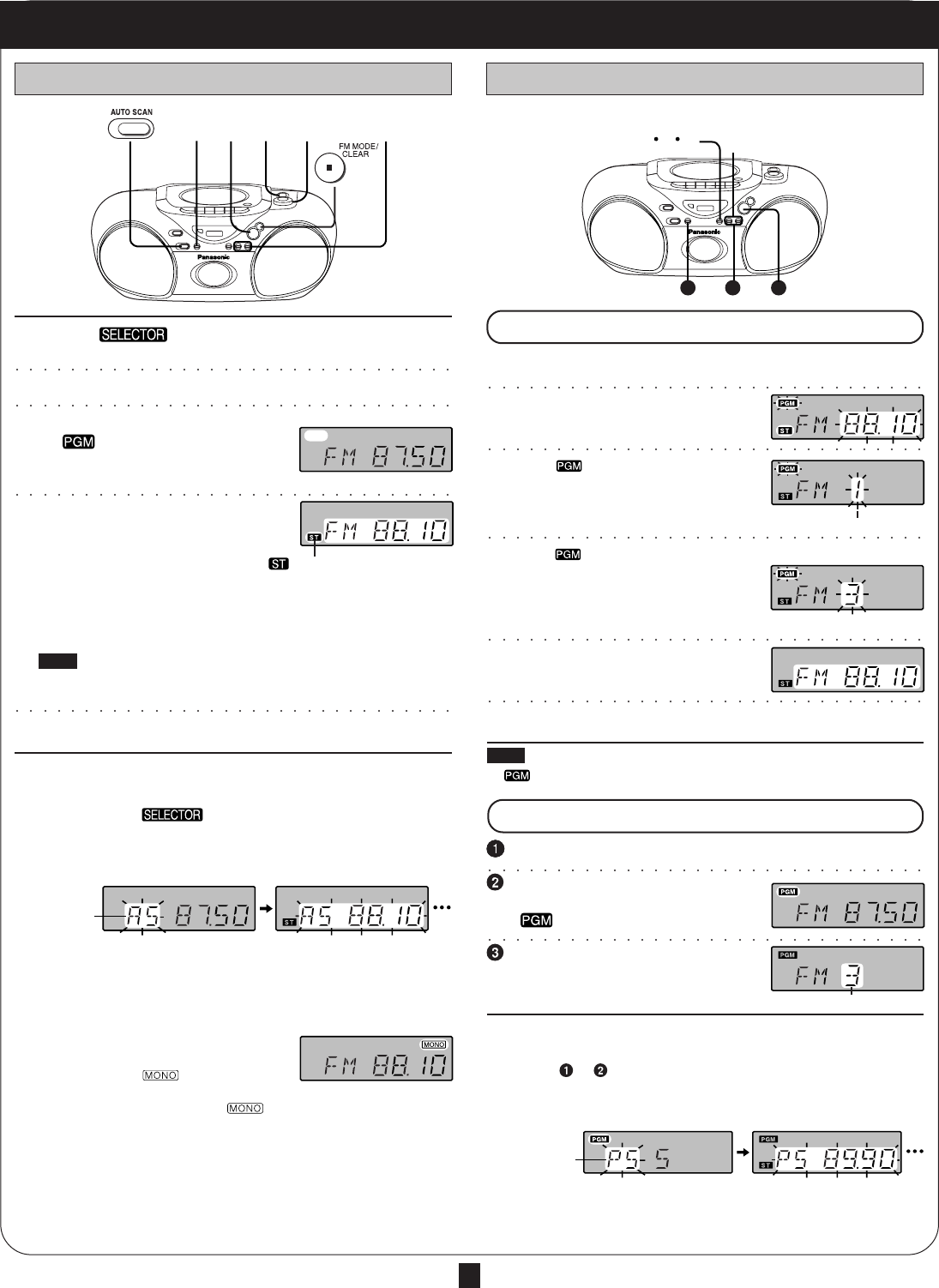
Switch [ ] to “TUNER”.
(Unit comes on.)
2
Press [BAND] to select “FM” or “AM”.
3
(Omit this step if using the remote control)
If “ ” is on the display, press
[TUNE MODE] to clear it off.
4
Press [–/g] or [f/+] to
tune to the desired station.
The frequency changes one step
each time a button is pressed.
Automatic tuning
Keep [–/
g] or [f/+] depressed and release when the frequency
display starts to change. A station with good reception is automati-
cally selected and the process stops.
To stop automatic tuning, press [–/
g] or [f/+] again.
Note
Automatic tuning may stop on a frequency where there is no station if
there is interference. Press [–/
g] and [f/+] to tune if this occurs.
5
Adjust the volume.
To use auto scan
You can search for a station by listening to all tuned-in stations for 8
seconds each.
Preparation: Switch [
] to “TUNER”.
1. Press [BAND] to select “FM” or “AM”.
2. Press [AUTO SCAN].
Auto scan starts.
3. Press [AUTO SCAN] when you find the desired station.
Auto scan ends when it reaches the original frequency again.
To stop during the process, press [AUTO SCAN].
To improve reception
FM: Extend the whip antenna and adjust its direction.
AM: Adjust facing of the unit.
If noise is excessive in the FM stereo mode
Press [FM MODE]. (“
” lights up.)
Sound will be produced in monaural, but this also reduces noise.
Press the button again to cancel. (“
” goes out.)
Preset the stations (twelve FM and twelve AM) to make tuning simpler.
Preparation: Tune to the desired station.
(Do steps 14 on the left.)
1
Press [MEMORY].
2
While “ ” and the frequency are
flashing
Press [MEMORY].
3
While “ ” and the preset channel
are flashing
Press [–/g] or [f/+] to
select the desired channel.
(Remote control: [
44
44
4] or [
33
33
3])
4
Press [MEMORY].
(This completes presetting.)
Repeat the above to preset other stations.
Note
If “
” goes off during presetting, return to step 1.
Press [BAND] to select “FM” or “AM”.
(Omit this step if using the remote control)
Press [TUNE MODE] to display
”.
Press [–/
g] or [f/+] to select
the desired channel (1–12).
(Remote control: [
44
44
4] or [
33
33
3])
To use preset scan
You can search for a station by listening to all preset channels for 8
seconds each.
1. Do steps to above.
For remote control, replace [– /
g] or [f/+] described below with [
44
44
4]
or [
33
33
3].
2. Press and hold [–/
g] or [f/+] until “PS” appears on the display.
3. Press [–/
g] or [f/+] when you find the desired channel.
Preset scan ends after searching through each preset channel once.
To stop during the process, press [–/
g] or [f/+].
Normal tuning Preset tuning
The Radio
To listen to preset channels
How to preset
Indicates
auto scan
Indicates
preset scan
” lights when an FM stereo
broadcast is being received.
Preset channel
Preset channel
3
2
15 4
1
2
3
124 3
P3-4 11/20/02, 11:25 AM3
Download manual in English (PDF, 0.63 MB)
(Consider the environment and only print this manual if it is really necessary)

Loading…

Rating

Let us know what you think about the Panasonic RX-D21E Stereo-set by leaving a product rating. Want to share your experiences with this product or ask a question? Please leave a comment at the bottom of the page.
Are you satisfied with the Panasonic RX-D21E Stereo-set?
Yes No
Be the first to rate this product
0 votes

Join the conversation about this product

Here you can share what you think about the Panasonic RX-D21E Stereo-set. If you have a question, first carefully read the manual. Requesting a manual can be done by using our contact form.

More about this manual

We understand that it’s nice to have a paper manual for your Panasonic RX-D21E Stereo-set. You can always download the manual from our website and print it yourself. If you would like to have an original manual, we recommend you contact Panasonic. They might be able to provide an original manual. Are you looking for the manual of your Panasonic RX-D21E Stereo-set in a different language? Choose your preferred language on our homepage and search for the model number to see if we have it available.

Specifications

Brand Panasonic
Model RX-D21E
Category Stereo-sets
File type PDF
File size 0.63 MB

All manuals for Panasonic Stereo-sets
More manuals of Stereo-sets
Manual Panasonic RX-D21E Stereo-set

Related products

Related categories

×
Download