Manual Panasonic RP-SM08GCE1K SD Card

Need a manual for your Panasonic RP-SM08GCE1K SD Card? Below you can view and download the PDF manual for free in English. This product currently has 4 frequently asked questions, 0 comments and has 0 votes. If this is not the manual you want, please contact us.

Is your product defective and the manual offers no solution? Go to a Repair Café for free repair services.

Manual

Loading…
2
Use an oil-based felt pen to write on the card. Do not use
pencils or ballpoint pens as these can damage the card and
data on it. Take care to keep the metal terminals free from ink.
While data is being read or written, do not remove the card or
turn off any equipment using the card. Do not remove the
batteries from battery-operated equipment. These actions can
cause data to be destroyed.
Make backup copies of your data wherever possible.
Panasonic will not accept responsibility for any data loss or loss
directly or indirectly caused by data loss.
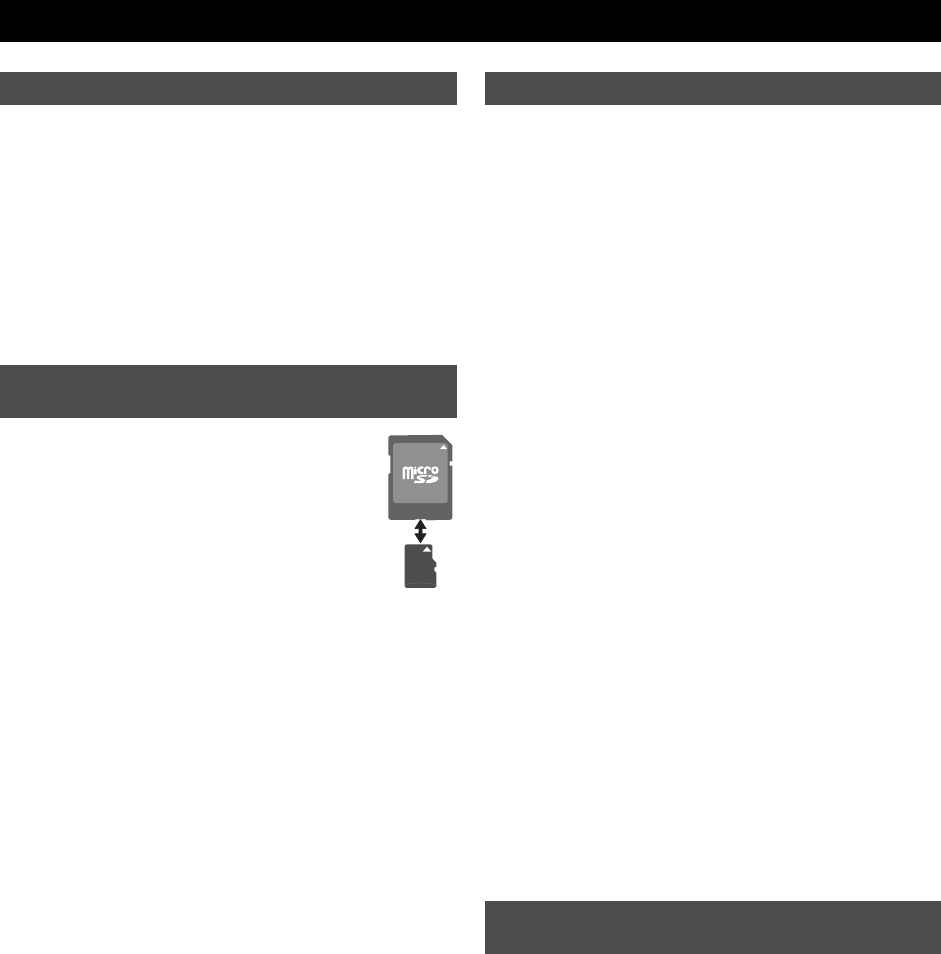
A microSDHC(microSD) card can be used on a
device having an SD memory card slot by inserting it
into the dedicated microSDSD adaptor (not
supplied). (When fitting the card, verify its orientation
and insert it into the adaptor as far as it will go. When
removing the card, pull it out in the opposite
direction.)
Keep out of reach of children. If swallowed, seek medical
advice immediately.
This card is coated with a bittering agent
¢
to prevent it from
being swallowed. The effect and sustentation of the bittering
agent is limited.
¢ The bittering agent tastes bitter, but has no harmful effects
(denatonium benzoate is used).
If a microSDHC(microSD) card is used on devices supporting
SDHC(SD) memory cards, always fit it to the exclusive adaptor.
Insert or remove the microSDHC(microSD) card together with
the adaptor. Do not leave the adaptor connected to the device.
Otherwise, this may cause a malfunction, or a device or data
failure.
This card is formatted to the SDHC(SD) memory card standard.
If reformatting is ever necessary, format it using SDHC(SD)
compatible equipment or SD formatting software compatible
with SDHC(SD) memory card. Formatting the card with any
other software will make the card non-standard and cause
problems with compatibility and performance. For a free version
of SD formatting software, visit Panasonic’s homepage.
http://panasonic.jp/support/audio/sd/download/sd_formatter_e.html
When a microSDHC(microSD) card or an adaptor is removed
from the device, do not leave the card or adaptor out in the
open.
Do not disassemble or remodel.
Do not impact, bend, drop, or wet.
Do not touch the metal terminals with your hands or metal
objects.
Do not attach other labels or stickers.
Do not use or store this card in a location subjected to static
electricity or electrical noise. If the host device does not operate
normally due to the effects of static electricity on the card, then
remove the card from the host device and insert it again.
Do not use or store in locations directly exposed to sunlight, a
heat vent, or a heating appliance.
Do not use or store in humid or dusty locations.
Do not use or store in locations exposed to corrosive gases.
microSDHC(microSD)/SDHC(SD) compatible equipment may
contain the functions “Format” and “Erase”. However, in most
cases all data on the card will not be completely erased even
after performing these functions. When disposing or transferring
ownership of the card, we recommend using Panasonic
formatting software (http://panasonic.jp/support/audio/sd/
download/sd_formatter_e.html) to completely erase all data from
the card.
microSDHC Logo is a trademark.
microSD Logo is a trademark.
ENGLISH
Protecting your data
To use this card on a device supporting
SDHC(SD) memory cards
Handling and storage precautions
Cautions about disposal or transferring
ownership of this card
RP-SM_E2.book 2 ページ 2009年5月27日 水曜日 午後1時48分
Download manual in English (PDF, 2.26 MB)
(Consider the environment and only print this manual if it is really necessary)

Loading…

Rating

Let us know what you think about the Panasonic RP-SM08GCE1K SD Card by leaving a product rating. Want to share your experiences with this product or ask a question? Please leave a comment at the bottom of the page.
Are you satisfied with the Panasonic RP-SM08GCE1K SD Card?
Yes No
Be the first to rate this product
0 votes

Join the conversation about this product

Here you can share what you think about the Panasonic RP-SM08GCE1K SD Card. If you have a question, first carefully read the manual. Requesting a manual can be done by using our contact form.

More about this manual

We understand that it’s nice to have a paper manual for your Panasonic RP-SM08GCE1K SD Card. You can always download the manual from our website and print it yourself. If you would like to have an original manual, we recommend you contact Panasonic. They might be able to provide an original manual. Are you looking for the manual of your Panasonic RP-SM08GCE1K SD Card in a different language? Choose your preferred language on our homepage and search for the model number to see if we have it available.

Specifications

Brand Panasonic
Model RP-SM08GCE1K
Category SD Cards
File type PDF
File size 2.26 MB

All manuals for Panasonic SD Cards
More manuals of SD Cards

Frequently Asked Questions about Panasonic RP-SM08GCE1K SD Card

Our support team searches for useful product information and answers to frequently asked questions. If you find an inaccuracy in our frequently asked questions, please let us know by using our contact form.

I can't add files to my SD card, why is that? Verified

Standard SD cards have a lock switch on the left side of the card. If the lock is engaged, adding or erasing files to the card is impossible. Disengage the lock to get full access to the card.

This was helpful (8) Read more

How much are kilobyte, megabyte, gigabyte and terabyte? Verified

One kilobyte consists of 1000 bytes. 1 megabyte = 1000 kilobyte. 1 gigabyte = 1000 megabyte. 1 terabyte = 1000 gigabyte.

This was helpful (3) Read more

What does SD stand for? Verified

SD stands for Secure Digital. SD cards are the standard storage medium for many digital cameras.

This was helpful (3) Read more

My SD card doesn't fit the reader, why is that? Verified

There are different sizes of SD card, standard SD, miniSD and microSD. There are adapters to make the smaller SD cards fit into the regular SD readers.

This was helpful (2) Read more
Manual Panasonic RP-SM08GCE1K SD Card

Related products

Related categories

×
Download