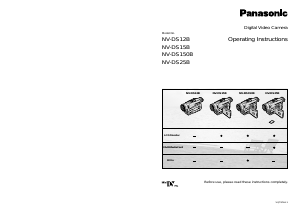
Manual Panasonic NV-DS12EG Camcorder

Need a manual for your Panasonic NV-DS12EG Camcorder? Below you can view and download the PDF manual for free in English. This product currently has 5 frequently asked questions, 0 comments and has 0 votes. If this is not the manual you want, please contact us.

Is your product defective and the manual offers no solution? Go to a Repair Café for free repair services.

Manual

Loading…
Basic Operations
1918
DATE/TIME
C.DISPLAY COUNTER MEMORY
TIMECODE
RETURN ---- YES
OFF TIME DATE
C.RESET ---- YES
DISPLAY
LCD/EVF SET ---- YES
LCD MODE NORMAL BRIGHT
DISPLAY SETUP
PRESS MENU TO EXIT
ALL PARTIAL OFF
DISPLAY SETUP
PRESS MENU TO EXIT
REMOTE
REC LAMP OFF ON
RETURN ---- YES
VCR1 VCR2 OFF
BEEP SOUND OFF ON
SHTR EFFECT OFF ON
SELFSHOOT NORMAL MIRROR
CLOCK SET ---- YES
OTHER FUNCTIONS
PRESS MENU TO EXIT
RETURN ---- YES
OTHER FUNCTIONS
PRESS MENU TO EXIT
DEMO MODE
RETURN ---- YES
OFF ON
DEMO MODE
PRESS MENU TO EXIT
DEMO MODE
PRESS MENU TO EXIT
?
>
@
A
B
H
G
F
E
D
C
=
I
56
7
[DIGITAL EFFECT] Sub-Menu
5 Digital Effects 1 [EFFECT1] (p. 48)
6 Digital Effects 2 [EFFECT2] (p. 48)
[CARD SETUP] Sub-Menu
!(NV-DS25 only)
7 Picture Quality [PICTURE QUALITY] (p. 69)
[RECORDING SETUP] Sub-Menu
"
8 Recording Speed Mode [REC SPEED] (p. 13)
9 Audio Recording Mode [AUDIO REC] (p. 64)
: Scene Index Mode [SCENEINDEX] (p. 42)
; Wind Noise Reduction [WIND CUT]
If you set [WIND CUT] to [ON], the noise of the
wind hitting the Microphone is reduced.
However, this also causes a slight deterioration
of the sound reproduction in the bass range.
< Zoom Microphone [ZOOM MIC] (p. 31)
F Shutter Effect [SHTR EFFECT] (p. 31)
G Date and Time Setting [CLOCK SET] (p. 23)
H Self-Recording [SELFSHOOT] (p. 29)
(NV-DS15, NV-DS150, NV-DS25 only)
[DEMO MODE] Sub-Menu
%
I Demonstration Mode [DEMO MODE]
If you connect the AC Adaptor to the Movie
Camera, set the [OFF/ON] Switch to [ON]
without any cassette inserted, and leave it on
for approximately 10 minutes without
performing any operation, the Movie Camera
automatically switches over to the
Demonstration Mode to show its functions.
Pressing a button or performing some other
operation suspends the Demonstration Mode.
Leaving the Movie Camera again on for more
than 10 minutes without operating it, causes the
demonstration to start again.
Also, when you set [DEMO MODE] to [ON] and
then exit the menu, the demonstration starts.
To cancel the Demonstration Mode, insert a
cassette or set [DEMO MODE] to [OFF].
Menu Functions
Camera Functions Menu
D.ZOOM
CINEMA
40 400
OFF ON
RETURN ---- YES
M.SENSOR OFF ON
CAMERA SETUP
PRESS MENU TO EXIT
REC SPEED
AUDIO REC 12bit 16bit
RETURN ---- YES
SP LP
SCENEINDEX 2HOUR DAY
WIND CUT OFF ON
ZOOM MIC OFF ON
RETURN ---- YES
RECORDING SETUP
PRESS MENU TO EXIT
CARD SETUP
PRESS MENU TO EXIT
PICTURE QUALITY
FINE NORMAL ECONOMY
RETURN ---- YES
1
2
4
3
7
5
6
8
9
:
;
<
1
3
2
4
ZOOM WIPE MIX
STROBE GAINUP
TRACER MOSAIC
MIRROR
EFFECT1
B/W SOLARI
OFF [&ZOOM [
EFFECT2 OFF NEGA SEPIA
DIGITAL EFFECT
PRESS MENU TO EXIT
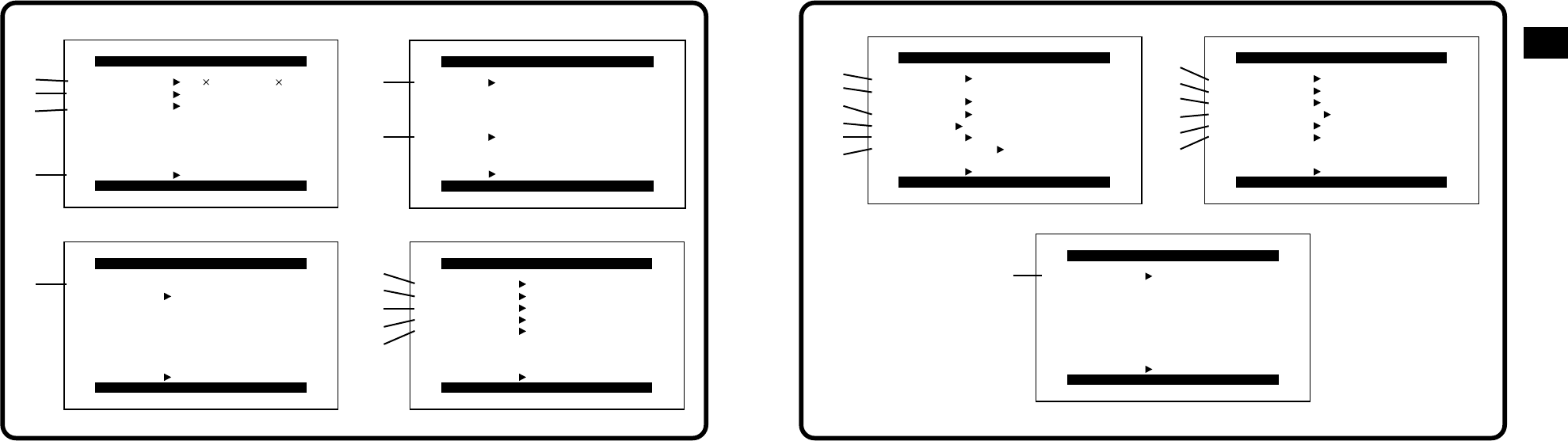
The illustrations of the menus are intended for
explaining the functions; the actual menus look
somewhat different.
Camera Mode Main-Menu [CAMERA FUNCTIONS]
1. CAMERA SETUP
2. DIGITAL EFFECT
3. CARD SETUP (NV-DS25 only)
4. RECORDING SETUP
5. DISPLAY SETUP
6. OTHER FUNCTIONS
7. DEMO MODE
[CAMERA SETUP] Sub-Menu
1 Digital Zoom [D.ZOOM] (p. 31)
2 Cinema-like Format Recording [CINEMA]
(p. 32)
3 Motion-Sensor-Controlled Recording
[M.SENSOR] (p. 52, 54)
4 Returning to the Main-Menu [RETURN]
If you set [RETURN] to [YES], the Menu
changes back to the Main-Menu.
[DISPLAY SETUP] Sub-Menu
#
= Date and Time Indication [DATE/TIME]
(p. 35)
> Counter Display Mode [C.DISPLAY] (p. 99)
? Counter Reset [C.RESET] (p. 97)
To reset the counter to zero.
However, the Time Code cannot be reset.
@ Display Mode [DISPLAY] (P. 99)
A LCD Lighting Mode [LCD MODE] (p. 22)
(NV-DS15, NV-DS150, NV-DS25 only)
B LCD and Viewfinder Adjustment [LCD/EVF
SET] (p. 22)
(LCD Monitor adjustment is only for models NV-
DS15, NV-DS150 and NV-DS25.)
[OTHER FUNCTIONS] Sub-Menu
$
C Remote Controller Mode [REMOTE] (p. 83)
D Recording Lamp [REC LAMP] (p. 25)
E Beep Sound [BEEP SOUND]
(NV-DS15, NV-DS150, NV-DS25 only)
If you set [BEEP SOUND] to [ON], a
confirmation/alarm beep sound is emitted in the
following cases:
1 Beep
³When you start recording
³When you switch the [OFF/ON] Switch from
[OFF] to [ON]
2 Beeps
³When you pause recording
10 Beeps
³When you operate the Movie Camera in an
inappropriate way before or during recording
Download manual in English (PDF, 11.2 MB)
(Consider the environment and only print this manual if it is really necessary)

Loading…

Rating

Let us know what you think about the Panasonic NV-DS12EG Camcorder by leaving a product rating. Want to share your experiences with this product or ask a question? Please leave a comment at the bottom of the page.
Are you satisfied with the Panasonic NV-DS12EG Camcorder?
Yes No
Be the first to rate this product
0 votes

Join the conversation about this product

Here you can share what you think about the Panasonic NV-DS12EG Camcorder. If you have a question, first carefully read the manual. Requesting a manual can be done by using our contact form.

More about this manual

We understand that it’s nice to have a paper manual for your Panasonic NV-DS12EG Camcorder. You can always download the manual from our website and print it yourself. If you would like to have an original manual, we recommend you contact Panasonic. They might be able to provide an original manual. Are you looking for the manual of your Panasonic NV-DS12EG Camcorder in a different language? Choose your preferred language on our homepage and search for the model number to see if we have it available.

Specifications

Brand Panasonic
Model NV-DS12EG
Category Camcorders
File type PDF
File size 11.2 MB

All manuals for Panasonic Camcorders
More manuals of Camcorders

Frequently Asked Questions about Panasonic NV-DS12EG Camcorder

Our support team searches for useful product information and answers to frequently asked questions. If you find an inaccuracy in our frequently asked questions, please let us know by using our contact form.

How much footage can I store on my SD card? Verified

This highly depends on the settings, but in general it can be said that 1GB of storage can hold about 5 minutes of HD footage or 1 minute 4K footage.

This was helpful (105) Read more

What does SD stand for? Verified

SD stands for Secure Digital. SD cards are the standard storage medium for many digital cameras.

This was helpful (58) Read more

A battery in my device is oxidized, can I still safely use it? Verified

Ja, the device can still be safely used. Firstly, remove the oxidizd battery. Never use bare hands to do this. Then clean the battery compartment with a cotton swab dipped in vinegar or lemon juice. Let it dry and insert new batteries.

This was helpful (44) Read more

What is a megapixel? Verified

A megapixel (MP) equals one million pixels. Megapixels are, among other things, used to indicate the resolution of digital cameras and camcorders. For example a camera that produces images of 1280x960 pixels has a resolution of about 1,3MP. Though there are many factors that influence the quality of an image it can be said that in general more megapixel results in a better image.

This was helpful (34) Read more

How can I prevent 'red eyes' in my pictures? Verified

The 'red eye' phenomenon is caused by too much light in too little time getting to eyes of the people in the picture. This effect is even stronger in a dark atmosphere. The following can be done to prevent it: don't let people look directly into the camera, create more light, take the picture closer to the subject or decrease the use of the zoom function.

This was helpful (32) Read more
Manual Panasonic NV-DS12EG Camcorder

Related products

Related categories

×
Download