2
RQT6549
Getting started
Dear customer
Thank you for purchasing this product. For optimum performance and
safety, please read these instructions carefully.
≥Unless otherwise indicated, illustrations in these operating
instructions are of the unit for U.S.A. and Canada.
≥Operations in these instructions are described mainly with the
remote control, but you can do the operations on the main unit if
the controls are the same.
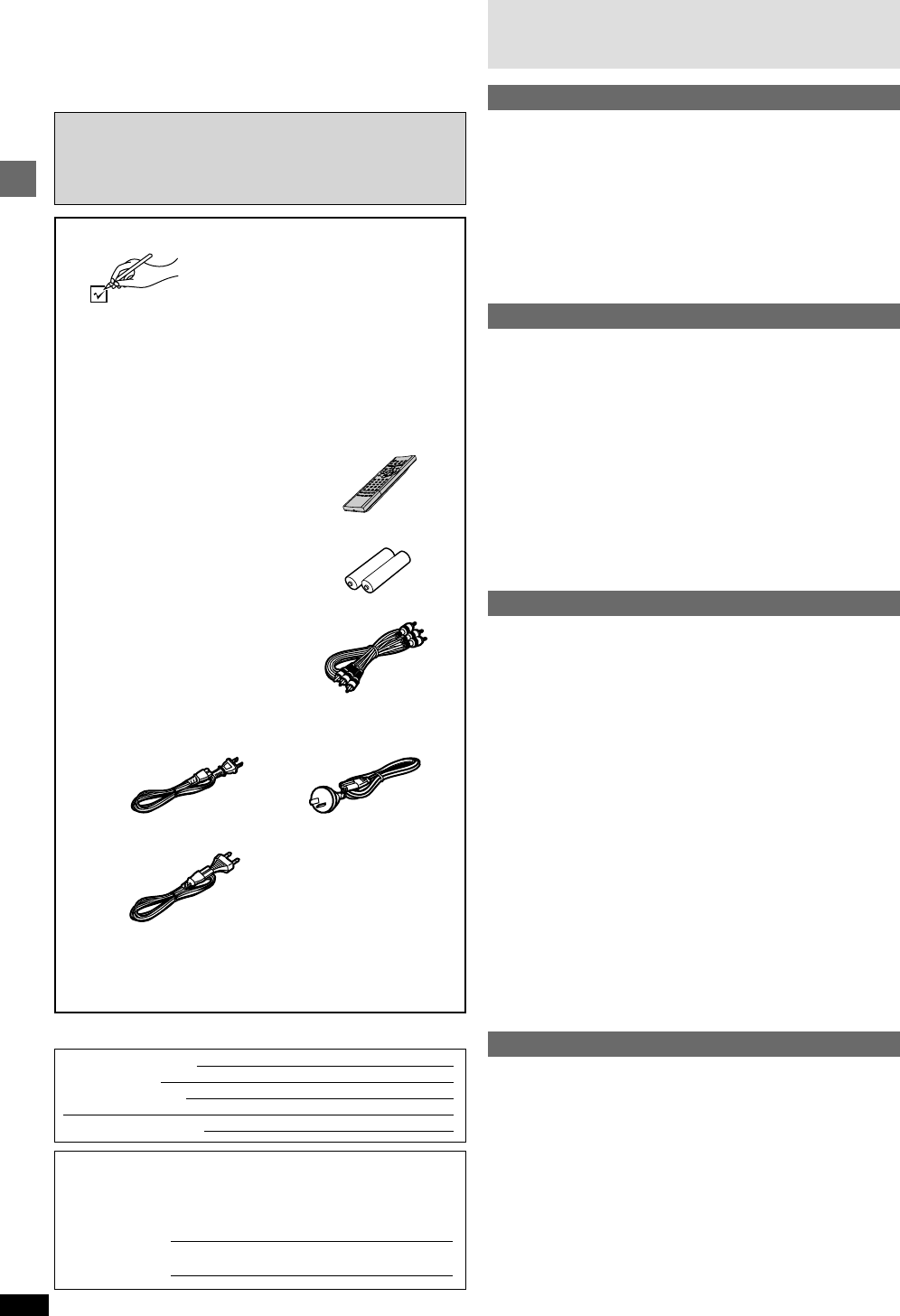
Accessories
Please check and identify the supplied
accessories.
Use numbers indicated in parentheses
when asking for replacement parts.
(For U.S.A.)
To order accessories contact 1-800-332-5368 or web site
(http://www.panasonic.com).
(For other areas)
To order accessories, call the dealer from whom you have
made your purchase.
∏ 1 Remote control
[For\U.S.A.[and\Canada[
(N2QAJB000061)
[For\others]
(N2QAJB000062)
∏ 2 Batteries
for remote control
∏ 1 Audio/video cable
(VJA0788)
∏ 1 AC power supply cord
[For[U.S.A.[and\Canada[ [For[Australia[and[N.Z.]
(RJA0065-A) (RJA0035-2X)
[For[Asia]
(RJA0019-2X)
[Note]
The included AC power supply cord is for use with this unit
only. Do not use it with other equipment.
The model number and serial number of this product can be found on
either the back or the bottom of the unit.
Please note them in the space provided below and keep for future
reference.
MODEL NUMBER
DVD-RP82
SERIAL NUMBER
Table of contents
Getting started
Accessories ..............................................................................2
IMPORTANT SAFETY INSTRUCTIONS ..................................4
Maintenance .............................................................................4
Disc information.......................................................................5
Connection ...............................................................................6
Connection to a television .................................................................... 6
Home Theater—Enjoying more powerful sound .................................. 7
Control reference guide ..........................................................8
The remote control ..................................................................8
Quick setup ..............................................................................9
Basic operations
Basic play ...............................................................................10
When a menu screen appears on the television ................................ 10
Skipping items .................................................................................... 10
Fast forward and rewind—SEARCH .................................................. 10
Slow-motion play ................................................................................ 10
Frame-by-frame viewing..................................................................... 10
Replaying a scene—QUICK REPLAY ............................................... 11
Starting play from a selected item ...................................................... 11
Setting the unit to turn off—SLEEP timer........................................... 11
Resume function ................................................................................ 11
Selecting groups to play ..................................................................... 12
Selecting still pictures—Page Skip .................................................... 12
Improving CD sound—RE-MASTER ................................................. 12
To enjoy even higher quality sound—AUDIO ONLY ......................... 12
Using menus to play WMA/MP3 discs and CD text ........................... 13
Advanced operations
Convenient features ..............................................................14
Repeat play ........................................................................................ 14
A-B repeat play................................................................................... 14
Program play/All group play ............................................................... 14
Random play ...................................................................................... 14
Playing the programs on DVD-RAM .....................................15
Selecting a program to play—DIRECT NAVIGATOR ........................ 15
Using the play list menu ..................................................................... 15
Increasing your enjoyment of movies .................................16
CINEMA ............................................................................................. 16
DIALOGUE ENHANCER.................................................................... 16
ADVANCED SURROUND.................................................................. 16
4:3 TV ZOOM function ....................................................................... 17
Changing soundtracks, subtitles and angles ...................................... 17
Using On-Screen Menu Icons ...............................................18
Common procedures .......................................................................... 18
Disc information.................................................................................. 18
Unit information .................................................................................. 19
Progress indicator .............................................................................. 20
Changing settings..................................................................21
Common procedures .......................................................................... 22
Entering a password (Ratings) ........................................................... 22
Digital output ...................................................................................... 23
Speaker setting .................................................................................. 23
Reference
Troubleshooting guide ..........................................................24
Glossary..................................................................................25
Limited Warranty (ONLY FOR U.S.A.) ..................................26
Customer Services Directory (ONLY FOR U.S.A.) ..............26
Product Service......................................................................26
Guía de referencia rápida en español ..................................27
(Spanish Quick Reference)
Specifications......................................................... Back cover
User memo:
DATE OF PURCHASE
DEALER NAME
DEALER ADDRESS
TELEPHONE NUMBER


Join the conversation about this product
Here you can share what you think about the Panasonic DVD-RP82PC DVD Player. If you have a question, first carefully read the manual. Requesting a manual can be done by using our contact form.