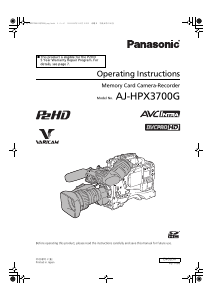
Manual Panasonic AJ-HPX3700G Camcorder

Need a manual for your Panasonic AJ-HPX3700G Camcorder? Below you can view and download the PDF manual for free in English. This product currently has 5 frequently asked questions, 0 comments and has 0 votes. If this is not the manual you want, please contact us.

Is your product defective and the manual offers no solution? Go to a Repair Café for free repair services.

Manual

Loading…
12
General: Features of the Input/Output unit
(Reference values when Panasonic bland SD memory cards
or SDHC memory cards are used for continuous recording.
Actual recording time depends on the kind of scenes and the
number of clips.)
The values for 8 GB and 16 GB SDHC memory cards are
double and four times the values for the 4 GB card.
For the latest information on P2 cards and SD memory cards
not available in the operating instructions, visit the P2
Support Desk at the following Web site.
https://eww.pavc.panasonic.co.jp/pro-av/
Independent 3 system HD SDI output provided
as standard configuration
HD SDI signals output from the HD SDI A · B connectors
and MON OUT connector are independent to each other.
HD SDI output includes embedded audio etc.
Dual Link compatible
The unit can be compatible to Dual Link using the HD SDI A
connector and the HD SDI B connector. Link A will be output
from the HD SDI A connector, and Link B from the HD SDI B
connector.
Recording to the P2 card will be YP
BPR 4:2:2 signal, and
Dual Link signal format will be RGB 4:4:4.
Features USB 2.0 port (HOST/DEVICE)
By connecting with a PC via USB 2.0, a P2 card inserted in
the unit can be used as a bulk storage device.
Also, since this unit has a USB HOST capability, it is
possible to store P2 card data on an external hard disk
connected using USB 2.0, to view clips stored on the hard
disk and to write clips stored on the hard disk to the P2 card.
Down converter output provided as a standard
configuration
The MON OUT connector outputs down converter (analog
composite) signals.
Also, output signal from the MON OUT connector can be
switched between an HD SDI signal and a VBS signal.
Remote control connector
By connecting the remote control unit (AJ-RC10G), which is
available as an optional accessory, the unit can be controlled
remotely. (Refer to page 123)
Confirmation of return video signals
It is possible to confirm the return video signals (analog
HD Y signals) supplied to the GENLOCK IN connector of the
unit in the viewfinder to confirm programs.
Only video signals from the same record format can be
confirmed. Note also that the 23.98PsF and 24PsF signals
cannot be confirmed. (Refer to page 193)
DC OUT connector
The DC OUT connector of the unit produces 1.5 A of
electrical current.
By connecting an external switch to this connector, it is
possible to control recording start/stop.
Since a tally lamp can be used by connecting the LED to this
connector, it is useful for shooting video when fixing the
camera on a crane. (Refer to page 125)
Viewfinder connection
From the viewfinder connector of the unit, 1080/59.94i,
1080/50i signals are output.
Confirm images in multi formats by connecting the
viewfinder (AJ-HVF21G), which is available as an optional
accessory. (Refer to page 29)
User button
On the side panel of the unit, 5 user buttons (USER MAIN/
USER 1/USER 2/MARKER SELECT/TEXT MEMO) are
available.
Each user button can be assigned the on/off function for any
frequently used feature among the many features of the unit,
such as SLOT SEL and Y GET. (Refer to page 59)
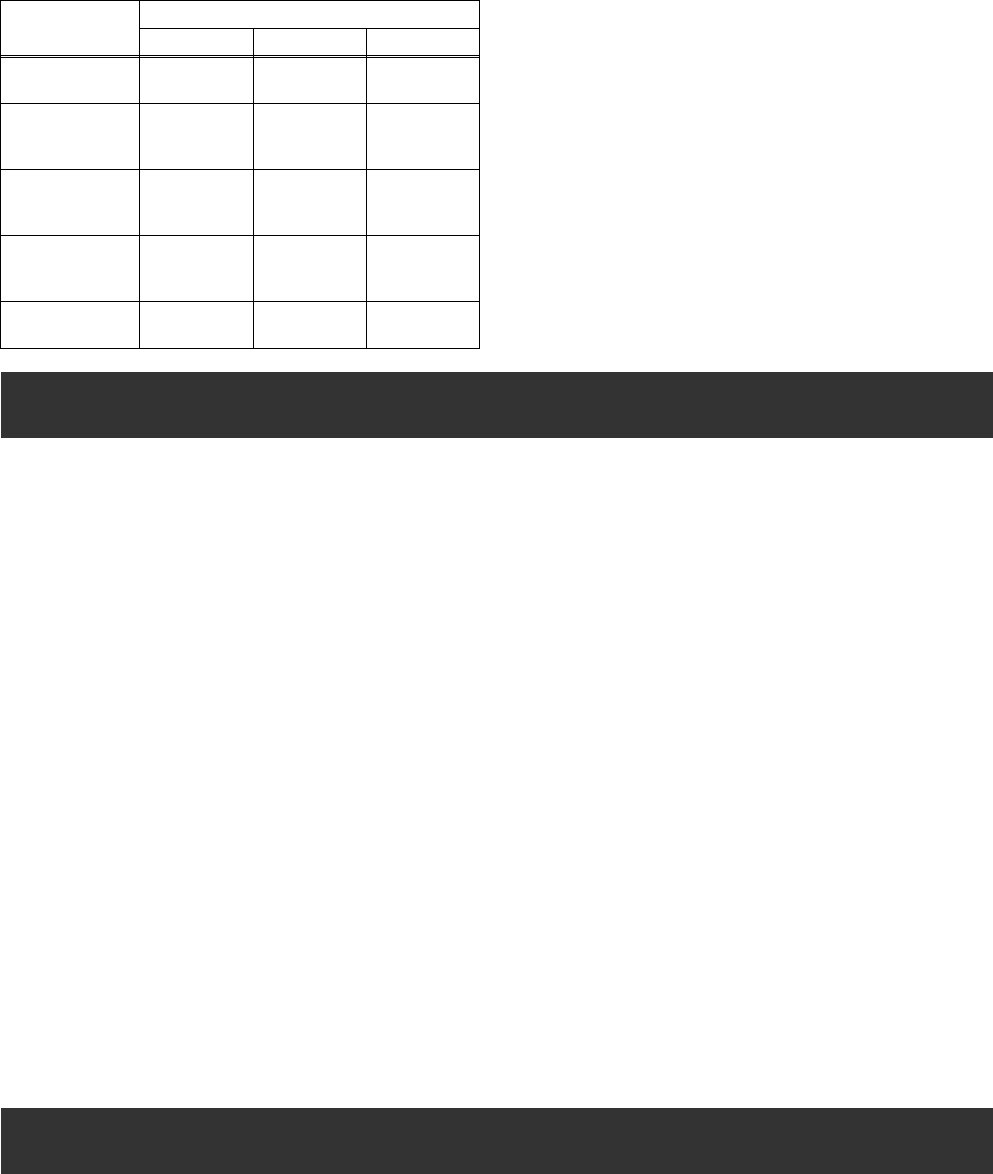
Approximate Proxy Recording Time (optional) on SD memory
cards
(Except for 24P native mode)
Card No.
(Card Capacity)
MPEG4 recording rate
192 kbps 768 kbps 1500 kbps
RP-SDH256
(256 MB)
Approx.
2h 17min
Approx.
35 min
Approx.
19 min
RP-SDH512
RP-SDK512
(512 MB)
Approx.
4h 27min
Approx.
69 min
Approx.
38 min
RP-SDQ01G
RP-SDK01G
(1 GB)
Approx.
8h 56min
Approx.
2h 19min
Approx.
77 min
RP-SDQ02G
RP-SDK02G
(2 GB)
Approx.
18 h 11 min
Approx.
4h 44min
Approx.
2h 37min
RP-SDV024G
(SDHC 4 GB)
Approx.
35 h 42 min
Approx.
9h 18min
Approx.
5h 12min
Features of the Input/Output unit
Other features
AJ-HPX3700G-VQT1V68_eng.book 12 ページ 2008年10月15日 水曜日 午後6時38分
Download manual in English (PDF, 23.92 MB)
(Consider the environment and only print this manual if it is really necessary)

Loading…

Rating

Let us know what you think about the Panasonic AJ-HPX3700G Camcorder by leaving a product rating. Want to share your experiences with this product or ask a question? Please leave a comment at the bottom of the page.
Are you satisfied with the Panasonic AJ-HPX3700G Camcorder?
Yes No
Be the first to rate this product
0 votes

Join the conversation about this product

Here you can share what you think about the Panasonic AJ-HPX3700G Camcorder. If you have a question, first carefully read the manual. Requesting a manual can be done by using our contact form.

More about this manual

We understand that it’s nice to have a paper manual for your Panasonic AJ-HPX3700G Camcorder. You can always download the manual from our website and print it yourself. If you would like to have an original manual, we recommend you contact Panasonic. They might be able to provide an original manual. Are you looking for the manual of your Panasonic AJ-HPX3700G Camcorder in a different language? Choose your preferred language on our homepage and search for the model number to see if we have it available.

Specifications

Brand Panasonic
Model AJ-HPX3700G
Category Camcorders
File type PDF
File size 23.92 MB

All manuals for Panasonic Camcorders
More manuals of Camcorders

Frequently Asked Questions about Panasonic AJ-HPX3700G Camcorder

Our support team searches for useful product information and answers to frequently asked questions. If you find an inaccuracy in our frequently asked questions, please let us know by using our contact form.

How much footage can I store on my SD card? Verified

This highly depends on the settings, but in general it can be said that 1GB of storage can hold about 5 minutes of HD footage or 1 minute 4K footage.

This was helpful (105) Read more

What does SD stand for? Verified

SD stands for Secure Digital. SD cards are the standard storage medium for many digital cameras.

This was helpful (58) Read more

A battery in my device is oxidized, can I still safely use it? Verified

Ja, the device can still be safely used. Firstly, remove the oxidizd battery. Never use bare hands to do this. Then clean the battery compartment with a cotton swab dipped in vinegar or lemon juice. Let it dry and insert new batteries.

This was helpful (44) Read more

What is a megapixel? Verified

A megapixel (MP) equals one million pixels. Megapixels are, among other things, used to indicate the resolution of digital cameras and camcorders. For example a camera that produces images of 1280x960 pixels has a resolution of about 1,3MP. Though there are many factors that influence the quality of an image it can be said that in general more megapixel results in a better image.

This was helpful (34) Read more

How can I prevent 'red eyes' in my pictures? Verified

The 'red eye' phenomenon is caused by too much light in too little time getting to eyes of the people in the picture. This effect is even stronger in a dark atmosphere. The following can be done to prevent it: don't let people look directly into the camera, create more light, take the picture closer to the subject or decrease the use of the zoom function.

This was helpful (32) Read more
Manual Panasonic AJ-HPX3700G Camcorder

Related products

Related categories

×
Download