DE
GEBRAUCHSANWEISUNG
OCR 200
EN
USER MANUAL
EINSCHLAFFUNKTION
Den Funktionsschalter auf OFF
oder AUTO schieben. Auf dem
Display wird 0:59 angezeigt.
1
Die SLEEP-Taste gedrückt halten.
Auf dem Display wird 00:59
angezeigt. Bei jedem Drücken
der MINUTE-Taste wird der
Minutenwert um jeweils 1 Minute
verringert.
2
Um den rückzustellen, erneut auf
SLEEP drücken. Im Display wird
0:59 angezeigt. Weiter mit Schritt 2.
HINWEIS
RADIOBETRIEB
Zum Einstellen
des gewünsch-
ten Frequenz-
bandes den
Bandwahl-
schalter ver-
wenden.
Den Netz-
stecker des
Radios einste-
cken.
Zum Einschal-
ten des Radios
den Funktions-
schalter auf ON
schieben.
321
Mit Hilfe des
Sendereinstell-
knopfes den
gewünschten
Radiosender
auswählen.
4
Mit dem Laut-
stärkeregler die
gewünschte
Lautstärke ein-
stellen.
Zum Ausschal-
ten des Radios
den Funktions-
schalter auf
OFF schieben.
5 6
Wenn der Schalter in der AU-•
TO-Position ist, schaltet sich
das Gerät entsprechend der
Einschlaf- und Weckeinstellun-
gen automatisch ein oder aus.
Für besseren UKW-Empfang •
die Wurfantenne abwickeln
und neu ausrichten.
Für einen besseren Mittelwel-•
lenempfang (AM) die Gerä-
teausrichtung ändern.
HINWEIS
321 4
RADIO/SUMMER ALS WECKTON
Einen Radiosen-
der
auswählen
und Lautstärke
angemessen
einstellen. Um
den
Summer als
Weck
ruf zu ver-
wenden, den
Lautstärke-
regler nach
rechts
drehen,
bis er klickt.
Um die Weckzeit
zu kontrollieren,
die Alarm-Taste
gedrückt halten.
Einstellen der
Weckzeit:
die AL.ON/
OFF-Taste und
gleichzeitig die
HOUR- oder
MINUTE-
Taste gedrückt
halten,
bis die
gewünschte
Weckzeit ange-
zeigt wird.
Den Funktions-
schalter
auf AUTO
schieben. Die
AUTO-Anzeige
leuchtet. Der
Wecker wird
zur eingestell-
ten Uhrzeit
aktiviert.
5
6
Durch Be-
tätigen der
Snooze-Taste
wird der Weck-
ruf vorüberge-
hend ausge-
stellt. Nach 9
Minuten ertönt
der Weckruf
erneut.
Auf AL.ON/OFF drücken, um den
Weckton für 24 Stunden auszu-
schalten. Um die Weckfunktion
ganz auszuschalten, den Funkti-
onsschalter auf OFF schieben.
Slide function switch to OFF
or AUTO. 0:59 appears on the
display.
Press and hold SLEEP button.
0:59 appears on the display.
Press MINUTE button to decrease
minute setting by 1 minute each.
SLEEP CONTROL
Um den Wert um 1 Stunde zu
erhöhen, die Stundentaste einmal
drücken. Der Timer kann auf Werte
zwischen 1 Stunde 59 Minuten und
1 Minute eingestellt werden. Nach
Ablauf der voreingestellten Zeit
schaltet sich das Radio aus.
3
4
Um das Radio auszuschalten,
bevor die eingestellte Zeit ab-
gelaufen ist, die SNOOZE-Taste
betätigen.
To add 1 hour, press HOUR button
once. Timer may be set from 1:59
to 1 minute. Radio will turn off
after pre-set time has elapsed.
To turn radio off before time has
elapsed, press SNOOZE button.
To reset sleep timer, press SLEEP
again. Display will show 0:59.
Continue with step 2.
NOTE
RADIO OPERATION
Plug the radio
in. To switch radio
on, slide func-
tion switch to
ON
Use band se-
lector to select
desired wave
band.
Use tuning
control to
select desired
radio station.
Adjust volume
control to
desired volume
level.
To turn radio
off, slide func-
tion switch to
OFF.
When the switch is in the •
AUTO position, it will permit
automatic turning ON and OFF
of the radio according to the
sleep and alarm settings.
For better FM reception, •
unwind and redirect the wire
antenna.
For better AM reception, repo-•
sition the radio.
NOTE
WAKE TO RADIO/BUZZER
Select radio
station and set
to reasonable
volume. To
wake to buzzer,
turn volume
control to the
right until it
clicks.
Press and hold
alarm button
to check alarm
time.
To set alarm
time: press
AL.ON/OFF
button togeth- togeth-
er with HOUR
or MINUTE
button until
desired time is
displayed.
Slide func-
tion switch to
AUTO.
AUTO indica-
tor turns on.
Alarm will be
activated at
pre-set time.
By pressing the
snooze button,
the alarm will
temporarily turn
off. After 9 min-
utes, alarm will
be on again.
Press AL.ON/OFF to turn alarm
sound off for 24 hours. To cancel
alarm, slide function switch to
OFF.
WICHTIGE SICHERHEITSANWEISUNGEN.
BITTE AUFMERKSAM DURCHLESEN UND FÜR SPÄTEREN
GEBRAUCH AUFBEWAHREN.
Der Blitz mit Pfeilspitze innerhalb eines gleichseitigen Dreiecks
soll den Benutzer vor nicht isolierter "gefährlicher Spannung" in-
nerhalb des Gerätegehäuses warnen, welche ausreichend hoch ist, um
eine Stromschlaggefahr für Personen und Tiere darzustellen.
Das Ausrufezeichen innerhalb eines gleichseitigen Dreiecks soll
den Benutzer auf wichtige Betriebs- und Wartungsanweisungen
im mitgelieferten Informationsmaterial hinweisen.
IMPORTANT SAFETY INSTRUCTIONS. READ CAREFULLY AND KEEP
FOR FUTURE REFERENCE.
The lightning flash with arrowhead within an equilateral triangle is
intended to alert the user to the presence of uninsulated “danger-
ous voltage” inside the enclosure of this appliance, which may be of
sufficient magnitude to constitute a risk of electric shock to persons and
animals.
The exclamation point within an equilateral triangle is intended
to alert the user to the presence of important operating and
maintenance instructions in the literature accompanying this appli-
ance.
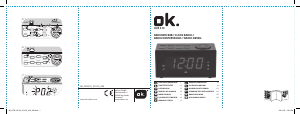
AM/FM-UHRENRADIO MIT DIGITALEM LED-DISPLAY //
AM/FM DIGITAL LED CLOCK RADIO // RADIORELOJ
AM/FM CON DISPLAY LED DIGITAL // RADIO-REVEIL
DEL NUMERIQUE AM/FM



Join the conversation about this product
Here you can share what you think about the OK OCR 200 Alarm Clock Radio. If you have a question, first carefully read the manual. Requesting a manual can be done by using our contact form.