Quick guide
Please see the User Manual that came with your NovoPen Echo® for complete instructions.
How to use NovoPen Echo®
Ask your doctor or nurse about injection training.
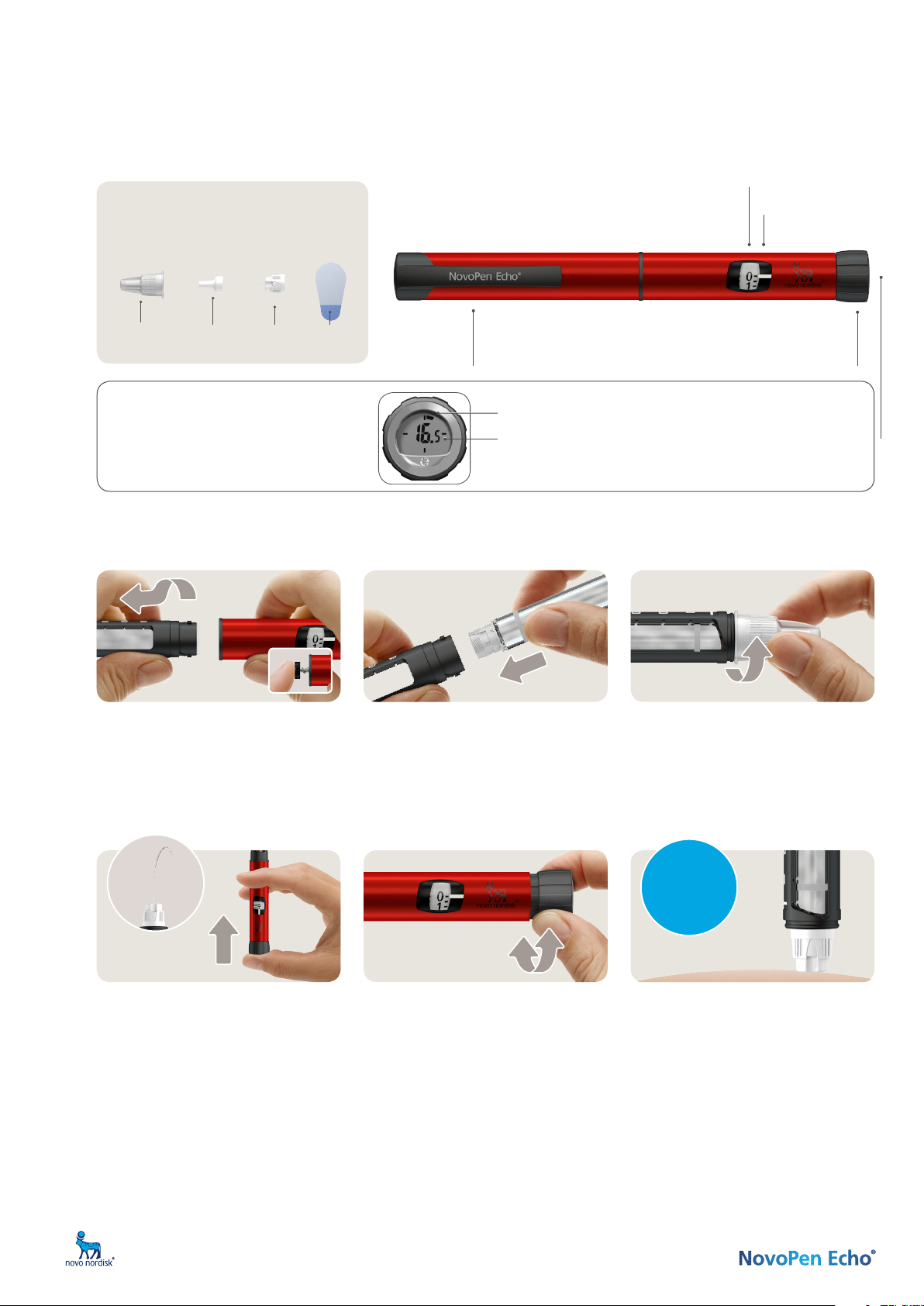
NovoPen Echo® remembers your last dose
To check your last dose pull out the dose
button and push it back in. After a brief display
check, the dose memory will show how many
units you last injected and how much time has
passed since then up to 12 hours.
Dose pointer
Pen cap
Always replace it to protect
the insulin from light.
Dose counter
Use it to see the
dose you select.
Dose button
Turn it to select your dose. Press
it down to inject your dose.
Dose memory
Pending illustration
In this example, 16.5 units were injected more
than one hour ago, but less than two.
The number in the middle shows the number of units last injected.
Each segment represents an hour since the last injection.
Do not share your NovoPen Echo® or Penfill® cartridges with other people. Sharing the pen can result in the spread of infections from one person to another even if the needle is changed.
If use you two types of insulin, it is highly recommended that you use a different coloured pen for each insulin.
ZINC ID: HQMMA/DV/0715/0084a
4. Test the insulin flow
ALWAYS test the flow before you inject.
Keep testing until insulin squirts from the
needle tip. This makes sure that any gap and
air bubbles are removed and that insulin is
getting through the needle.
• Select 2 units and press the dose button
until the dose counter shows “0”.
• If no insulin appears, repeat the insulin
flow test. The insulin flow test is complete
when you see insulin squirt.
2. Insert an insulin cartridge
• Take a new insulin cartridge and check that:
– It contains the correct insulin, which looks
as it should.
– It has no cracks or damage.
• Slide the cartridge into the cartridge holder
with the threaded end first.
• Twist the cartridge holder back on.
1. Prepare your pen
• Pull off the pen cap.
• Twist off the cartridge holder.
• The piston rod may stick out of your pen.
If so, push it in until it stops.
5. Select your dose
• Pull out the dose button, if it is not
already out.
• Make sure the dose counter shows “0“
before you start.
• Turn the dose button to select the dose
you need. You can turn forwards or
backwards.
3. Attach a new needle
• Take a new needle, and tear off the paper
tab.
• Push the needle straight onto the pen.
Turn until it is on tight.
• Pull off the outer needle cap and save it.
•
Pull off the inner needle cap and throw it away.
Use a new needle for each injection.
6. Inject your dose
• Insert the needle into your skin and press
the dose button until the dose counter
shows “0”.
• Then wait and count slowly to 6 before
you remove the needle from your skin.
• Safely remove and throw away the
needle. Put the pen cap back on.
Do not store your pen with a needle
attached.
NovoFine® Plus
Always use a new needle for each injection.
This reduces the risk of contamination, infection,
blocked needles and inaccurate dosing.
Inner
needle cap
Paper
tab
Needle
Outer
needle cap
Wait and
count slowly
1-2-3-4-5-6


Join the conversation about this product
Here you can share what you think about the Novo Nordisk NovoPen Echo Insulin Pen. If you have a question, first carefully read the manual. Requesting a manual can be done by using our contact form.
reply | This was helpful (0) (Translated by Google)