Manual Nintendo Wii Kirbys Dream Collection - Special Edition

Need a manual for your Nintendo Wii Kirbys Dream Collection - Special Edition? Below you can view and download the PDF manual for free in English. This product currently has 3 frequently asked questions, 0 comments and has 0 votes. If this is not the manual you want, please contact us.

Is your product defective and the manual offers no solution? Go to a Repair Café for free repair services.

Manual

Loading…
3 4
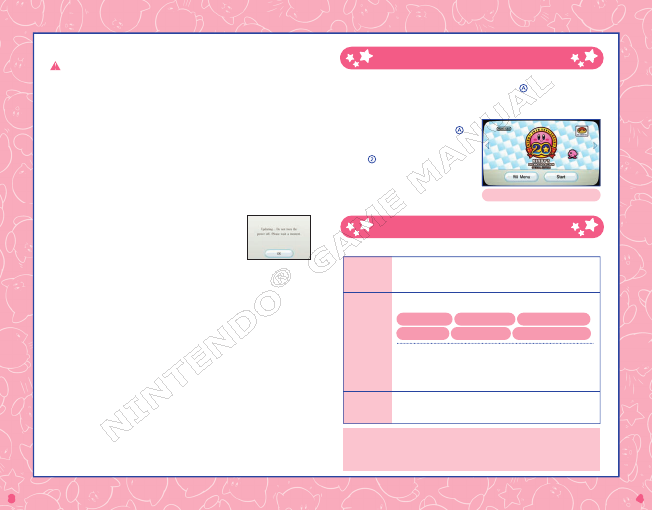
Starting the Game
1. Insert the Kirby’s Dream Collection Special Edition Game Disc into the Wii
console’s disc slot, point at the Disc Channel, and press
.
*If the game title is not displayed, a Wii system menu update is needed.
2. When the Channel Preview screen is
displayed, point at Start and press .
3. The title screen will be displayed.
Press to go to the mode-selection
screen.
Channel Preview Screen
How to Play
Select a mode to play from the following.
New
Challenge
Stages
Classic
Titles
Kirby’s
History
In this mode, control Kirby as you set high scores with a single
Copy Ability and attempt to reach the goal. Each level has
multiple stages to clear before you can advance!
Enjoy the following six classic Kirby titles, just as they
appeared when released.
Kirby’s Dream Land
Kirby’s Adventure
Kirby’s Dream Land 2
Kirby Super Star
Kirby’s Dream Land 3 Kirby 64
: The Crystal Shards
Kirby Super Star and Kirby’s Dream Land 3 can be played
by two players simultaneously. Kirby 64: The Crystal Shards
can be played by four players simultaneously. (Additional
accessories required for multiplayer mode; sold separately).
Follow the footsteps of the Kirby series year by year. You can
view the gameplay videos and packages for all titles, as well as
anime TV episodes.
For Wii Remote
controls, please see pages 7-22. For details on the controls for
each game of Classic Titles, please read the electronic manual. Electronic manuals
can be accessed from the HOME Menu after selecting the game.
CAUTION: WRIST STRAP USE
Please use the wrist strap to help prevent injury to other people or damage to
surrounding objects or the Wii Remote in case you accidentally let go of the
Wii Remote during gameplay.
Also remember the following:
• Make sure all players put on the wrist strap properly when it is their turn.
• Do not let go of the Wii Remote during gameplay.
• Dry your hands if they become moist.
• Allow adequate room around you during gameplay and make sure that all
areas you might move into are clear of other people and objects.
• Stay at least three feet from the television.
• Use the Wii Remote Jacket.
SYSTEM MENU UPDATE
Please note that when fi rst loading the Game Disc into
the Wii console, the system will check if you have the
latest version of the system menu, and if necessary,
a Wii System Update Confi rmation screen will appear.
Select OK to proceed with the update. Please note that
the Wii console must have the latest version of the Wii system menu in order
to play the Game Disc.
When the system menu is updated, unauthorized hardware and/or software
modifi cations may be detected and unauthorized content may be removed
causing the immediate or delayed inoperability of your console. Failure to accept
the update may render this game, and future games, unplayable. Please note
that Nintendo cannot guarantee that unauthorized software or accessories will
continue to function with the Wii console after this or future updates of the Wii
system menu.
Download manual in English (PDF, 5.49 MB)
(Consider the environment and only print this manual if it is really necessary)

Loading…

Rating

Let us know what you think about the Nintendo Wii Kirbys Dream Collection - Special Edition by leaving a product rating. Want to share your experiences with this product or ask a question? Please leave a comment at the bottom of the page.
Are you satisfied with the Nintendo Wii Kirbys Dream Collection - Special Edition?
Yes No
Be the first to rate this product
0 votes

Join the conversation about this product

Here you can share what you think about the Nintendo Wii Kirbys Dream Collection - Special Edition. If you have a question, first carefully read the manual. Requesting a manual can be done by using our contact form.

More about this manual

We understand that it’s nice to have a paper manual for your Nintendo Wii Kirbys Dream Collection - Special Edition. You can always download the manual from our website and print it yourself. If you would like to have an original manual, we recommend you contact Nintendo Wii. They might be able to provide an original manual. Are you looking for the manual of your Nintendo Wii Kirbys Dream Collection - Special Edition in a different language? Choose your preferred language on our homepage and search for the model number to see if we have it available.

Specifications

Brand Nintendo Wii
Model Kirbys Dream Collection - Special Edition
Category Games
File type PDF
File size 5.49 MB

All manuals for Nintendo Wii Games
More manuals of Games

Frequently Asked Questions about Nintendo Wii Kirbys Dream Collection - Special Edition

Our support team searches for useful product information and answers to frequently asked questions. If you find an inaccuracy in our frequently asked questions, please let us know by using our contact form.

What does the region code on my Nintendo Wii game mean? Verified

The region codes indicate for which model game computer your game is suited. For example a PAL game can only be played on a PAL game computer. The following region codes exist: PAL (Europe & Oceania), NTSC-U (North America, South America, Singapore, Malaysia and the Philippines), NTSC-J (Japan, Hong Kong & Taiwan) and NTSC-K (South Korea).

This was helpful (15) Read more

Can I play my Nintendo Wii game on the Nintendo Wii U too? Verified

Yes, Nintendo states that all Wii games can also be played on the Wii U.

This was helpful (9) Read more

Can I repair scratches on a game disc myself? Verified

Scratches prevent de laser from reading the disc correctly. When the scratches are only superficial it is possible to repair them yourself by polishing the disc with a slightly abrasive compound. Ideally you use a professional abrasive compound but it’s also possible to use regular toothpaste. After polishing the disc it needs to be washed and let to dry. There are specialised businesses that can do this.

This was helpful (9) Read more
Manual Nintendo Wii Kirbys Dream Collection - Special Edition

Related products

Related categories

×
Download