Manual myCharge HB67V HubPlus Portable Charger

Need a manual for your myCharge HB67V HubPlus Portable Charger? Below you can view and download the PDF manual for free in English. This product currently has 6 frequently asked questions, 0 comments and has 0 votes. If this is not the manual you want, please contact us.

Is your product defective and the manual offers no solution? Go to a Repair Café for free repair services.

Manual

Loading…
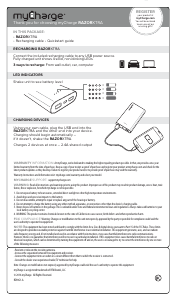
Thank you for choosing myCharge HUBPLUS
IN THIS PACKAGE:
HUBPLUS • Quickstart guide
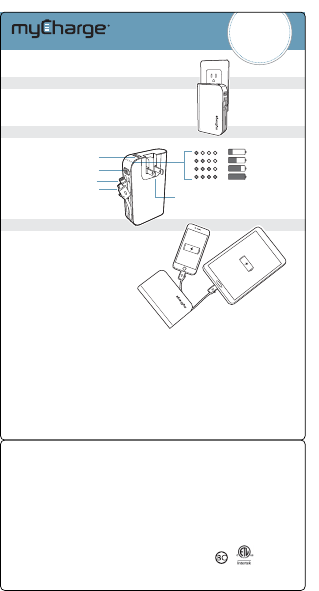
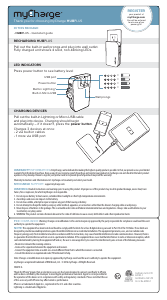
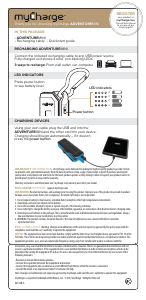
RECHARGING HUBPLUS
Press power button to see battery level
Built-in Lightning™
Power button
Built-in Micro-USB
LED INDICATORS
Pull out the built-in Lightning or Micro-USB cable
and plug into device. Charging should begin
automatically – if it doesn't, press the power button.
Charges 3 devices at once:
• 2 via built-in cables
• 1 more via USB port
CHARGING DEVICES
=
=
=
=
WARRANTY INFORMATION: At myCharge, we’re dedicated to making the highest quality products possible. In that, we provide a one-year limited
warranty from the date of purchase. Keep a copy of your receipt as proof of purchase and register your product at mycharge.com and check for the latest product
updates as they develop. Failure to register your product and/or to provide proof of purchase may void the warranty.
Warranty Instructions and Information visit: mycharge.com/warranty and select your model.
MYCHARGE SUPPORT: support.mycharge.com
WARNING: Read all instructions and warnings prior to using this product. Improper use of this product may result in product damage, excess heat, toxic
fumes, re or explosion, for which myCharge is not responsible.
1. Do not expose battery to heat sources, extended direct sunlight or other high-temperature environments.
2. Avoid drops and excessive impacts to the battery.
3. Do not disassemble, attempt to repair or replace any part of the housing or battery.
4. Do not attempt to charge the battery using any other method, apparatus, or connections other than the device’s charging cable or wall prongs.
5. Never dispose of batteries in the garbage. This is unlawful under state and federal environmental laws and regulations. Always take used batteries to your
local battery-recycling center.
6. WARNING: This product contains chemicals known to the state of California to cause cancer, birth defects and other reproductive harm.
FCC COMPLIANCE: Warning: Changes or modications to this unit not expressly approved by the party responsible for compliance could void the user’s
authority to operate the equipment.
NOTE: This equipment has been tested and found to comply with the limits for a Class B digital device, pursuant to Part 15 of the FCC Rules. These limits are
designed to provide reasonable protection against harmful interference in a residential installation. This equipment generates, uses, and can radiate radio
frequency energy and, if not installed and used in accordance with the instructions, may cause harmful interference to radio communications. However, there is
no guarantee that interference will not occur in a particular installation. If this equipment does cause harmful interference to radio or television reception, which
can be determined by turning the equipment o and on, the user is encouraged to try to correct the interference by one or more of the following measures:
• Reorient or relocate the receiving antenna.
• Increase the separation between the equipment and receiver.
• Connect the equipment into an outlet on a circuit dierent from that to which the receiver is connected.
• Consult the dealer or an experienced radio/TV technician for help.
Note: Changes or modications not expressly approved by myCharge could void the user’s authority to operate this equipment.
myCharge is a registered trademark of RFA Brands, LLC. © 2016 myCharge. All Rights Reserved.
HB67V-A
Pull out the built-in wall prongs and plug into wall outlet.
Fully charged unit shows 4 solid, non-blinking LEDs.
USB port
Wall prongs
REGISTER
your product at
myCharge.com
You will be entered
to win one of our
power gifts!
4009792
Conforms to UL STD
60950-1
Certied to CSA STD
C22.2 No.60950-1
“Made for iPhone” means that an electronic accessory has been designed to connect specically to iPhone
and has been certied by the developer to meet Apple performance standards. Apple is not responsible for
the operation of this device or its compliance with safety and regulatory standards. Please note that the use
of this accessory with iPhone may aect wireless performance.
iPhone is a trademark of Apple Inc., registered in the U.S. and other countries.
Lightning is a trademark of Apple Inc.
Download manual in English (PDF, 0.1 MB)
(Consider the environment and only print this manual if it is really necessary)

Loading…

Rating

Let us know what you think about the myCharge HB67V HubPlus Portable Charger by leaving a product rating. Want to share your experiences with this product or ask a question? Please leave a comment at the bottom of the page.
Are you satisfied with the myCharge HB67V HubPlus Portable Charger?
Yes No
Be the first to rate this product
0 votes

Join the conversation about this product

Here you can share what you think about the myCharge HB67V HubPlus Portable Charger. If you have a question, first carefully read the manual. Requesting a manual can be done by using our contact form.

More about this manual

We understand that it’s nice to have a paper manual for your myCharge HB67V HubPlus Portable Charger. You can always download the manual from our website and print it yourself. If you would like to have an original manual, we recommend you contact myCharge. They might be able to provide an original manual. Are you looking for the manual of your myCharge HB67V HubPlus Portable Charger in a different language? Choose your preferred language on our homepage and search for the model number to see if we have it available.

Specifications

Brand myCharge
Model HB67V HubPlus
Category Portable Chargers
File type PDF
File size 0.1 MB

All manuals for myCharge Portable Chargers
More manuals of Portable Chargers

Frequently Asked Questions about myCharge HB67V HubPlus Portable Charger

Our support team searches for useful product information and answers to frequently asked questions. If you find an inaccuracy in our frequently asked questions, please let us know by using our contact form.

How long does it take to fully charge my portable charger? Verified

This depends on model and capacity, but in general the charging of portable chargers is faster when connected to a power socket than when it is connect to a device through USB.

This was helpful (511) Read more

Is it normal that the light blinks while charging? Verified

Yes, with most portable chargers the small light blinks while charging. Often the light will remain lit constantly when the charging cycle is complete.

This was helpful (274) Read more

Is it normal for my portable charger to become warm while charging it? Verified

Yes, portable chargers can become warmer while charging them, this is perfectly normal.

This was helpful (96) Read more

How do I ensure that my portable charger lasts as long as possible? Verified

When using a portable charger it is best to use it until it is completely depleted and then fully recharge it. Intermediate charging will decrease the lifespan of the battery.

This was helpful (83) Read more

What does mAh mean? Verified

mAh stands for milliampère/hour and indicates the power of a battery. A battery of for example 2000mAh will supply 2000 milliampère per hour and is able to run a radio that uses 250mA per hour for 8 hours. A battery with a higher mAh will have a longer runtime.

This was helpful (58) Read more

How much power should my portable charger have? Verified

How much power a portable charger should have depends on what device it should charge. In general it can be said that to charge a smartphone or Mp3 player you need 2200-4000mAh, for tablets 5000-8000mAh and for laptops 10400-12000mAh.

This was helpful (56) Read more
Manual myCharge HB67V HubPlus Portable Charger

Related products

Related categories

×
Download