Manual Mitsubishi WD8200U Projector

Need a manual for your Mitsubishi WD8200U Projector? Below you can view and download the PDF manual for free in English. This product currently has 3 frequently asked questions, 0 comments and has 0 votes. If this is not the manual you want, please contact us.

Is your product defective and the manual offers no solution? Go to a Repair Café for free repair services.

Manual

Loading…

EN-74
490
201
119*
421
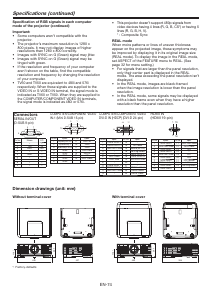
Dimension drawings (unit: mm)
Specifications (continued)
Specification of RGB signals in each computer
mode of the projector (continued)
Important:
t Some computers aren’t compatible with the
projector.
t The projector’s maximum resolution is 1280 x
800 pixels. It may not display images of higher
resolutions than 1280 x 800 correctly.
t Images with SYNC on G (Green) signal may jitter.
t Images with SYNC on G (Green) signal may be
tinged with green.
t If the resolution and frequency of your computer
aren’t shown on the table, find the compatible
resolution and frequency by changing the resolution
of your computer.
t
TV60 and TV50 are equivalent to 480i and 576i
respectively. When these signals are supplied to the
VIDEO IN or S-VIDEO IN terminal, the signal mode is
indicated as TV60 or TV50. When they are supplied to
the COMPUTER/COMPONENT VIDEO IN terminals,
the signal mode is indicated as 480i or 576i.
t 5IJTQSPKFDUPSEPFTOUTVQQPSUQTJHOBMTGSPN
video devices having 4 lines (R, G, B, CS*) or having 5
lines (R, G, B, H, V).
* : Composite Sync
REAL mode
When moire patterns or lines of uneven thickness
appear on the projected image, these symptoms may
be improved by displaying it in its original image size
(REAL mode). To display the image in the REAL mode,
set ASPECT of the FEATURE menu to REAL. (See
page 32 for menu setting.)
t 'PSTJHOBMTUIBUBSFMBSHFSUIBOUIFQBOFMSFTPMVUJPO
only their center part is displayed in the REAL
mode. The area exceeding the panel resolution isn’t
displayed.
t *OUIF3&"-NPEFJNBHFTBSFCMBDLGSBNFE
when the image resolution is lower than the panel
resolution.
t *OUIF3&"-NPEFTPNFTJHOBMTNBZCFEJTQMBZFE
with a black frame even when they have a higher
resolution than the panel resolution.
490
506
201
119*
Without terminal cover
With terminal cover
Connectors
SERIAL IN/OUT
(D-SUB 9-pin)
15
6
9
Pin No.
Name I/O
1–
2 TXD IN
3 RXD OUT
4–
5 GND
6–
7–
8–
9–
COMPUTER/COMPONENT VIDEO
IN-1 (Mini D-SUB 15-pin)
15
11
6
10
15
Pin No.
Spec.
Pin No.
Spec.
1 R(RED)/P
R
/C
R
9 DDC 5V
2 G(GREEN)/Y 10 GND
3 B(BLUE)/P
B
/C
B
11 GND
4 GND 12 DDC Data
5 GND 13 HD/CS
6 GND 14 VD
7 GND 15 DDC Clock
8 GND
COMPUTER/COMPONENT VIDEO
DVI-D IN (HDCP)
(DVI-D 24-pin
)
1724
16
9
8
1
Pin No.
Spec.
Pin No.
Spec.
1 TMDS DATA 2- 13
-
2 TMDS DATA 2+ 14
+5V Power
3
TMDS DATA 2 Shield
15
Ground (for +5V)
4
-
16 Hot Plug Detect
5
-
17 TMDS DATA 0-
6 DDC Clock 18 TMDS DATA 0+
7 DDC Data 19
TMDS DATA 0 Shield
8
-
20
-
9 TMDS DATA 1- 21
-
10 TMDS DATA 1+ 22
TMDS Clock Shield
11
TMDS DATA 1 Shield
23 TMDS Clock+
12
-
24 TMDS Clock-
HDMI IN
(HDMI 19-pin)
19
1
2
18
Pin No.
Spec.
Pin No.
Spec.
1
TMDS Data2+
11
TMDS Clock Shield
2
TMDS Data2 Shield
12
TMDS Clock-
3
TMDS Data2-
13
CEC
4
TMDS Data1+
14
5
TMDS Data1 Shield
15
SCL
6
TMDS Data1-
16
SDA
7
TMDS Data0+
17
DDC Ground
8
TMDS Data0 Shield
18
+5 V Power
9
TMDS Data0-
19
Hot Plug Detect
10
TMDS Clock+
*: Factory-defaults
Download manual in English (PDF, 0.31 MB)
(Consider the environment and only print this manual if it is really necessary)

Loading…

Rating

Let us know what you think about the Mitsubishi WD8200U Projector by leaving a product rating. Want to share your experiences with this product or ask a question? Please leave a comment at the bottom of the page.
Are you satisfied with the Mitsubishi WD8200U Projector?
Yes No
Be the first to rate this product
0 votes

Join the conversation about this product

Here you can share what you think about the Mitsubishi WD8200U Projector. If you have a question, first carefully read the manual. Requesting a manual can be done by using our contact form.

More about this manual

We understand that it’s nice to have a paper manual for your Mitsubishi WD8200U Projector. You can always download the manual from our website and print it yourself. If you would like to have an original manual, we recommend you contact Mitsubishi. They might be able to provide an original manual. Are you looking for the manual of your Mitsubishi WD8200U Projector in a different language? Choose your preferred language on our homepage and search for the model number to see if we have it available.

Specifications

Brand Mitsubishi
Model WD8200U
Category Projectors
File type PDF
File size 0.31 MB

All manuals for Mitsubishi Projectors
More manuals of Projectors

Frequently Asked Questions about Mitsubishi WD8200U Projector

Our support team searches for useful product information and answers to frequently asked questions. If you find an inaccuracy in our frequently asked questions, please let us know by using our contact form.

Can I power off my projector immediately after use? Verified

After using the projector the lamp is still very hot. It is best to leave the projector on after use, giving the internal fan time to do it's work and cool the lamp. This will extend the lifetime of the lamp.

This was helpful (214) Read more

What is keystone correction? Verified

A projector can often not be placed straight in front of a screen or wall. The projected image can become distorted because of this. This is the keystone effect. Keystone correction is a feature that addresses this distortion. Not all projectors offer keystone correction.

This was helpful (158) Read more

What is the contrast ratio? Verified

The contrast ratio tells how far the whitest white is from the blackest black. A contrast ratio of for example 400:1 means that the blackest black on screen is 400 times darker than the whitest white. A high contrast ratio contributes to the sharpness of the image.

This was helpful (103) Read more
Manual Mitsubishi WD8200U Projector

Related products

Related categories

×
Download