Manual Microsoft Xbox 360 NBA Live 10

Need a manual for your Microsoft Xbox 360 NBA Live 10? Below you can view and download the PDF manual for free in English. This product currently has 2 frequently asked questions, 0 comments and has 0 votes. If this is not the manual you want, please contact us.

Is your product defective and the manual offers no solution? Go to a Repair Café for free repair services.

Manual

Loading…
2
2
3
3
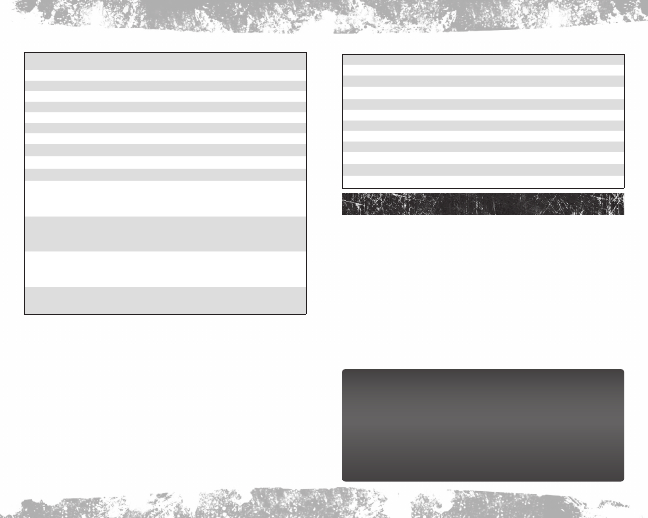
Offense
Shoot /Lay-up/Tip-in
(press and hold to jump, then release to shoot;
tap to fake)
Pass
Dunk
(pull and hold) +
Dynamic Quick Play
Direct pass/Off-ball switch
+
Receiver Button
Pick & Roll control
Alley-oop pass
Call timeout
Quick coaching options

Quick match-ups

Quick subs

Spin (moving dribble)
Double cross (stationary dribble)
Sweep through (from triple threat)
Attacking size-up (while holding Turbo)

Stepback (moving dribble)
Standing stepback (stationary dribble)
Protect low (from triple threat)
Retreat dribble (while holding Turbo)

Crossover (moving dribble)
Standing crossover (stationary dribble)
Cross to hesitation (hold after standing cross)
Step through (from triple threat)

(ball in right hand)
Moving hesitation (moving dribble)
Standing hesitation (stationary dribble)
Jab step (from triple threat)

(ball in right hand)
free ThrOws
Press and hold until the meter reaches the target window, then release . Your margin for error depends
on the player’s free throw ability as well as the skill level you are playing on. When your opponent is shooting
free throws, repeatedly press and to make their controller vibrate and throw off their rhythm.
Defense
Switch player
Steal/Intercept
Take charge

(hold)
Hands up

(hold)
Block/Rebound
Intentional foul
Defensive assist
Direct switch
Double team
(hold)
Quick subs

Quick coaching options

Quick matchups

Setting Up the game
Before hitting the hardwood, make sure to set up a gamer profile and an NBA LIVE 10 User Profile to save all
of your memorable achievements.
Gamer PrOfile
Create a gamer profile to track achievements and save all game progress. A gamer profile must be created
in order to play Xbox LIVE
®
.
To create a new gamer profile, press
to bring up the Xbox Guide. Highlight CREATE NEW PROFILE and
press . Create a profile name using the virtual keyboard.
After your gamer profile is created and saved to a storage device, you can customize your gamer profile and
set personal settings. When you are signed in with your gamer profile, achievements will be tracked and
game progress can be saved.
nOTe: To activate a gamer profile, press on the Xbox 360 Controller. You may activate another gamer
profile at any time simply by logging in with another Xbox 360 Controller. Any progress that has not been
saved to an active gamer profile will be lost when signing out or changing the active gamer profile.
User PrOfiles
Keep track of your personal stats and accomplishments with a User Profile. An active User Profile saves
career achievements in various game modes to your Xbox 360 Hard Drive or Xbox 360 Memory Unit. Access
Profile Management and activate and/or set a lead profile.
Dynamic Dna
Every player performs differently over the course of a season. Some overachieve. Others produce in an
underwhelming fashion. Tendencies shift, offensive play styles change, and every player—whether an
NBA All-Star or role player—goes through hot and cold streaks over the course of the season.
The revolutionary Dynamic DNA incorporates all the daily stats and shot charts from real-life NBA
games and incorporates them into NBA LIVE 10, creating the most accurate gaming experience ever.
As long as you are connected to Xbox LIVE, and are entitled for updated Dynamic DNA, your rosters are
kept up-to-date on a daily basis, as are all of the latest Player DNA, DNA Ratings, Streaks, Tendencies,
and more.
DNA Scouting Report—Access each of the following fully detailed reports: Player DNA, DNA
Tendencies, Shot Streaks, and StatsStreaks. New reports for NBA LIVE 10 include detailed Offensive
Production Breakdowns, Drive Decision Tendencies, and nine different shooting percentage categories.
DNA Ratings—Every player’s ratings change based on their real-life performance, and are updated weekly.
Download manual in English (PDF, 0.78 MB)
(Consider the environment and only print this manual if it is really necessary)

Loading…

Rating

Let us know what you think about the Microsoft Xbox 360 NBA Live 10 by leaving a product rating. Want to share your experiences with this product or ask a question? Please leave a comment at the bottom of the page.
Are you satisfied with the Microsoft Xbox 360 NBA Live 10?
Yes No
Be the first to rate this product
0 votes

Join the conversation about this product

Here you can share what you think about the Microsoft Xbox 360 NBA Live 10. If you have a question, first carefully read the manual. Requesting a manual can be done by using our contact form.

More about this manual

We understand that it’s nice to have a paper manual for your Microsoft Xbox 360 NBA Live 10. You can always download the manual from our website and print it yourself. If you would like to have an original manual, we recommend you contact Microsoft Xbox 360. They might be able to provide an original manual. Are you looking for the manual of your Microsoft Xbox 360 NBA Live 10 in a different language? Choose your preferred language on our homepage and search for the model number to see if we have it available.

Specifications

Brand Microsoft Xbox 360
Model NBA Live 10
Category Games
File type PDF
File size 0.78 MB

All manuals for Microsoft Xbox 360 Games
More manuals of Games

Frequently Asked Questions about Microsoft Xbox 360 NBA Live 10

Our support team searches for useful product information and answers to frequently asked questions. If you find an inaccuracy in our frequently asked questions, please let us know by using our contact form.

Can I play my Xbox 360 game on the Xbox One? Verified

Yes, almost all Xbox 360 games can be played on the Xbox One, either by using the disc or by downloading them. The Xbox 360 games can not be played on the original Xbox.

This was helpful (21) Read more

Can I repair scratches on a game disc myself? Verified

Scratches prevent de laser from reading the disc correctly. When the scratches are only superficial it is possible to repair them yourself by polishing the disc with a slightly abrasive compound. Ideally you use a professional abrasive compound but it’s also possible to use regular toothpaste. After polishing the disc it needs to be washed and let to dry. There are specialised businesses that can do this.

This was helpful (12) Read more
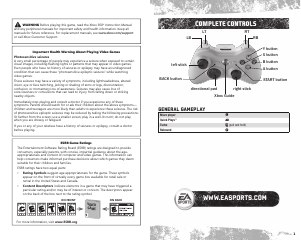
Manual Microsoft Xbox 360 NBA Live 10

Related products

Related categories

×
Download