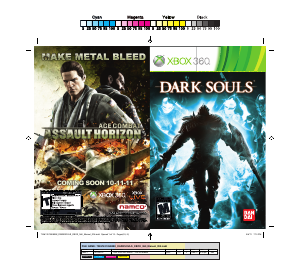
Manual Microsoft Xbox 360 Dark Souls

Need a manual for your Microsoft Xbox 360 Dark Souls? Below you can view and download the PDF manual for free in English. This product currently has 2 frequently asked questions, 0 comments and has 3 votes with an average product rating of 33/100. If this is not the manual you want, please contact us.

Is your product defective and the manual offers no solution? Go to a Repair Café for free repair services.

Manual

Loading…
DARK SOULS
2
DARK SOULS
3
MAIN MENU
Select to begin a New Game or choose to Load Game.
New Game
Start a new game.
Load Game
Select a previously saved game.
NOTE: In order to play Dark Souls you need to create save data. When starting the
game for the  rst time, a save data is created automatically. During the save do not
turn off your Xbox 360® system.
DARK SOULS
2
l
>
C
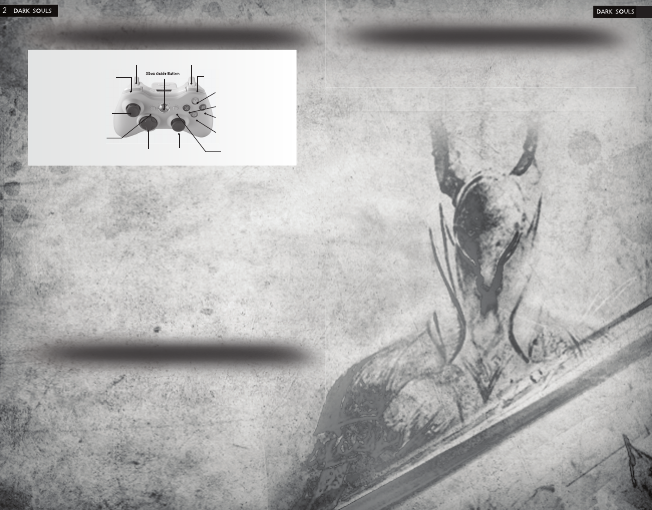
Right StickD-pad
Xbox Guide Button
Xbox Guide Button
`
]
<
_
L
x
Right TriggerLeft Trigger
Left Bumper
Left Stick
Right Bumper
Y
X
B
A
Menu Control
Highlight menu item ................... ....
Select highlighted menu item ........
Cancel/Return to previous menu ...
GAME CONTROLS
L
A
B
GAME CONTROLS
Move .........................................................
Move Camera ...........................................
Dash .........................................................
Attack/Cast magic.....................................
Strong attack ............................................
Guard/Dual wield weapon action
cast magic ................................................
Parry/Dual wield weapon ..........................
Target lock/release ...................................
Backstep ...................................................
Roll ...........................................................
Interact......................................................
Change Equipment ...................................
Use Item ...................................................
Change weapon stance ............................
Open start menu .......................................
Navigate menu options .............................
L
C
L+
Bhold
`
x
_
]
click
C
B
L
+Btap
A
l
X
Y
>
lleft/right
Choose from 10 classes, each class has its own unique abilities and statistics. Every
class starts the game with certain equipment and spells. However, as you play, you’ll
discover Dark Souls has non class-speci c items. Therefore, you may adjust your at-
tributes when leveling up to meet certain basic requirements a weapon or armor might
have.
Warrior: The fearless warrior is a weapon expert with high strength and dexterity.
Knight
The low-ranking knight has high HP and solid armor. Knights are not easily toppled.
Wanderer: The aimless wanderer has high dexterity and wields the scimitar.
Thief: The guilt-ridden thief has a high chance of critical hits and carries a Master Key.
Bandit: The savage bandit has high strength and wields a heavy battle axe.
Hunter: The bow-wielding hunter can handle close-range and long-range, but is
vulnerable to magic.
Sorcerer: The sorcerer of Vinheim Dragon School can cast soul sorceries.
Pyromancer: The Great Swamp pyromancer casts  re spells and wields a hand axe.
Cleric: The cleric on Pilgrimage wields a mace and casts healing miracles.
Deprived: The unclothed enigma is only armed with a club and old plank shield.
DARK SOULS
CREATE CHARACTER
CLASSES
Customize a character to begin your Dark Souls quest. As you customize a character,
you can see any changes to their stats on the left side of the screen. Their equipment
is shown in the center of the screen. When you are  nished creating a character, select
ACCEPT.
Character Name: Type in a name for the character.
Sex: Select the character’s gender.
Class: Choose the character’s class. Each class has its own attacks, weaponry, and
attributes. There are 10 classes from which to choose.
Gift: Select a gift for the character. Gifts are special items that remain with the charac-
ter throughout the game.
Physique: Determine the character’s physique.
Face: Select a speci c face for the character. Each face is based on the people that
inhabit the world of Dark Souls.
Hair: Determine the hairstyle for the character.
Color: Choose a color for the character’s hair and eyes.
Physical Appearance: Select CUSTOMIZE to further adjust the character’s features.
Download manual in English (PDF, 24.47 MB)
(Consider the environment and only print this manual if it is really necessary)

Loading…

Rating

Let us know what you think about the Microsoft Xbox 360 Dark Souls by leaving a product rating. Want to share your experiences with this product or ask a question? Please leave a comment at the bottom of the page.
Are you satisfied with the Microsoft Xbox 360 Dark Souls?
Yes No
33%
67%
3 votes

Join the conversation about this product

Here you can share what you think about the Microsoft Xbox 360 Dark Souls. If you have a question, first carefully read the manual. Requesting a manual can be done by using our contact form.

More about this manual

We understand that it’s nice to have a paper manual for your Microsoft Xbox 360 Dark Souls. You can always download the manual from our website and print it yourself. If you would like to have an original manual, we recommend you contact Microsoft Xbox 360. They might be able to provide an original manual. Are you looking for the manual of your Microsoft Xbox 360 Dark Souls in a different language? Choose your preferred language on our homepage and search for the model number to see if we have it available.

Specifications

Brand Microsoft Xbox 360
Model Dark Souls
Category Games
File type PDF
File size 24.47 MB

All manuals for Microsoft Xbox 360 Games
More manuals of Games

Frequently Asked Questions about Microsoft Xbox 360 Dark Souls

Our support team searches for useful product information and answers to frequently asked questions. If you find an inaccuracy in our frequently asked questions, please let us know by using our contact form.

Can I play my Xbox 360 game on the Xbox One? Verified

Yes, almost all Xbox 360 games can be played on the Xbox One, either by using the disc or by downloading them. The Xbox 360 games can not be played on the original Xbox.

This was helpful (21) Read more

Can I repair scratches on a game disc myself? Verified

Scratches prevent de laser from reading the disc correctly. When the scratches are only superficial it is possible to repair them yourself by polishing the disc with a slightly abrasive compound. Ideally you use a professional abrasive compound but it’s also possible to use regular toothpaste. After polishing the disc it needs to be washed and let to dry. There are specialised businesses that can do this.

This was helpful (12) Read more
Manual Microsoft Xbox 360 Dark Souls

Related products

Related categories

×
Download