Manual Microsoft Xbox 360 Crysis 2

Need a manual for your Microsoft Xbox 360 Crysis 2? Below you can view and download the PDF manual for free in English. This product currently has 2 frequently asked questions, 0 comments and has 0 votes. If this is not the manual you want, please contact us.

Is your product defective and the manual offers no solution? Go to a Repair Café for free repair services.

Manual

Loading…
2
3
PLAYER CONTROLS (CONT.)
Jump
(press and hold to power jump)
Reload/Grab/Pick up
(tap)/(press and hold)/ (press and hold)
Toggle crouch
Toggle visor
Toggle Nanovision
Toggle fire modes
Cycle explosives
Activate support bonus (multiplayer only)
Scoreboard (multiplayer only)
Pause menu
Nanosuit customization
Weapon customization
(press and hold)
Survival Tip: Remain Unseen
When maneuvering into a position or you fi nd yourself in a potentially dangerous/open area, use the
Nanosuit Stealth mode. Enemies can’t shoot what they can’t see.
VISOR MODE
Zoom
Highlight enemy/objective
Survival Tip: Tactical Options
The Visor mode displays tactical options for increased battlefi eld awareness and strategic advantage.
Pay attention to your tactical options to fully exploit every environment and gain the upper hand in combat.
VEHICLE CONTROLS
Steer
Look
Accelerate
Reverse
Fire primary weapon
Fire secondary weapon
Get out
Toggle seats
Handbrake
Lights
Toggle Nanovision
Pause menu
PLaYinG THe GaMe
missiOn inFORmatiOn
OBJECTIVES
As your mission evolves, your briefing and objectives are updated and displayed on Alcatraz’s HUD. Objectives
are briefly shown at the top of the screen and then given an objective marker as a waypoint to follow.
FieLD eQuipment BRieFinG
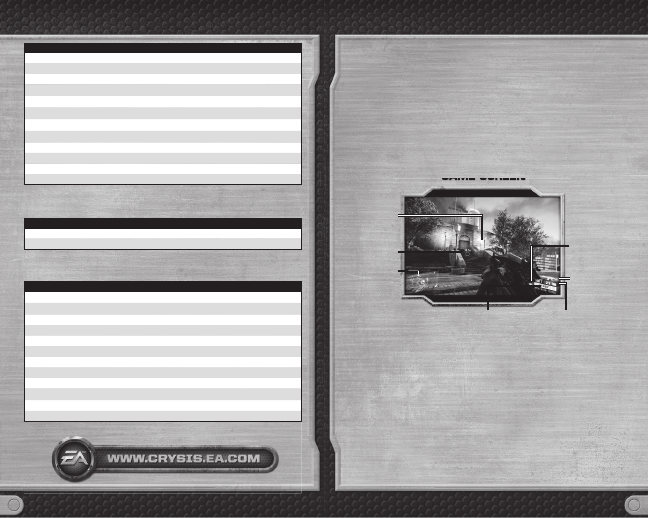
HEADS-UP DISPLAY
The Nanosuit 2.0 is the latest secret weapon of the U.S. Special Forces, granting operatives a range of
enhanced abilities. The suit features an integral heads-up display (HUD) utilizing a satellite uplink to place
essential tactical information directly in view.
GaME SCrEEN
GaME SCrEEN
Weapon
crosshair
Selected weapon
Objective
marker
Tactical radar
and threat
gauges
Bullets remaining
in current
magazine
Bullets remaining in
current weapon
Nanosuit status
information
TACTICAL RADAR AND STEALTH METER
Stealth tactics are key to surviving the streets of New York. Stay alert and monitor the threat status data to
remain undetected.
NOTE: The Tactical Radar becomes redder as your detection level increases. Enemy icons change from
green to yellow to red as enemies become more aware of your location. After you clear an area, a radar
pulse ripples across the map.
NOTE: Enemies in a state of alert (yellow arrowheads) or in combat (fl ashing red arrowheads) appear on
the Tactical Radar even if you haven’t tagged them. Vehicles appear as white outlines once tagged.
THREAT ANALYSIS
Your HUD displays two variables: your current risk of detection and the enemy’s alert status.
If the enemy alert status begins to rise, act quickly to minimize your visibility or move away from your
current position.
HIT DETECTION
Instant analysis of incoming projectiles allows the Nanosuit to pinpoint the location of any enemy that
scores a hit, allowing you to retaliate accurately. Stay alert for a dial around your crosshair indicating the
direction of incoming fire.
Download manual in English (PDF, 2.55 MB)
(Consider the environment and only print this manual if it is really necessary)

Loading…

Rating

Let us know what you think about the Microsoft Xbox 360 Crysis 2 by leaving a product rating. Want to share your experiences with this product or ask a question? Please leave a comment at the bottom of the page.
Are you satisfied with the Microsoft Xbox 360 Crysis 2?
Yes No
Be the first to rate this product
0 votes

Join the conversation about this product

Here you can share what you think about the Microsoft Xbox 360 Crysis 2. If you have a question, first carefully read the manual. Requesting a manual can be done by using our contact form.

More about this manual

We understand that it’s nice to have a paper manual for your Microsoft Xbox 360 Crysis 2. You can always download the manual from our website and print it yourself. If you would like to have an original manual, we recommend you contact Microsoft Xbox 360. They might be able to provide an original manual. Are you looking for the manual of your Microsoft Xbox 360 Crysis 2 in a different language? Choose your preferred language on our homepage and search for the model number to see if we have it available.

Specifications

Brand Microsoft Xbox 360
Model Crysis 2
Category Games
File type PDF
File size 2.55 MB

All manuals for Microsoft Xbox 360 Games
More manuals of Games

Frequently Asked Questions about Microsoft Xbox 360 Crysis 2

Our support team searches for useful product information and answers to frequently asked questions. If you find an inaccuracy in our frequently asked questions, please let us know by using our contact form.

Can I play my Xbox 360 game on the Xbox One? Verified

Yes, almost all Xbox 360 games can be played on the Xbox One, either by using the disc or by downloading them. The Xbox 360 games can not be played on the original Xbox.

This was helpful (21) Read more

Can I repair scratches on a game disc myself? Verified

Scratches prevent de laser from reading the disc correctly. When the scratches are only superficial it is possible to repair them yourself by polishing the disc with a slightly abrasive compound. Ideally you use a professional abrasive compound but it’s also possible to use regular toothpaste. After polishing the disc it needs to be washed and let to dry. There are specialised businesses that can do this.

This was helpful (12) Read more
Manual Microsoft Xbox 360 Crysis 2

Related products

Related categories

×
Download