Digital Thermo Hygrometer
HD 100
Digital Thermo-Hygrometer
HG 100
DE GB
Lesen Sie die Gebrauchsanweisung, insbesondere die Sicherheitshinweise,
sorgfältig durch, bevor Sie das Gerät einsetzen.
WICHTIGE HINWEISE!
UNBEDINGT AUFBEWAHREN!
SICHERHEITSHINWEISE!
• Gerät nur laut Gebrauchsanweisung
benutzen.
•
Kinder vom Gerät fernhalten.
• Gerät ist kein medizinisches Produkt.
Nicht für medizinische Zwecke oder Ver-
öffentlichen der Messergebnisse verwen-
den.
• Schadhaftes Gerät nicht verwenden.
• Gerät nicht selbst reparieren. Es erlischt
dann nicht nur jeglicher Garantieanspruch,
sondern es können ernsthafte Gefahren
entstehen. Reparaturen nur von autorisier-
ter Servicestelle durchführen lassen.
• Gerät vor Schlägen, Stößen, Vibrationen
und Feuchtigkeit schützen.
• Kinder nie mit den Verpackungsfolien
spielen lassen. Erstickungsgefahr!
BATTERIEHINWEISE!
• Schwache Batterien umgehend aus dem
Gerät entfernen. Erhöhte Auslaufgefahr,
Kontakt mit Haut, Augen und Schleimhäu-
ten vermeiden! Bei Kontakt mit Batterie-
säure die betroffenen Stellen sofort mit
reichlich klarem Wasser spülen und
umgehend einen Arzt aufsuchen!
• Bei verschluckter Batterie sofort einen Arzt
aufzusuchen!
• Batterie entfernen, wenn das Gerät länge-
re Zeit nicht benutzt wird.
• Batterien von Kindern fernhalten!
• Batterie nicht wiederaufladen! Nicht
kurzschließen! Nicht ins Feuer werfen!
Explosionsgefahr!
Lieferumfang:
• 1 MEDISANA Hygrometer HG 100
• 1 x AAA Batterie 1,5V
• 1 Gebrauchsanweisung
Einsatzbereich:
Gerät zur Kontrolle des Innenraumklimas.
Funktionen:
-Innenraumtemperaturen von -10°C bis
+50°C (+14°F bis +122°F)
-
Relative Luftfeuchtigkeit von 20% bis 90%
-Uhrzeit, Zeitanzeige 2 Modi (12h / 24h),
tägliche Alarm-(Weck-) Funktion
-Komfortzonen-Indikator (Smiley Anzeige)
„SMILEY“
erscheint bei Innenraumtemperatur von
18
°C
bis 25
°C (64°F bis 77°F) und Luft-
feuchtigkeit 40%RH
bis
65%RH.
„SMILEY“
erscheint bei anderer Temperatur und Luft-
feuchtigkeit des Innenraums.
Inbetriebnahme:
-Im Gerät ist bereits eine 1,5 V Batterie (Typ
AAA) eingelegt. Batteriefach öffnen, Isolier-
streifen herausziehen, Deckel wieder auf-
setzen. Das Gerät zeigt Temperatur sowie
relative Luftfeuchtigkeit an.
-Erscheint im Display eine ungewöhnliche
Anzeige, Batterie entfernen und nach 2 Sek.
wieder einsetzen. Gerät kehrt zur normalen
Anzeige zurück.
-
Batterie ersetzen, wenn weiterhin die unge-
wöhnliche Anzeige oder die Anzeige
schwach wird. Beim Einsetzen auf die Pola-
rität achten.
-
Gerät ausschalten: Batterie entnehmen.
Aufstellung:
-Ausklappbare Aufstellstütze
-Eingebauter Magnet zur Befestigung an
Metallgegenständen.
Uhrzeit:
1.MODE-Taste für 2 Sekunden drücken. 2.
Mit SET-Taste zwischen 12h-/24h-
Modus wählen.
3.MODE-Taste drücken. Je einmal, zur
Einstellung von Stunde und Minute.
4.Mit SET-Taste den Wert für Stunde und
Minute einstellen.
5.MODE-Taste drücken, um zurück zur
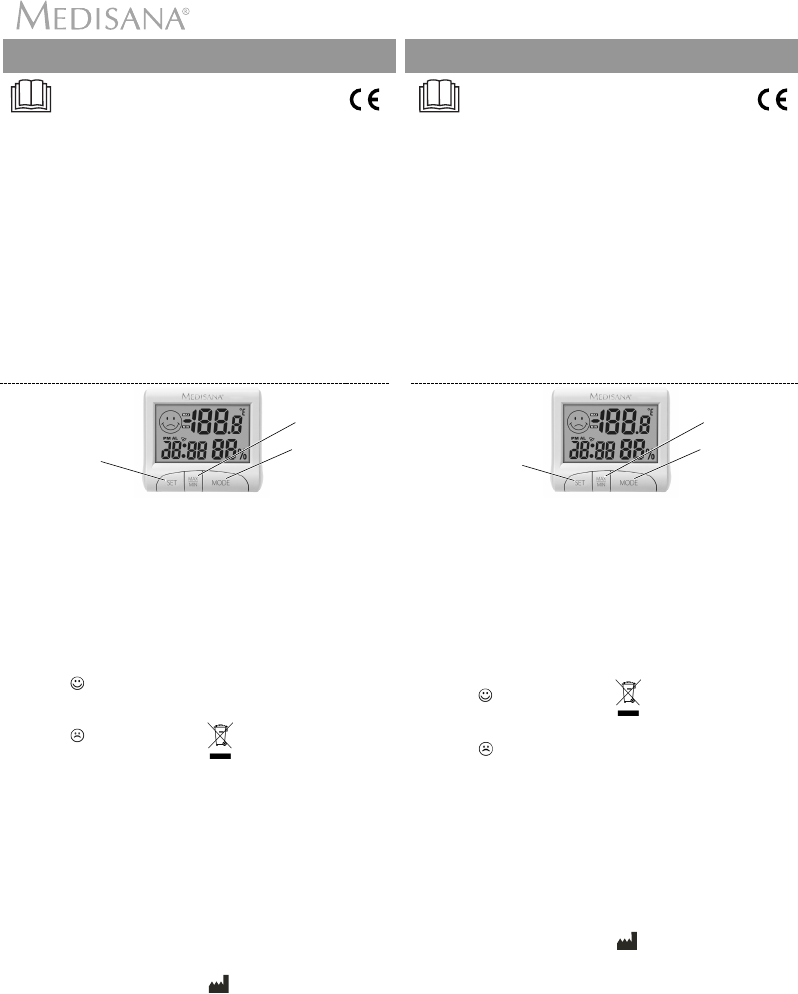
Zeile oben:
Smiley, Temperatur
Zeile unten:
Uhrzeit, Luftfeuchtigkeit
ändert den jeweils
einzugebenden Wert
zeigt MAX- u.MIN-
Werte der gespei-
cherten Temperatur
stellt aktuelle Zeit
und Anzeige im
12h/24h-Modus ein
normalen Uhrzeitanzeige zu gelangen.
Gerät kehrt nach 15 Sek. zur normalen Uhr-
zeitanzeige zurück.
Alarm:
1. MODE-Taste für 2 Sek. drücken.
2.Mit SET-Taste Stunde einstellen,
MODE-Taste drücken und mit SET-
Taste Minuten einstellen, SET-Taste-
drücken.
3.Mit SET Alarm ein- oder ausschalten.
Reinigung:
-Nur mit leicht angefeuchtetem Tuch reini-
gen. Nie Chemikalien oder ätzende Reini-
gungsmittel verwenden.
-Ohne Batterie,
sauber und trocken aufbe-
wahren.
Entsorgung:
Gerät nicht zusammen mit dem
Hausmüll entsorgen. Vor Entsor-
gung Batterie entnehmen. Batterie nur in
den Sondermüll oder in eine Sammelstati-
on.
Technische Daten:
Messbereich :
Temperatur
:
-10°C ~ +50°C
(+14°F ~ +122°F)
Luftfeuchtigkeit
: 20% ~ 90%
Spannung : 1 x AAA Batterie 1,5V
Größe : ca. 82 x 70 x 20 mm
Gewicht : ca. 70g (inkl. Batterie)
Art.Nr. : 60079
EAN : 40 15588 60079 1
Änderungen vorbehalten.
MEDISANA AG
Jagenbergstraße 19
41468 NEUSS
DEUTSCHLAND
E-Mail: info@medisana.de
Internet: www.medisana.
de
Serviceadresse siehe Garantiekarte.
60079/072015
Read the instruction manual carefully before using this device, especially the
safety instructions.
IMPORTANT INFORMATION!
RETAIN FOR FUTURE USE!
SAFETY INSTRUCTIONS!
• Only use device in accordance with
instructions.
• Keep device away from children.
• Device is not a medical product. Do not
use for medical purposes or publication
of measurement results.
• Do not use device if damaged.
• Do not repair device yourself. This not
only invalidates claims under guarantee
but may also cause serious damage.
Repair work should only be carried out by
authorised service staff.
• Protect device from knocks, impacts,
vibration and moisture.
• Never allow children to play with the
packaging film. Risk of suffocation!
BATTERY INFORMATION!
• Remove low batteries from the device
immediately. Increased risk of leakage,
avoid contact with skin, eyes and mucous
membranes. If battery acid comes in
contact with skin, rinse the affected area
with copious amounts of fresh water and
seek medical attention immediately.
• Call doctor immediately if battery is
swallowed!
• Remove battery if device is not used for a
long period.
• Keep battery out of children's reach!
• Do not attempt to recharge batteries. Do
not short circuit. Do not throw into a fire.
Risk of explosion.
Items supplied
• 1 MEDISANA Hygrometer HG 100
• 1 x battery AAA 1.5V
• 1 Instruction manual
Area of application:
Device for controlling indoor climate.
Function:
-Indoor temperatures of -10°C to +50°C
(+14°F to +122°F)
-Relative humidity of 20% to 90%
-Time, 2 mode time display (12h / 24h),
daily alarm (wake up) function
-Comfort zone indicators (Smiley display)
„SMILEY“
appears at indoor temperature of 18°C to
25°C (64°F to 77°F) and humidity of
40%RH to 65%RH.
„SMILEY“
appears at other indoor temperatures and
humidities.
Using the device:
-The device comes with a 1.5 V battery (AAA
type) already inserted. Open battery
compartment, pull out insulation strip,
replace cover. The device displays both
temperature and relative humidity.
-If the display shown is abnormal, remove
battery and reinsert after 2 seconds. Device
returns to normal display.
-Replace battery if the display is still
abno mal or faint. Check polarity when ins-
erting battery.
-Switching device off: Remove battery.
Assembly:
-Foldout mounting supports
-Integrated magnet for attachment to metal
objects. .
Time:
1.Press MODE button for 2 seconds.
2. Use SET button to select 12h/24h mode.
3. Press MODE button. once to set setting
both hours and minutes.
4. Set the hours and minutes using the SET
button.
5. Press MODE button to return to normal
time display.
Device returns to normal time display after
15 seconds.
Top line:
Smiley, temperature
Bottom line:
Time, humidity
changes the value to
be entered in each case
shows MAX and
MIN values of
stored temperature
set up current time
and display in
12h/24h mode
Alarm:
1. Press MODE button for 2 sec.
2. Set hour using SET button, press
MODE button and set minutes using set
button, press the set button.
3. SET switches alarm on or off.
Cleaning:
-Only clean the device using a soft, slightly
damp cloth. Never use chemicals or cau-
stic cleaning agents.
- Store in a clean and dry state without
battery.
Disposal:
Do not dispose of device together
with domestic waste. Remove battery
before disposal. Dispose of battery
only as hazardous waste or in a collection
area.
Technical specifications:
Measuring
range :
Temperature
:
-10°C ~ +50°C
(+14°F ~ +122°F)
Humidity
: 20% ~ 90%
Voltage : 1 x battery AAA 1.5V
Dimensions
: approx. 82 x 70 x 20 mm
Weight : approx. 70g (incl. battery)
Item number : 60079
EAN number : 40 15588 60079 1
Subject to change without notice.
MEDISANA AG
Jagenbergstraße 19
41468 NEUSS
GERMANY
E-Mail: info@medisana.de
Internet: www.medisana.
de
Service address, see Warranty Card.
60079_HG_100_Hygrometer_20072015.qxd:Kompakt-GA 20.07.2015 17:36 Uhr Seite 1


Join the conversation about this product
Here you can share what you think about the Medisana HG 100 Weather Station. If you have a question, first carefully read the manual. Requesting a manual can be done by using our contact form.
reply | This was helpful (0) (Translated by Google)
reply | This was helpful (0) (Translated by Google)