Manual McIntosh C52 Pre-amplifier

Need a manual for your McIntosh C52 Pre-amplifier? Below you can view and download the PDF manual for free in English. This product currently has 2 frequently asked questions, 0 comments and has 0 votes. If this is not the manual you want, please contact us.

Is your product defective and the manual offers no solution? Go to a Repair Café for free repair services.

Manual

Loading…
4
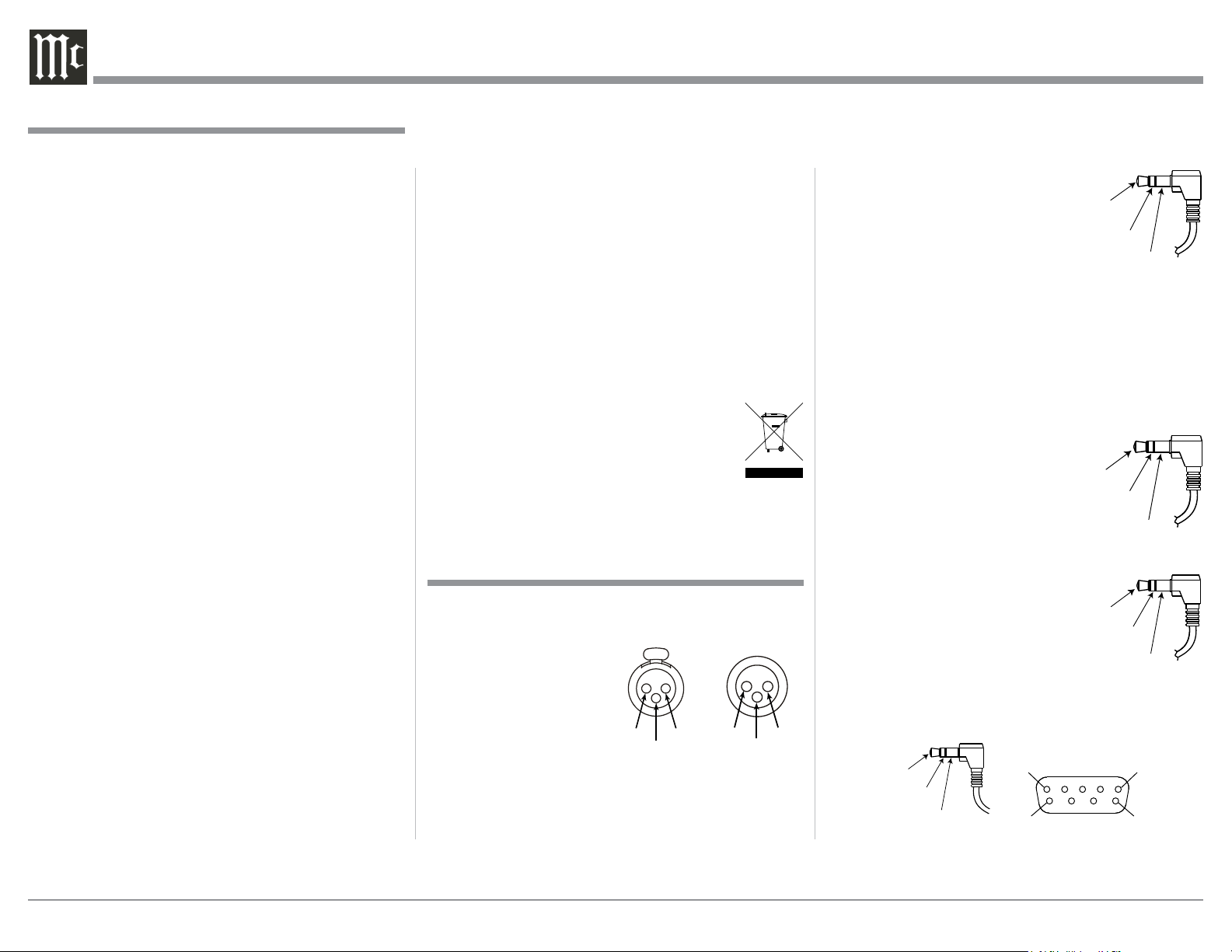
nation of the Power Output Meters
on McIntosh Power Amplifiers. A
3.5mm stereo mini phone plug is
used for connection to the Power
Control, Trigger and PASSTHRU
Outputs on the C52.
Note: The Power Control, Trigger,
PASSTHRU and Data Connecting Cable is avail-
able from the McIntosh Parts Department:
Power Control, Trigger, PASSTHRU and Data
Cable Part No. 170-202
Six foot, shielded 2 conductor, with 3.5mm stereo
mini phone plugs on each end.
Data Port Connectors
The C52 Data Out Ports send Re-
mote Control Signals to Source
Components. A 3.5mm stereo
mini phone plug is used for con-
nection.
IR IN Port Connectors
The IR IN Port also uses a 3.5mm
stereo mini phone plug and allows
the connection of other brand IR
Receivers to the C52.
RS232 Data Port Cable
The RS232 Data Cable is a 3.5mm stereo mini phone
plug to a subminiature DB 9 connector:
General Information and Connector Information
Connector and Cable Information
XLR Connectors
Below is the Pin configuration for the XLR Balanced
Input and Output Connectors on the C52. Refer to the
diagrams for connections:
PIN 1: Shield/Ground
PIN 2: + Output
PIN 3: - Output
Power Control and Trigger Connectors
The C52 Power Control Out, Trigger and PASSTHRU
Output Jacks send Power On/Off Signals (+12 volt/0
volt) when connected to other McIntosh Components.
An additional connection is for controlling the illumi-
Data
Signal
N/C
Data
Ground
PIN 2 PIN 1
PIN 3
PIN 1
PIN 2
PIN 3
1. For additional connection information, refer to the
owner’s manual(s) for any component(s) connected
to the C52 Audio Preamplifier.
2. The Main AC Power going to the C52 and any
other McIntosh Component(s) should not be applied
until all the system components are connected
together. Failure to do so could result in malfunc-
tioning of some or all of the systems normal opera-
tions. When the C52 and other McIntosh Compo-
nents are in their Standby Power Off Mode, the
Microprocessors Circuitry inside each component
is active and communication is occurring between
them.
3. Balanced and Unbalanced Inputs and Outputs can
be mixed. For example, you may connect signal
sources to Unbalanced Inputs and send signals
from the Balanced Outputs. You can also use Bal-
anced and Unbalanced Outputs simultaneously,
connected to different Power Amplifiers.
4. The C52 internal Digital to Analog Converter
Circuitry is designed to decode 2-channel PCM
(Pulse Code Modulation) and DSD (Direct Stream
Digital) Digital Signals. The Coaxial and Optical
Digital Audio Inputs are for PCM Digital Signals.
The Digital DIN and USB Audio Inputs are for
PCM and DSD Digital Signals. Other Digital Audio
Signal Format Types will cause the Audio Outputs
of the C52 to be muted and the Front Panel Infor-
mation Display will indicate an error message.
5. Sound Intensity is measured in units called Deci-
bels and “dB” is the abbreviation.
6. The McIntosh C52 is factory configured for imme-
diate use. It can also be customized to complement
the components making up your system. Refer to
the C52 “Setup Mode” starting on page 13 for ad-
ditional information.
General Information
Power
Control
Meter
Illumination
Control
Ground
Main, Triggers 1-4
and PASSTHRU
7. The Remote Control Supplied with the C52
Preamplifier is capable of operating other com-
ponents. For additional information go to www.
mcintoshlabs.com.
8. The IR Input, with a 3.5mm mini phone jack, is
configured for non-McIntosh IR sensors such as
a Xantech Model HL85BK Kit. Use a Connection
Block such as a Xantech Model ZC21 when two or
more IR sensors need to be connected to the C52.
The signal from a connected External IR Sensor
will have priority over the signal from the Front
Panel IR Sensor.
9. When discarding the unit, comply with local rules
or regulations. Batteries should never be
thrown away or incinerated but disposed
of in accordance with the local regula-
tions concerning battery disposal.
10. For additional information on the C52 and other
McIntosh Products please visit the McIntosh Web
Site at www.mcintoshlabs.com.
IR Data
Control
Ground
N/C
PIN 1
PIN 6
PIN 5
PIN 9
Data In
(DB9-pin2)
Ground
(DB9-pin5)
Data Out
(DB9-pin3)
DB9
(male connector)
Download manual in English (PDF, 8.13 MB)
(Consider the environment and only print this manual if it is really necessary)

Loading…

Rating

Let us know what you think about the McIntosh C52 Pre-amplifier by leaving a product rating. Want to share your experiences with this product or ask a question? Please leave a comment at the bottom of the page.
Are you satisfied with the McIntosh C52 Pre-amplifier?
Yes No
Be the first to rate this product
0 votes

Join the conversation about this product

Here you can share what you think about the McIntosh C52 Pre-amplifier. If you have a question, first carefully read the manual. Requesting a manual can be done by using our contact form.

More about this manual

We understand that it’s nice to have a paper manual for your McIntosh C52 Pre-amplifier. You can always download the manual from our website and print it yourself. If you would like to have an original manual, we recommend you contact McIntosh. They might be able to provide an original manual. Are you looking for the manual of your McIntosh C52 Pre-amplifier in a different language? Choose your preferred language on our homepage and search for the model number to see if we have it available.

Specifications

Brand McIntosh
Model C52
Category Pre-amplifiers
File type PDF
File size 8.13 MB

All manuals for McIntosh Pre-amplifiers
More manuals of Pre-amplifiers

Frequently Asked Questions about McIntosh C52 Pre-amplifier

Our support team searches for useful product information and answers to frequently asked questions. If you find an inaccuracy in our frequently asked questions, please let us know by using our contact form.

Wat is the difference betwee an amplifier and a pre-amplifier? Verified

An amplifier is often an integrated amplifier, with pre-amplifier and power amplifier in one device. A pre-amplifier regulates volume and sometimes balance and tone and lets you choose what source is used (cd, tape, turntable, etc). A pre-amplifier often provides a little amplification, just enough for the power amplifier. This is an active pre-amplifier. Sometimes a pre-amplifier does not amplify, making it a passive pre-amplifier.

This was helpful (6) Read more

Can I connect a speaker to a pre-amplifier? Verified

No, a speaker can only be connect to a power amplifier or integrated amplifier.

This was helpful (4) Read more
Manual McIntosh C52 Pre-amplifier

Related products

Related categories

×
Download