Manual Manhattan 179485 Keyboard

Need a manual for your Manhattan 179485 Keyboard? Below you can view and download the PDF manual for free in English. This product currently has 2 frequently asked questions, 0 comments and has 0 votes. If this is not the manual you want, please contact us.

Is your product defective and the manual offers no solution? Go to a Repair Café for free repair services.

Manual

Loading…
ENGLISH: USB Gaming Keyboard with LEDs — Low-Force Key Edition
Easy Installation
Plug the keyboard into a USB port on a computer. The OS will automatically detect the
keyboard and install the drivers.
For specications, visit manhattanproducts.com.
ESPAÑOL: Teclado gaming — Edición Teclas de Baja Fuerza
Fácil Instalación
Sólo conecte el teclado a un puerto USB en la PC. El sistema operativo detectará
automáticamente el teclado e instalará los controladores necesarios.
Para más especicaciones, visite manhattanproducts.com.
FRANÇAIS: Clavier Gaming — Édition Touches à faible pression
Installation facile
Connectez le clavier à un port USB de votre PC. Le système d’exploitation détecte le
clavier et installe le pilote automatiquement.
Vous trouvez les spécications sur manhattanproducts.com.
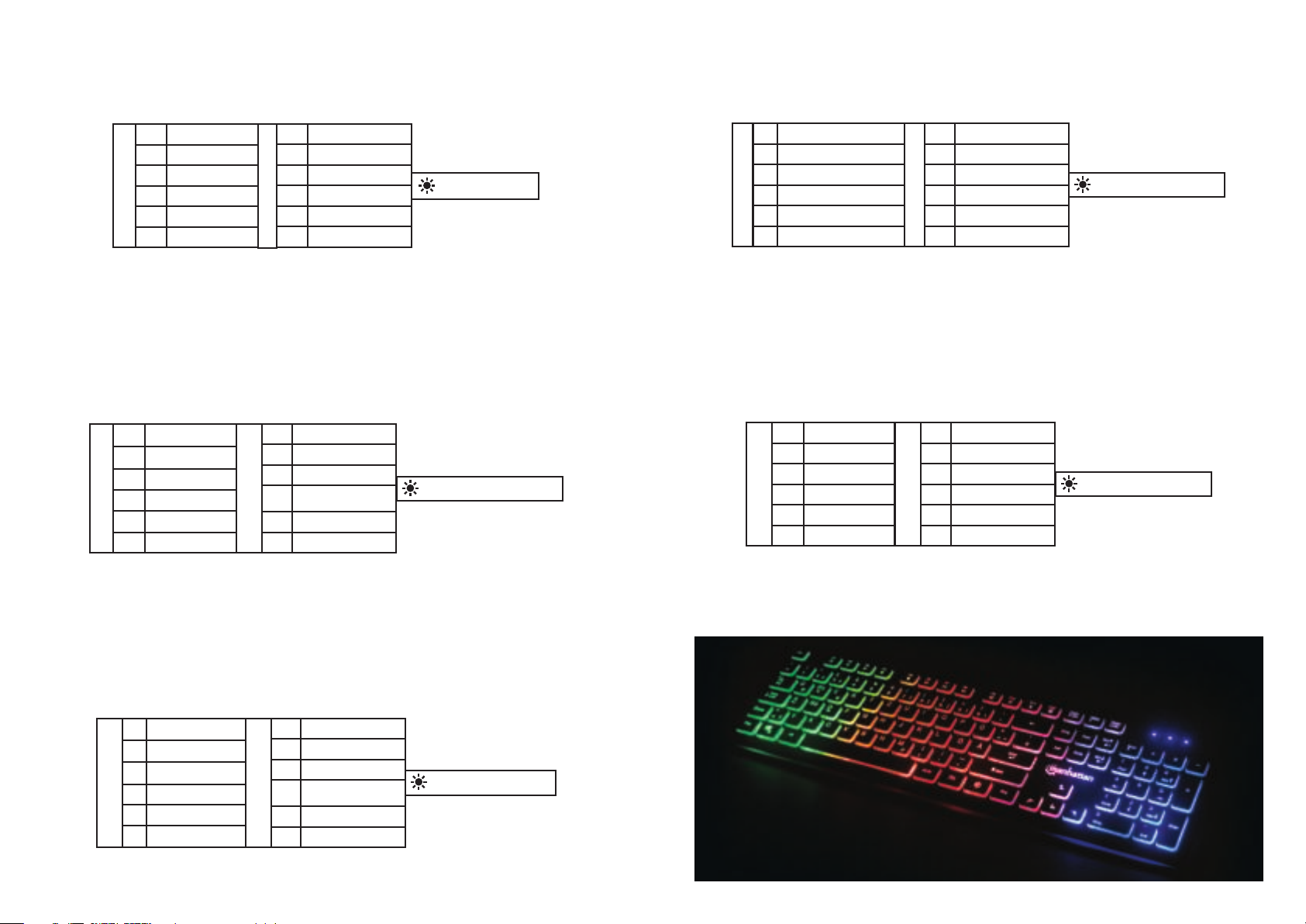
F1 Media Player
F2 Volume Down
F3 Volume Up
F4 Mute
F5 Stop
F6 Previous
FN
+
F7 Play/Pause
F8 Next
F9 Email
F10 Browser Home Page
F11 Key Lock
F12 Calculator
FN
+
Keyboard Backlight
F1 Reproductor
F2 Reducir volumen
F3
Aumentar volumen
F4 Silencio
F5 Stop
F6 Previa
F7 Reproducir/Pausa
F8 Siguiente
F9 E-mail
F10
Página de inicio del
navegador
F11 Bloqueo de teclas
F12 Calculadora
FN
+
FN
+
Retroiluminación del teclado
POLSKI: Klawiatura Gamingowa — Edycja niskoprolowa
Szybka instalacja
Podepnij klawiaturę do wolnego portu USB komputera. System operacyjny
automatycznie wykryje nowe urządzenie i zainstaluje odpowiednie sterowniki.
Specykacja techniczna dostępna jest na stronie manhattanproducts.com.
ITALIANO: Tastiera Gaming — Edizione Chiave a bassa forza
Installazione semplice
Basta collegare la tastiera nella porta USB del computer. Il sistema operative riconoscerà
automaticamente la tastiera e installerà i driver.
Per ulteriori speciche, visita il sito manhattanproducts.com.
F1
Lecteur Multimédia
F2 Baisser le Volume
F3
Augmenter le Volume
F4 Muet
F5 Stop
F6 Précédent
F7 Lecture/Pause
F8 Suivant
F9 E-mail
F10
Page d’Accueil du
Navigateur
F11
Touche de Verrouillage
F12 Calculatrice
FN
+
FN
+
Rétro-éclairage du Clavier
FN
+
F1
Odtwarzacz multimedialny
F2 Przycisz
F3 Podgłośnij
F4 Wycisz
F5 Zatrzymaj
F6 Poprzedni
F7
Odtwarzanie/Pauza
F8 Następny
F9 E-mail
F10
Strona główna przeglądarki
F11 Blokada klawiatury
F12 Kalkulator
FN
+
Podświetlenie klawiatury
FN
+
FN
+
F1
Lettore multimediale
F2 Abbassa il volume
F3 Alza il volume
F4 Silenzia
F5 Ferma
F6 Precedente
F7 Riproduci/Pausa
F8 Successivo
F9 Email
F10
Pagina iniz. del browser
F11 Blocco tasti
F12 Calcolatrice
Retroilluminazione tastiera
Download manual in English (PDF, 0.64 MB)
(Consider the environment and only print this manual if it is really necessary)

Loading…

Rating

Let us know what you think about the Manhattan 179485 Keyboard by leaving a product rating. Want to share your experiences with this product or ask a question? Please leave a comment at the bottom of the page.
Are you satisfied with the Manhattan 179485 Keyboard?
Yes No
Be the first to rate this product
0 votes

Join the conversation about this product

Here you can share what you think about the Manhattan 179485 Keyboard. If you have a question, first carefully read the manual. Requesting a manual can be done by using our contact form.

More about this manual

We understand that it’s nice to have a paper manual for your Manhattan 179485 Keyboard. You can always download the manual from our website and print it yourself. If you would like to have an original manual, we recommend you contact Manhattan. They might be able to provide an original manual. Are you looking for the manual of your Manhattan 179485 Keyboard in a different language? Choose your preferred language on our homepage and search for the model number to see if we have it available.

Specifications

Brand Manhattan
Model 179485
Category Keyboards
File type PDF
File size 0.64 MB

All manuals for Manhattan Keyboards
More manuals of Keyboards

Frequently Asked Questions about Manhattan 179485 Keyboard

Our support team searches for useful product information and answers to frequently asked questions. If you find an inaccuracy in our frequently asked questions, please let us know by using our contact form.

The letters on the keyboard are not in the places that I am used to, why is that? Verified

Most keyboards use a QWERTY layout, standing for the first six letters on the keyboard. However, there are different keyboard layouts, matching the specific needs of a certain language. It is also possible that the keyboard keys have been swapped. Especially with older keyboards this is easy to do.

This was helpful (1365) Read more

What is the best way to clean my keyboard Verified

Never insert objects between the edges of the keys, as this will mainly push dirt in and damage the keyboard. It is best to clean the keyboard with compressed air while keeping the keyboard upside down. The top of the keys can be cleaned with a slightly damp cloth.

This was helpful (204) Read more
Manual Manhattan 179485 Keyboard

Related products

Related categories

×
Download