Manual Magnus TM-11P Tripod

Need a manual for your Magnus TM-11P Tripod? Below you can view and download the PDF manual for free in English. This product currently has 0 frequently asked questions, 0 comments and has 0 votes. If this is not the manual you want, please contact us.

Is your product defective and the manual offers no solution? Go to a Repair Café for free repair services.

Manual

Loading…
Adjusting the Center Column
1
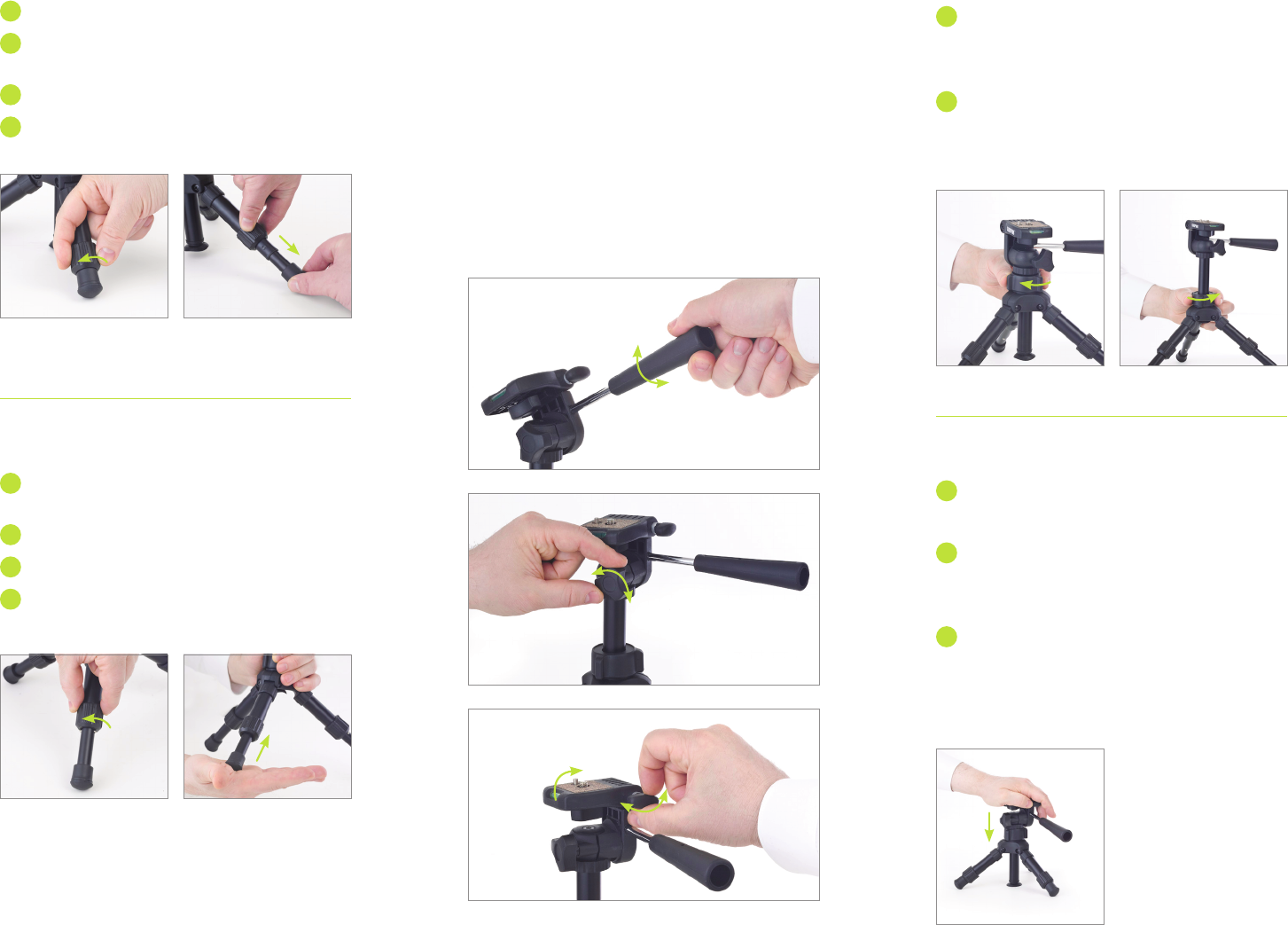
To raise or lower the center column, loosen
the center column locking collar by rotating it
counterclockwise. (Fig. H)
2
Position the center column at the desired height,
and tighten the locking collar by rotating it
clockwise. (Fig. I)
Using the Suction Cup
1
Start with the tripod legs collapsed but in
spread position.
2
Loosen the center column locking collar, and push
the center column downward until the suction cup
adheres to the surface. (Fig. J)
3
Tighten the center column locking collar.
Note: For an enhanced grip, slightly moisten the bottom
of the suction cup.
Extending the Tripod Legs
1
Spread the tripod legs.
2
Rotate the twist locks a quarter turn
counterclockwise to loosen them. (Fig. A)
3
Pull out the legs to their full extension. (Fig. B)
4
Rotate the twist locks clockwise until secure.
Collapsing the Tripod Leg Extensions
1
Rotate the twist locks a quarter turn
counterclockwise to loosen them. (Fig. C)
2
Give each leg a firm push to fully collapse it. (Fig. D)
3
Rotate the twist locks clockwise until secure.
4
Fold the legs in.
Using the Three-Way Pan Head
To use the 90˚ tilting feature, loosen the tilt lock by
twisting it counterclockwise. Position the head at the
desired angle, and tighten the tilt lock by rotating it
clockwise. (Fig. E)
To use the 360˚ panning feature, loosen the pan
locking knob. Pan as necessary, and tighten the
locking knob. (Fig. F)
To change the camera orientation from horizontal
to vertical position, loosen the platform locking
knob. Rotate the platform 90˚, and tighten the
locking knob. (Fig. G)
Figure A
Figure H
Figure J
Figure G
Figure F
Figure E
Figure C
Figure B
Figure I
Figure D
Download manual in English (PDF, 1.49 MB)
(Consider the environment and only print this manual if it is really necessary)

Loading…

Rating

Let us know what you think about the Magnus TM-11P Tripod by leaving a product rating. Want to share your experiences with this product or ask a question? Please leave a comment at the bottom of the page.
Are you satisfied with the Magnus TM-11P Tripod?
Yes No
Be the first to rate this product
0 votes

Join the conversation about this product

Here you can share what you think about the Magnus TM-11P Tripod. If you have a question, first carefully read the manual. Requesting a manual can be done by using our contact form.

More about this manual

We understand that it’s nice to have a paper manual for your Magnus TM-11P Tripod. You can always download the manual from our website and print it yourself. If you would like to have an original manual, we recommend you contact Magnus. They might be able to provide an original manual. Are you looking for the manual of your Magnus TM-11P Tripod in a different language? Choose your preferred language on our homepage and search for the model number to see if we have it available.

Specifications

Brand Magnus
Model TM-11P
Category Tripods
File type PDF
File size 1.49 MB

All manuals for Magnus Tripods
More manuals of Tripods
Manual Magnus TM-11P Tripod

Related products

Related categories

×
Download