Manual Lorus R2373LX9 Sports Watch

Need a manual for your Lorus R2373LX9 Sports Watch? Below you can view and download the PDF manual for free in English. This product currently has 6 frequently asked questions, 0 comments and has 1 vote with an average product rating of 100/100. If this is not the manual you want, please contact us.

Is your product defective and the manual offers no solution? Go to a Repair Café for free repair services.

Manual

Loading…

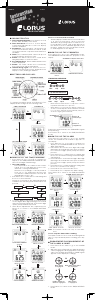
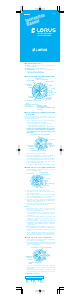
HOW TO USE TIMER
ENGAGEMENT/DISENGAGEMENT
OF ALARM & CHIME
1. Press Button D two times to go to the ALARM
mode.
2. With each press of Button B, the alarm and
chime can be engaged or disengaged in
the following order. The ALARM singal and/
or CHIME signal appear on the display
accordingly.
Both alarm and chime
are engaged.
Only alarm
is engaged.
Only chime
is engaged.
Neither alarm nor
chime is engaged.
Press Button D three times to go to the TIMER
mode. The TIMER mode indicator appears on
the display.
1. Press Button C to change the display to the
TIMER SETTING mode. The hour digits start
flashing.
2. Press Button B to set the hour digits. One digit
(flashing) is increased with each press of
Button B. The digits are increased quickly by
keeping Button B pressed.
3. Press Button D to confirm the hour setting and
move on to the minute setting. The minute
digits start flashing.
4. Press Button B to set the minute digits. One
digit (flashing) is increased with each press of
Button B. The digits are increased quickly by
keeping Button B pressed.
5. Press Button D to confirm the minute setting
and move on to the second setting. The
second digits start flashing.
6. Press Button B to set the second digits in the
same manner as the hour and minute setting.
7. Press Button C to complete the timer
setting.
3. Press Button D to return to the TIME/CALENDAR
mode.
Note: The alarm can be set only in one time zone.
How to stop the alarm while sounding
The alarm sounds for 10 seconds at the designated
time. To stop it manually while sounding, press any
Button.
TIMER OPERATION
1. Press Button B in the TIMER mode to start the
countdown timer.
2. Press Button B to stop the countdown timer.
3. To reset the timer, press Button C.
Press Button D to return to the TIME/CALENDAR
mode.
B
B
C
Start
Stop
Reset
Press Button D to return to the TIME/CALENDAR
mode.
The miniature battery either CR2016 or
CR2032, which powers your watch should last
approximately 2 years for CR2016 or 4 years for
CR2032. However, because it is inserted at the
factory, the actual life of the battery once in your
possession may be less than the specified period.
Be sure to replace the battery to prevent any
possible malfunction as soon as it runs down. To
replace the battery we recommend taking the
watch to a local watch repair shop.
Note: If the alarm is used for more than 20 seconds
a day and/or the illuminating light for more
than 8 seconds a day, the battery life may
be less than the specified period.
BATTERY CHANGE
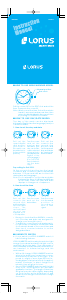
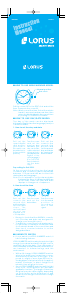
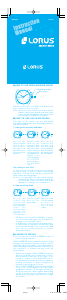
HOW TO SET SECOND TIME ZONE
Press Button D four times to go to the SECOND TIME
ZONE. The SECOND TIME ZONE indicator appears
on the display.
1. Press Button C to change the display to the
TIME ZONE SETTING mode. The hour digits start
flashing.
2. Press Button B to set the hour digits. One digit
(flashing) is increased with each press of
Button B. The digits are increased quickly by
keeping Button B pressed.
3. Press Button D to confirm the hour setting and
move on to the minute setting. The minute
digits start flashing.
4. Press Button B to set the minute digits. The
minute digits are increased in 30-minute
increments.
5. Press Button C to complete the second time
zone setting.
HOW TO USE EL BACKLIGHT
In any mode press Button A to illuminate the
display for about 3 seconds.
Note:
1. The backlight of the watch employs an
electro-luminescent (EL) light, which tends to
lose illuminating power after very long use.
2. The illumination provided by backlight may be
hard to see when viewed under direct sunlight.
SECOND TIME ZONE
indicator
CARE OF YOUR LORUS WATCH
• BATTERY
CAUTION
Do not expose the old battery to fire or
recharge it. Keep it at a place beyond
the reach of chil dren. If a child swallows
it, consult a doctor immediately.
• WATERRESISTANT
Condition
of use
Accidental
contact with
water, such
as splashes
and rain
Swimming
and taking
a shower
Skin
diving
Scuba
diving
Indication
on the dial/
case back
No
Indication
* If your watch is 200 M/20 BAR, 100 M/10 BAR
or 50 M/5 BAR water resistant, it is so indicated
on the dial/case back.
• Donotoperatethebuttonswhenthewatchis
wet.
• Ifthewatchisexposedtosaltwater,rinseitin
fresh water and then wipe it thoroughly dry.
NO NO NO
YES
YES
YES NO NO
YES YES NO
NO
NO
NO
YES
WATER
RESISTANT
WATER
RESISTANT
(50M/5 BAR
)
WATER
RESISTANT
100M/10 BAR
or above
(
NO
(
Caution:
Leather straps are not water resistant except
so indicated, even if the watch head is water
resistant.
• ALLERGICREACTION
Because the case and band touch the skin
directly, it is important to clean them regularly. If
not, shirt sleeves may be stained and those with
delicate skin may develop a rash. Please wear
the watch with some play to avoid any possible
allergic reaction. If you develop a rash on your
wrist, stop wearing and consult a physician.
• MAGNETISM
Your watch will not be affected by magnetism
generated by household electric appliances.
• SHOCKSANDVIBRATIONS
Your watch may be worn for normal sports
activities, but be careful not to drop it or hit it on
hard surfaces.
• TEMPERATURE
Your watch is preadjusted so that constant
accuracy may be insured at normal tem pera ture.
SERVICE
When your LORUS watch requires repair or
sevicing, please see the enclosed WARRANTY/
GUARANTEE.
Printed in China
MINUTE SETTING(+30)
HOUR SETTING(+1)
TIMER mode indicator
B
C
B
B
C
D
D
MINUTE SETTING
HOUR SETTING
SECOND SETTING
ALARM mode indicator
TIME ZONE SETTING
MINUTE SETTING
HOUR SETTING
B
B
B
D
D
C
C
C
B
B
C
D
NREZ009.indd 2 15/05/07 16:29
Download manual in English (PDF, 0.49 MB)
(Consider the environment and only print this manual if it is really necessary)

Loading…

Rating

Let us know what you think about the Lorus R2373LX9 Sports Watch by leaving a product rating. Want to share your experiences with this product or ask a question? Please leave a comment at the bottom of the page.
Are you satisfied with the Lorus R2373LX9 Sports Watch?
Yes No
100%
0%
1 vote

Join the conversation about this product

Here you can share what you think about the Lorus R2373LX9 Sports Watch. If you have a question, first carefully read the manual. Requesting a manual can be done by using our contact form.

More about this manual

We understand that it’s nice to have a paper manual for your Lorus R2373LX9 Sports Watch. You can always download the manual from our website and print it yourself. If you would like to have an original manual, we recommend you contact Lorus. They might be able to provide an original manual. Are you looking for the manual of your Lorus R2373LX9 Sports Watch in a different language? Choose your preferred language on our homepage and search for the model number to see if we have it available.

Specifications

Brand Lorus
Model R2373LX9 Sports
Category Watches
File type PDF
File size 0.49 MB

All manuals for Lorus Watches
More manuals of Watches

Frequently Asked Questions about Lorus R2373LX9 Sports Watch

Our support team searches for useful product information and answers to frequently asked questions. If you find an inaccuracy in our frequently asked questions, please let us know by using our contact form.

A battery in my device is oxidized, can I still safely use it? Verified

Ja, the device can still be safely used. Firstly, remove the oxidizd battery. Never use bare hands to do this. Then clean the battery compartment with a cotton swab dipped in vinegar or lemon juice. Let it dry and insert new batteries.

This was helpful (939) Read more

My mechanical watch runs fast, what can I do? Verified

This might be caused by exposure to a magnetic field. It can be solved by a demagnetisation process performed by a professional watchmaker.

This was helpful (878) Read more

What do AM and PM stand for? Verified

AM stands for Ante Meridiem and indicates that the time is before midday. PM stands for Post Meridiem and indicates that the time is past midday.

This was helpful (754) Read more

What is a 'Chronograph'? Verified

A 'Chronograph' is literally a 'writer of time'. The term is used to describe clocks and watches that tell the time of day as well as measure a certain period of time, like a stopwatch.

This was helpful (659) Read more

What is GMT? Verified

GMT stands for Greenwich Mean Time (sometimes called UTC, standing for Coordinated Universal Time). It is the time for the longitude 0, that passes through Greenwich near London.

This was helpful (499) Read more

What is a quartz movement? Verified

Watches and clocks with a quartz movement are driven by a battery. This sends an electric current through quartz crystals that will vibrate. These vibrations are passed on to the movement. Because the vibrations have a fixed frequency, watches and clocks with a quartz movement are extremely precise.

This was helpful (482) Read more

Manual Lorus R2373LX9 Sports Watch

Related products

Related categories

×
Download