Manual Logitech QuickCam Pro 9000 Webcam

Need a manual for your Logitech QuickCam Pro 9000 Webcam? Below you can view and download the PDF manual for free in English. This product currently has 0 frequently asked questions, 2 comments and has 5 votes with an average product rating of 60/100. If this is not the manual you want, please contact us.

Is your product defective and the manual offers no solution? Go to a Repair Café for free repair services.

Manual

Loading…
QuickCam
®
Pro 9000
QuickCam
®
Pro 9000
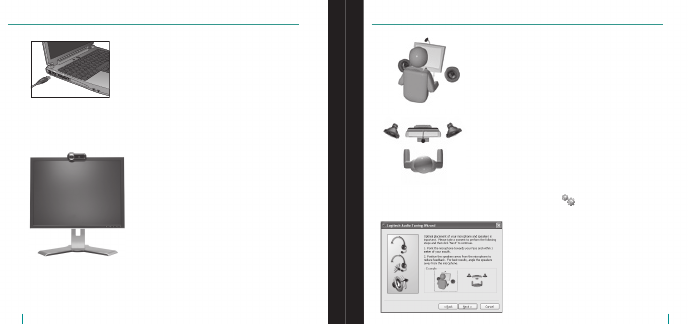
Connect Your Camera to Your Computer
Wait until you are prompted by the software before
connecting your camera to an available USB port on
your computer.
Position Your Camera, Microphone,
and Speakers
The Audio Tuning Wizard
The first time that you start QuickCam, you are guided through
the Microphone/Speaker Setup Utility and Audio Tuning Wizard
that lets you do the following:
Select the audio input device (microphone)
and audio output device (speakers).
Enable Acoustic Echo Cancellation (AEC)—recommended.
Enable background suppression—recommended.
Specify microphone input volume and speaker output volume.
Test audio settings.
In situations with loud and irregular background noise, your voice
can become distorted when using noise suppression. If this occurs,
disable noise suppression in the QuickCam
®
software.
Tip To change your audio settings in the QuickCam
®
software,
click the Settings button, and then click the Audio tab.
Your camera comes with Logitech
®
RightSound
Technology.
RightSound
Technology cancels echo and significantly reduces
background noise. The following steps will ensure the best
possible audio performance:
Position your camera in the middle of your monitor
for optimal eye contact.
Position your camera’s microphone no more than 3 feet
(1 m) away from you and point it toward you.
Position your speakers (if used) at least 12 inches
(30 cm) away from your microphone to reduce feedback,
and then angle your speakers away from your microphone.
Tip Do not place objects between you and the microphone.
Download manual in English (PDF, 2.08 MB)
(Consider the environment and only print this manual if it is really necessary)

Loading…

Rating

Let us know what you think about the Logitech QuickCam Pro 9000 Webcam by leaving a product rating. Want to share your experiences with this product or ask a question? Please leave a comment at the bottom of the page.
Are you satisfied with the Logitech QuickCam Pro 9000 Webcam?
Yes No
60%
40%
5 votes

Join the conversation about this product

Here you can share what you think about the Logitech QuickCam Pro 9000 Webcam. If you have a question, first carefully read the manual. Requesting a manual can be done by using our contact form.

ian 07-04-2020
just want the god damm user manual in pdf is that to much

reply | This was helpful (0)
claude merlin 05-04-2026
pro 9000 user manual thank you

reply | This was helpful (0) (Translated by Google)

More about this manual

We understand that it’s nice to have a paper manual for your Logitech QuickCam Pro 9000 Webcam. You can always download the manual from our website and print it yourself. If you would like to have an original manual, we recommend you contact Logitech. They might be able to provide an original manual. Are you looking for the manual of your Logitech QuickCam Pro 9000 Webcam in a different language? Choose your preferred language on our homepage and search for the model number to see if we have it available.

Specifications

Brand Logitech
Model QuickCam Pro 9000
Category Webcams
File type PDF
File size 2.08 MB

All manuals for Logitech Webcams
More manuals of Webcams

Manual Logitech QuickCam Pro 9000 Webcam

Related products

Related categories

×
Download