Manual Logitech MX1000 Mouse

Need a manual for your Logitech MX1000 Mouse? Below you can view and download the PDF manual for free in English. This product currently has 4 frequently asked questions, 0 comments and has 0 votes. If this is not the manual you want, please contact us.

Is your product defective and the manual offers no solution? Go to a Repair Café for free repair services.

Manual

Loading…
Installation
1
© 2004 Logitech. All rights reserved. Logitech, the Logitech logo, and other Logitech marks are owned
by Logitech and may be registered. All other trademarks are the property of their respective owners.
Logitech assumes no responsibility for any errors that may appear in this manual. Information contained
herein is subject to change without notice.
© 2004 Logitech. Tous droits réservés. Logitech, le logo Logitech et les autres marques Logitech sont
la propriété exclusive de Logitech et sont susceptibles d’être des marques déposées. Toutes les autres
marques sont la propriété exclusive de leurs détenteurs respectifs. Logitech décline toute responsabilité
en cas d'erreurs dans ce manuel. Les informations énoncées dans le présent document peuvent faire
l’objet de modifications sans avis préalable.
623412-0403.A
www.logitech.com
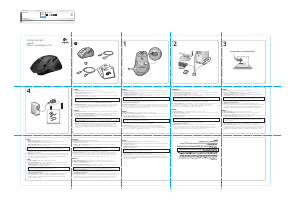
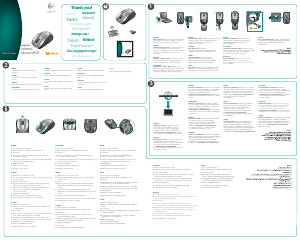
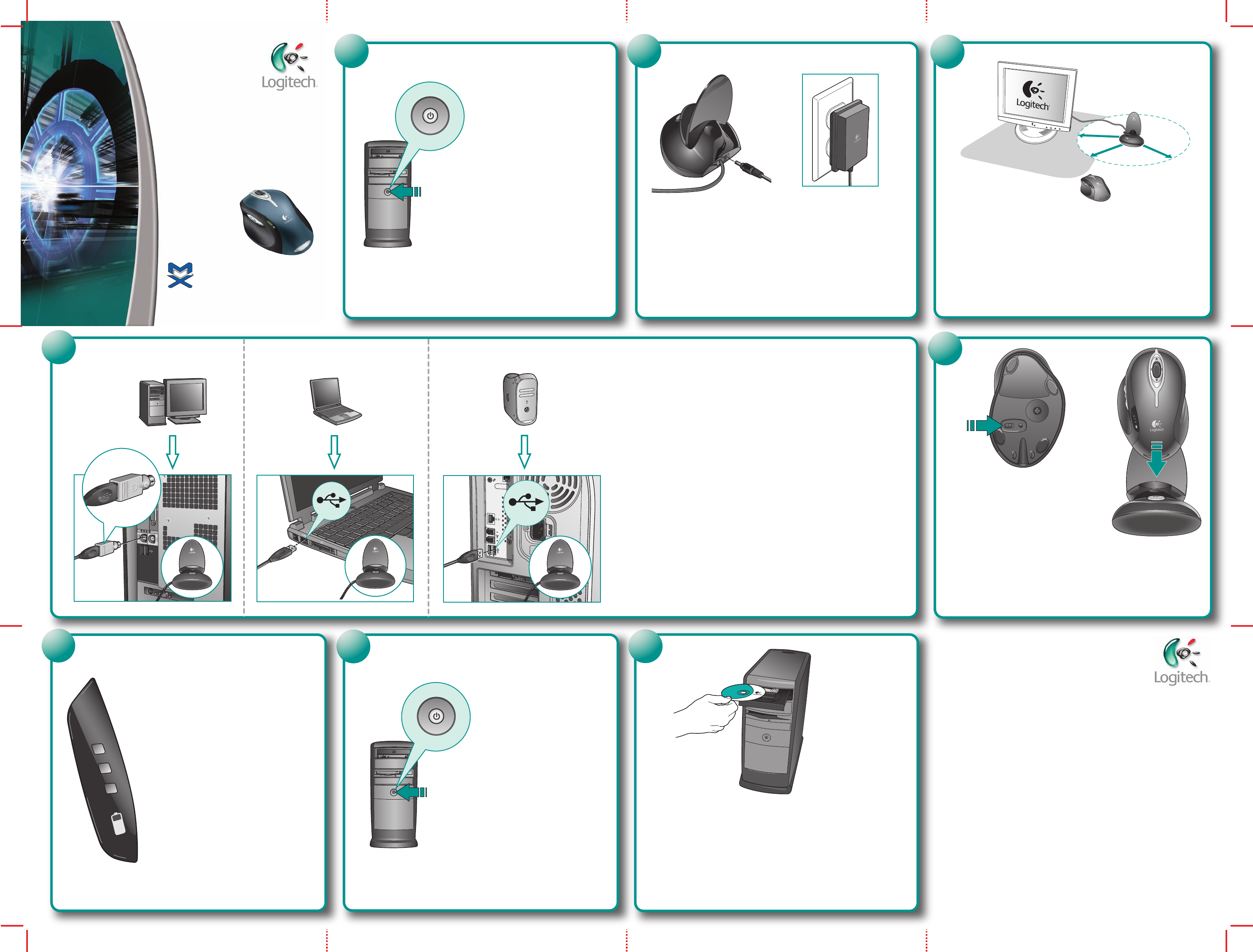
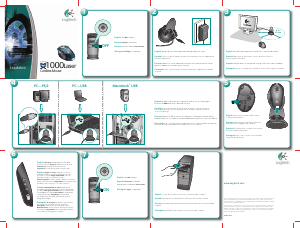
English Turn OFF computer.
Español Apague el ordenador.
Français Mettez l’ordinateur hors tension.
Português Desligue o computador.
2
English Plug AC cable into back of Base Station. Plug AC adapter into outlet.
Español Conecte el cable CA a la parte posterior de la estación base. Conecte el adaptador CA
a la toma de alimentación.
Français Branchez le cordon d'alimentation électrique sur le panneau arrière de la base.
Branchez l’adaptateur secteur dans la prise électrique.
Português Ligue o cabo CA à parte de trás da central. Ligue o adaptador CA à tomada
de parede.
OFF
3
English Place Base Station away from electrical devices. Avoid metallic surfaces.
Español NO coloque la estación base cerca de dispositivos eléctricos.
Evite las superficies metálicas.
Français Eloignez la base de tout appareil électrique. Evitez toute surface métallique.
Português Coloque a central longe de aparelhos eléctricos. Evite superfícies metálicas.
7
English Turn ON computer.
Español Encienda el ordenador.
Français Mettez l’ordinateur sous tension.
Português Ligue o computador.
ON
8
English To enjoy all the features of the mouse, you must install the software.
Español Para disponer de todas las funciones del ratón, debe instalar el software.
Français Pour profiter pleinement de toutes les fonctions de la souris, vous devez installer
le logiciel.
Português Para utilizar todas as funções do rato, deve instalar o software.
6
5
4
Macintosh
®
USB
PC—USB
English Plug Base Station cable into computer. PC desktops use green PS/2 adapter.
PC notebooks
AND Macintosh use black USB connector.
Español Conecte al ordenador el cable de la estación base. Los PC de sobremesa
usan el adaptador PS/2 verde. Los PC portátiles Y los ordenadores Macintosh usan sólo
el conector USB negro.
Français Branchez le câble de la base sur l’ordinateur. Les ordinateurs de bureau utilisent
l'adaptateur PS/2 vert. Les ordinateurs portables PC ET Macintosh utilisent le connecteur USB noir.
Português Ligue o cabo da central ao computador. PCs de secretária utilizam um adaptador
PS/2 verde. Os PCs portáteis E Macintosh utilizam um conector USB preto.
PC—PS/2
8 in.
20 cm
English
Turn on mouse and
place in Base Station
to charge internal batteries.
Français Mettez la souris sous tension et placez-la
dans sa base pour recharger les piles internes.
Español Encienda el ratón y colóquelo en la estación
base para cargar las pilas internas.
Português Ligue o rato e coloque-o na central para
carregar as baterias internas.
English
Charging: Initially, all mouse LEDs blink
green in sequence. Charged: All LEDs turn solid green.
Low Battery: First LED at bottom turns red.
Important: For full capacity, make one full charge.
Español Carga en curso: al principio, todos los
indicadores luminosos del ratón parpadean en verde
de forma secuencial. Carga completada: todos los
indicadores luminosos permanecen verdes.
Pila descargada: el primer indicador luminoso en la parte
inferior emite una luz roja. Importante: para cargar las pilas
al máximo, realice un proceso de carga completa.
Français Chargement en cours: aubut tous
les témoins de la souris clignotent en vert les uns à la suite
des autres. Chargement terminé: tous lesmoins verts
restent allumés en continu. Piles faibles: le témoin sit
en bas devient rouge. Important: pour parvenir à
une charge totale, il convient d'effectuer un cycle de
chargement complet.
Português A carregar: Inicialmente, todas as luzes
dos LEDs do rato piscam a verde em sequência.
Carregado: Todas as luzes dos LEDs ficam verdes.
Baterias fracas: A luz do primeiro LED na parte inferior
fica vermelha. Importante: Para a capacidade máxima,
é necessário um carregamento completo.
Cordless Mouse
1000
Laser
Logitech
®
Download manual in English (PDF, 2.16 MB)
(Consider the environment and only print this manual if it is really necessary)

Loading…

Rating

Let us know what you think about the Logitech MX1000 Mouse by leaving a product rating. Want to share your experiences with this product or ask a question? Please leave a comment at the bottom of the page.
Are you satisfied with the Logitech MX1000 Mouse?
Yes No
Be the first to rate this product
0 votes

Join the conversation about this product

Here you can share what you think about the Logitech MX1000 Mouse. If you have a question, first carefully read the manual. Requesting a manual can be done by using our contact form.

More about this manual

We understand that it’s nice to have a paper manual for your Logitech MX1000 Mouse. You can always download the manual from our website and print it yourself. If you would like to have an original manual, we recommend you contact Logitech. They might be able to provide an original manual. Are you looking for the manual of your Logitech MX1000 Mouse in a different language? Choose your preferred language on our homepage and search for the model number to see if we have it available.

Specifications

Brand Logitech
Model MX1000
Category Mice
File type PDF
File size 2.16 MB

All manuals for Logitech Mice
More manuals of Mice

Frequently Asked Questions about Logitech MX1000 Mouse

Our support team searches for useful product information and answers to frequently asked questions. If you find an inaccuracy in our frequently asked questions, please let us know by using our contact form.

What is the best surface to use a mouse on? Verified

A traditional trackball mouse will work best on a padded surface such as a mouse pad. An optical mouse will work on almost any flat surface, with the exception of transparent or reflective surfaces. Surfaces with a printed repetitive pattern might interfere with the functioning of the mouse.

This was helpful (129) Read more

What is an ergonomic mouse? Verified

Daily use of a regular mouse over long periods of time can result in pain in the arm and wrist. This is also called RSI (Repetitive Strain Injury). An ergonomic mouse is shaped to reduce these issues or prevent them.

This was helpful (61) Read more

What is the difference between a normal mouse and a gaming mouse? Verified

Every gaming mouse can be used asa regular mouse. However, a gaming mouse often has additional buttons in specific places to make gaming easier. There even are gaming mice that have buttons that are meant to better play a specific game.

This was helpful (60) Read more

What size mouse is best for my hand? Verified

This partially depends on personal preference and necessity, but in general a mouse should be around 60% of the size of your hand. This is the most comfortable and most ergononical.

This was helpful (55) Read more
Manual Logitech MX1000 Mouse

Related products

Related categories

×
Download