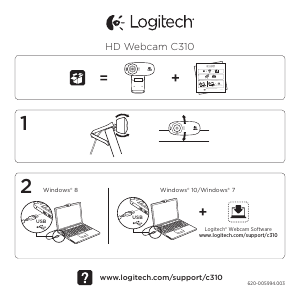
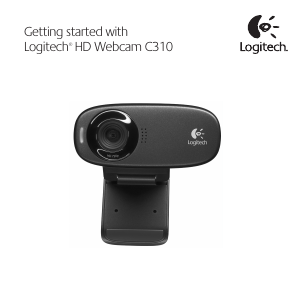
Manual Logitech HD C310 Webcam

Need a manual for your Logitech HD C310 Webcam? Below you can view and download the PDF manual for free in English. This product currently has 0 frequently asked questions, 1 comment and has 11 votes with an average product rating of 55/100. If this is not the manual you want, please contact us.

Is your product defective and the manual offers no solution? Go to a Repair Café for free repair services.

Manual

Loading…
English 7
Logitech
®
HD Webcam C310
The Logitech software optimizes the settings for your environment automatically. To adjust any
of your settings choose Camera options. This is available from the Camera app (see the previous
page) and from within Metro apps that support webcams.
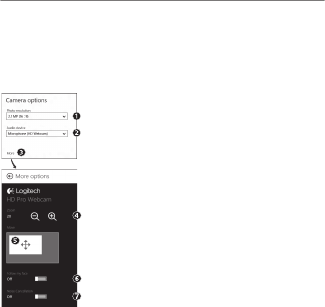
Adjusting your Camera settings
1. Choose your required resolution for photo capture, or video
capture when in Video Mode.
2. Choose the microphone you want to use to record sound in
your videos, if you have more than one available.
3. Access More Options, to benefit from enhanced features such as
digital Zoom and Move.
If the More Options pane doesn’t show the Logitech logo
and offer enhanced options, it is likely that the Logitech software
didn’t install correctly when you first connected your camera.
To reinstall it, go to the Windows Store and look for Logitech
Camera Controller.
4. Zoom in or out to include/exclude your surroundings.
5. Having zoomed in, drag the white box to pan (adjust the focus area
of your webcam).
6. Use Follow my face so you’re always in the picture.
7. Enjoy clear conversations without annoying background noise.
Depending on the features available with your camera, you can access
further advanced settings by scrolling.
Tip: The Camera app lets you use your webcam’s most popular features quickly and easily.
If you want to take advantage of the enhanced features your webcam offers, such as motion
detection, use the Logitech Webcam Software available from logitech.com/downloads.
Download manual in English (PDF, 11.37 MB)
(Consider the environment and only print this manual if it is really necessary)

Loading…

Rating

Let us know what you think about the Logitech HD C310 Webcam by leaving a product rating. Want to share your experiences with this product or ask a question? Please leave a comment at the bottom of the page.
Are you satisfied with the Logitech HD C310 Webcam?
Yes No
55%
45%
11 votes

Join the conversation about this product

Here you can share what you think about the Logitech HD C310 Webcam. If you have a question, first carefully read the manual. Requesting a manual can be done by using our contact form.

MATZ Marithé 16-08-2020
I think this is a great product, but since I have had a lot of LOGITECH models and haven't used them for a long time, I don't know how to take pictures directly on the webcam ??? can you explain it to me (yesterday, unwittingly, i got there, but i don't know how) ... thank you Otherwise, I have always been satisfied with your webcams without any hesitation.

reply | This was helpful (0) (Translated by Google)

More about this manual

We understand that it’s nice to have a paper manual for your Logitech HD C310 Webcam. You can always download the manual from our website and print it yourself. If you would like to have an original manual, we recommend you contact Logitech. They might be able to provide an original manual. Are you looking for the manual of your Logitech HD C310 Webcam in a different language? Choose your preferred language on our homepage and search for the model number to see if we have it available.

Specifications

Brand Logitech
Model HD C310
Category Webcams
File type PDF
File size 11.37 MB

All manuals for Logitech Webcams
More manuals of Webcams
Manual Logitech HD C310 Webcam

Related products

Related categories

×
Download