Manual Logik LWLOM10 Mouse

Need a manual for your Logik LWLOM10 Mouse? Below you can view and download the PDF manual for free in English. This product currently has 4 frequently asked questions, 0 comments and has 0 votes. If this is not the manual you want, please contact us.

Is your product defective and the manual offers no solution? Go to a Repair Café for free repair services.

Manual

Loading…
GB-5GB-4
GB-6
GB-7
66
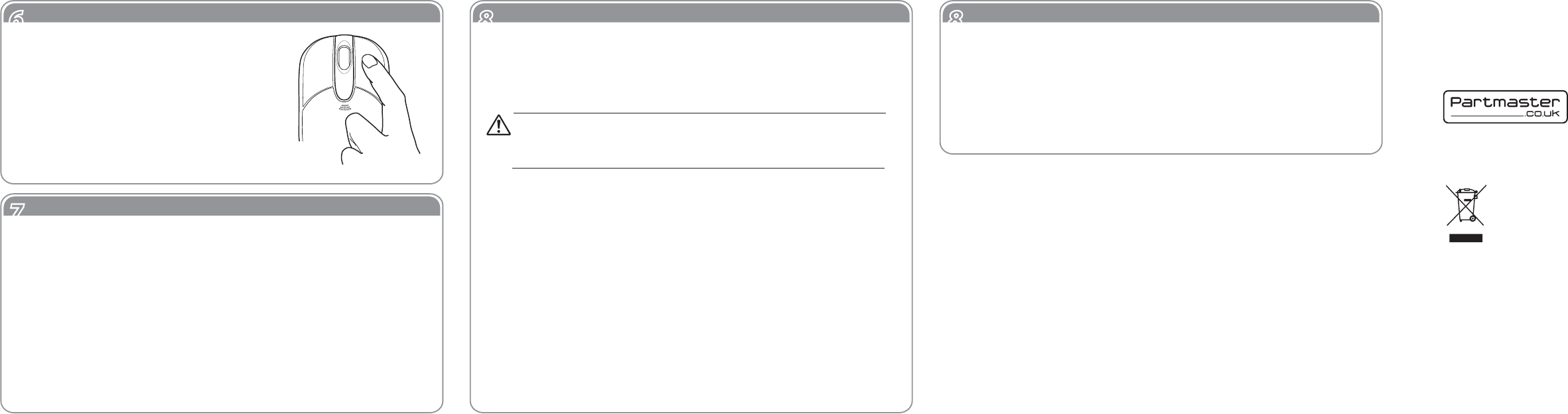
Sleep Mode Function
77
Troubleshooting
88
Safety
88
Safety
To reduce the risk of injury :
Keep batteries out of the reach of children.
Do not heat, open, puncture, mutilate, or dispose of batteries in re.
Do not mix new and old batteries or batteries of different types
Do not allow metal objects to touch the battery terminals on the
device; they can become hot and cause burns.
Mouse Not Working :
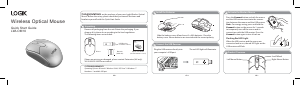
1. Make sure the USB receiver is plugged into a USB port and the
computer is on.
2. Check battery installation. Replace batteries if needed.
3. If mouse performance is slow or intermittent around a wireless
network, unplug the USB receiver from the USB port and then reinsert
it. Press the Connect button again on the bottom of the mouse to
reactivate it.
After the mouse has been in on idle state for
8 minutes, it will go into Sleep Mode.
To reactivate the mouse, click on either the
Right or the Left mouse button.
Battery-Powered Devices :
Improper use of batteries may result in battery uid leakage, overheating,
or explosion. Released battery uid is corrosive and may be toxic. It can
cause skin and eye burns, and is harmful if swallowed.
Optical :
Never point the optical sensor towards the face, particularly the eyes, to
avoid possible injury.
Wireless Devices :
Before boarding any aircraft or packing a wireless device in luggage that
will be checked, remove the batteries from the wireless device.
Wireless devices can transmit radio frequency (RF) energy, whenever
batteries are installed and the wireless device is turn on.
While the mouse is functioning, the optical light is visible to the
naked eye. Be careful not to look directly into the emitter hole
while the mouse is active.
Features and specications are subject to change without prior notice.
Windows is a registered trademark of Microsoft Corporation in the United States
and other countries.
This symbol on the product or in the instructions means that your electrical and
electronic equipment should be disposed at the end of its life separately from your
household waste. There are separate collection systems for recycling in the EU.
For more information, please contact the local authority or your retailer where you
purchased the product.
Visit Partmaster.co.uk today for the easiest way to buy electrical
spares and accessories. With over 1 million spares and accesso-
ries available we can deliver direct to your door the very next
day. Visit www.partmaster.co.uk or call 0844 800 3456 (UK
customers only) Calls charged at National Rate.
DSG Retail Ltd. • Maylands Avenue Hemel Hempstead • Hertfordshire HP2 7TG England
Notes for battery disposal:
The batteries used with this product contain chemicals that are harmful to the environment. To
preserve our environment, disposal of used batteries according to your local laws or regulations.
Do not dispose of batteries with the normal household waste.
For more information, please contact the local authority or your retailer where you purchased the
product.
Download manual in English (PDF, 1.53 MB)
(Consider the environment and only print this manual if it is really necessary)

Loading…

Rating

Let us know what you think about the Logik LWLOM10 Mouse by leaving a product rating. Want to share your experiences with this product or ask a question? Please leave a comment at the bottom of the page.
Are you satisfied with the Logik LWLOM10 Mouse?
Yes No
Be the first to rate this product
0 votes

Join the conversation about this product

Here you can share what you think about the Logik LWLOM10 Mouse. If you have a question, first carefully read the manual. Requesting a manual can be done by using our contact form.

More about this manual

We understand that it’s nice to have a paper manual for your Logik LWLOM10 Mouse. You can always download the manual from our website and print it yourself. If you would like to have an original manual, we recommend you contact Logik. They might be able to provide an original manual. Are you looking for the manual of your Logik LWLOM10 Mouse in a different language? Choose your preferred language on our homepage and search for the model number to see if we have it available.

Specifications

Brand Logik
Model LWLOM10
Category Mice
File type PDF
File size 1.53 MB

All manuals for Logik Mice
More manuals of Mice

Frequently Asked Questions about Logik LWLOM10 Mouse

Our support team searches for useful product information and answers to frequently asked questions. If you find an inaccuracy in our frequently asked questions, please let us know by using our contact form.

What is the best surface to use a mouse on? Verified

A traditional trackball mouse will work best on a padded surface such as a mouse pad. An optical mouse will work on almost any flat surface, with the exception of transparent or reflective surfaces. Surfaces with a printed repetitive pattern might interfere with the functioning of the mouse.

This was helpful (128) Read more

What is an ergonomic mouse? Verified

Daily use of a regular mouse over long periods of time can result in pain in the arm and wrist. This is also called RSI (Repetitive Strain Injury). An ergonomic mouse is shaped to reduce these issues or prevent them.

This was helpful (60) Read more

What is the difference between a normal mouse and a gaming mouse? Verified

Every gaming mouse can be used asa regular mouse. However, a gaming mouse often has additional buttons in specific places to make gaming easier. There even are gaming mice that have buttons that are meant to better play a specific game.

This was helpful (59) Read more

What size mouse is best for my hand? Verified

This partially depends on personal preference and necessity, but in general a mouse should be around 60% of the size of your hand. This is the most comfortable and most ergononical.

This was helpful (55) Read more
Manual Logik LWLOM10 Mouse

Related products

Related categories

×
Download