1
2
3
54
6 7
EN
User Guide
FG-6019
Digital Color Display
Luggage Scale
Handheld, Precise and Portable
E. How to Weight an Object
1. Power on: Press the POWER SWITCH button to
turn it on. The LCD display will show 0.00.
2. When the display shows zero, press UNIT to select
the desired weight unit.
3. Strap the webbing belt through the luggage handle
and secure the hook of the belt onto the triangle
4. Lift the scale gently. Make sure the scale is
horizontal and balanced. The LCD screen shows
the weight. Wait for weight reading to stop and
stabilize.
5. The auto hold function keeps the measured weight
on the screen for 45 seconds after you have
weighed something.
6. Power off: Press POWER SWITCH button and hold
for 3 seconds until the unit turns off, the scale will
automatically switch off if idle for 30 seconds.
7. Tare function: After the weighed result of the object
(a bag or a container) is shown, press the POWER
SWITCH button once to zero the reading. Place an
additional object on the scale. The LCD screen will
display the net weight of the additional object.
Thank you for purchasing the Lifetrons Digital
Color Display Luggage Scale. This guide
outlines the operating procedures and safety
precautions. Please read it carefully to make
sur
e you are using your product properly and
retain it for future reference.
What's Inside
• Digital Color Display Luggage Scale
• 3V DC CR2032 Lithium Battery x 1
• Storage pouch
• User guide
Features
• Modern design
• Easy to carry
• Large screen and digits for easy reading
• Overweight indicator bar
• Power saving with auto shut off
• High precision strain gauge sensor system
• Tare function
• Data lock function
• Overload indication
• Buzzer
• Dimensions: 125 x 38 x 64mm
• Max capacity: 50kg/110lb
• Units: kg, lb, oz
• Power supply: Button cell battery x 1
• Viewable LCD: 28 x 18mm
• Weight: 85g
• Refrain from dropping the product or bumping it
against other objects
• Should any abnormal situations or problems
occur while using this product, discontinue its
use immediately
• The scale can be damaged if overloaded. If the
weight of an object is over 5% of the maximum
weight, EEEE will be shown on the LCD screen
to alert you
• Avoid any exposure to extreme heat or cold.
Your scale works better when operated at
normal room temperature. Always allow the
scale to acclimatize to normal room
temperature for at least one hour before use
• The battery should be removed if the scale is
not in use for a long period of time — to avoid
damage caused by battery leakage
• Avoid shaking, dropping or damaging the scale.
This is a precision instrument and it must be
handled with care
Children
Keep out of reach of children. Do not allow
children to play with your product or its
accessories. They could hurt themselves or others
and could accidentally damage the product. Your
product and its accessories may contain small
parts that could become detached and create a
c
hoking hazard.
Safety Precautions
Please follow the rules outlined in this guide
operation:
• Be cautious of any edges, uneven surfaces,
metal parts, accessories or packaging to
prevent possible injury or damage. Take note
that this product should not be placed in your
mouth
• Do not modify, repair or dismantle the product.
complete breakdown of the product, etc. and
will void the warranty
• Do not use any kind of liquid to clean the
product. Keep in mind that the surface of the
product should only be wiped with a clean dry
cloth
• Do not use this product in locations with high
temperatures or high humidity levels (i.e.:
bathrooms); ideally, the product should be used
in a location free of excessive dust and not
exposed to direct sunlight
• Do not insert foreign objects or liquids into the
product; this could damage the product
How to use
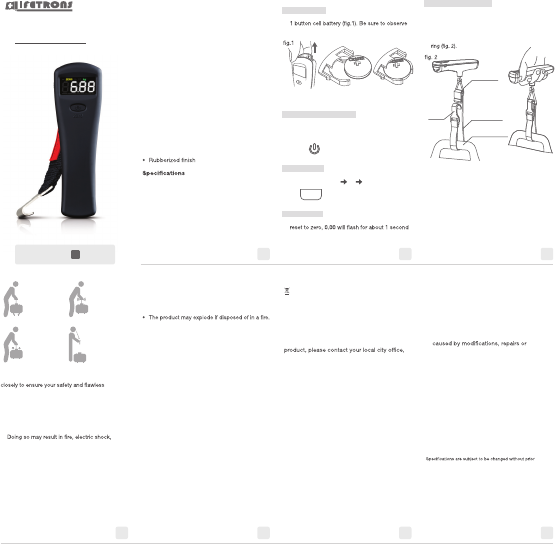
A. Battery Case
1. Pull out the battery case from the slot and insert
the polarity as illustrated in the drawing below
and insert the battery case back into the scale.
B. POWER SWITCH Button
1. Press the POWER SWITCH button to turn the
scale on or to reset it to zero. (This will also
release the holding value of a previously
weighed item or tare).
C. UNIT Button
1. Press the UNIT button to select or change the
unit weight from kg oz Ib.
D. Reset Scale
1. When pressing the POWER SWITCH button to
on the LCD screen.
2. Please keep your hand as stable as possible
and do not touch the scale (triangle ring
and hook).
4. The warranty does not cover product failures
which have been caused by use of
accessories or other peripheral devices
which are not Lifetrons branded original
accessories intended for use with the
product. The warranty does not cover any
damage caused by misuse, abuse, neglect
or accidental breakage.
5. The warranty does not cover product failures
disassembly by any person not authorized
by the manufacturer.
6. Any defective unit or part shall become
property of the manufacturer.
Additional Information
Register your Lifetrons product online at
www.lifetrons.com.
Please visit our website www.lifetrons.com or
contact our customer service center at
products and special offers.
©Copyright 2012 by Lifetrons Switzerland GmbH. Lifetrons
®
is
a registered trademark of Lifetrons Switzerland GmbH or
Lifetrons International Limited. All brands and product names
listed are trademarks or registered trademarks of their
respective holders and are hereby recognized as such.
notice. All rights reserved.
Disposal of Electrical and Electronic Equipment
This symbol indicates that all electrical and
electronic equipment included with this product
should not be treated as household waste.
Instead, it should be left at the appropriate
collection point for the recycling of electronic
equipment. By ensuring this product is
disposed of correctly, you are helping to
prevent negative consequences for the
environment and human health. To recycle this
household waste disposal service or where you
purchased the product.
Limited Warranty
If within 12 months of purchase this product or
any part thereof is proven to be defective by
reason of faulty workmanship or defect in
materials, we will repair or replace the same
product free of charge of labor or materials on
condition that:
1. The original invoice or sales receipt with the
date of purchase is presented with the
defective unit.
2. Lifetrons does not take any responsibility for
lost information of any kind and will not
reimburse you for any such loss.
3. The limited warranty is only valid if the
original proof of purchase for this product,
issued by a Lifetrons authorized dealer,
specifying the date of purchase, is presented
with the product to be repaired or replaced.
Lifetrons reserves the right to refuse
warranty service if this information has been
removed or changed after the original
purchase of the product from the dealer.
The positive (+) side of the button cell battery
should be inserted face up, with the plus sign
facing toward the back of the tuner body.
POWER SWITCH button
ZERO
Convert between weight units
(oz, lb, kg)
UNIT
1. Lift luggage 2. Wait for the beep
3. Set luggage down 4. Read weight
trangle ring
webbing belt
luggage handle
hook


Join the conversation about this product
Here you can share what you think about the Lifetrons FG-6019 Luggage Scale. If you have a question, first carefully read the manual. Requesting a manual can be done by using our contact form.
reply | This was helpful (0)
reply | This was helpful (0)