Manual Laser SPK-BTPH19-BLU Speaker

Need a manual for your Laser SPK-BTPH19-BLU Speaker? Below you can view and download the PDF manual for free in English. This product currently has 5 frequently asked questions, 0 comments and has 0 votes. If this is not the manual you want, please contact us.

Is your product defective and the manual offers no solution? Go to a Repair Café for free repair services.

Manual

Loading…

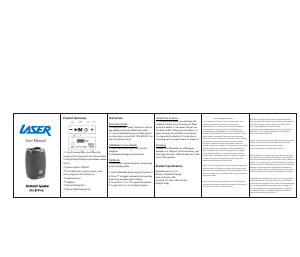
Bluetooth Speaker
SPK-BTPH19
Product Overview
A
1E
A Vol-/Previous track: short press for
previous track, long press for Volume down
A
2E
A Play/Pause/FM auto scan/Answer (when
call in)
A
3E
A Power button: ON/OFF
A
4E
A Vol+/Next track: short press for next
track, long press for Volume up
A
5E
A Auxiliary Input
A
6E
A USB Port
A
7E
A Micro SD Card Slot
A
8E
A Micro USB Charging Port
Instruction
Bluetooth Mode
1. Long press the “Power” button to turn on
the speaker and enter Bluetooth mode.
2. Turn on Bluetooth on your mobile phone
or other device, search for “SPK-BTPH19” on
the list and then pair it.
USB Mode/ Line-in Mode
1. Insert USB stick or Micro SD card for
playback.
2. Playback will begin automatically.
FM Mode
To have better signal reception, please plug
in the charging cable.
1. Select FM Mode by pressing the button A
2E
2. Press A
2E
A to begin automatically searching
and saving available radio stations.
3. Short Press A
1E
A or A
4E
A to select the station.
4. Long Press A
1E
A or A
4E
A to adjust volume.
Hands free function
1. The music will pause, you will hear the
ringtone if there is an incoming call. Short
press the button A
2E
A to answer the call via
the built-in MIC. Short press the button A
2E
A
again hang up the call after conversation.
2. Long press the button A
2E
A to decline an
incoming call if you don’t want to answer it.
Charging
Connect the USB cable to a USB power
adapter or a USB port of the computer, and
then plug the micro USB into the micro USB
port of the speaker.
Product Specification
Bluetooth version: 5.0
Battery: 1200mAh Playing
time: 2h Power: 5W
Unit Size: 92 x 83 x 135 mm Unit
Weight: 358g
Warranty Against Defects
Laser Corporation Pty Ltd (“Laser”) warrants your new
product to be free from defects in materials and
workmanship for 12 months, from the date of purchase,
provided that the product is used in accordance with
accompanying recommendations or instructions where
provided. The benefit of this warranty is in addition to your
rights under the Australian Consumer Law and to other
rights and remedies of the consumer under a law in relation
to the goods or services to which the warranty relates.
Through a network of retailers and resellers, Laser will
provide you with your choice of a refund, repair or exchange
(where possible) for this product if it becomes defective
within the warranty periods. This warranty will no longer
apply where the defect is a result of alteration, accident,
misuse, abuse, normal wear and tear, neglect or improper
storage. Please retain your receipt as proof of purchase.
How to make a product warranty claim:
Step 1: Find your receipt which proves the date of purchase.
Where the date of purchase cannot be verified, your place
of purchase or Laser will make an assessment based on the
date of manufacture, the condition of the Laser Product and
the type of defect.
Step 2a): Contact your place of purchase. They will assess
the nature of the fault and refund or replace the product as
per their store refund or warranty policy.
Step 2b): If your place of purchase cannot be contacted,
then you can contact Laser. Customer Service with details of
your defective Laser Product: Phone: (02) 9870 3340; or
Email: [email protected] or online
www.laserco.net/support/warranty (click on “Consumers
(End Users)”). Our business address is at 1/6-8 Byfield
Street, North Ryde, NSW 2113
Step 3: Laser will issue you with a Return Authorisation (RA)
number within 48 hours. When requested, send us the
defective Product and a copy of your receipt.
Laser will cover the cost of the return delivery.
Step 4: Wait for us to contact you. Once we have received
your defective Laser Product for inspection, we will inform
you of our assessment of your claim within 7 days. When we
contact you, we will firstly let you know whether you have a
valid claim under this Warranty, and if so, we will inform you
whether your defective Laser Product will be replaced or
repaired, together with the number of days you can expect
to wait to receive your replaced or repaired Laser Product.
Our goods come with guarantees that cannot be excluded
under the Australian Consumer Law. You are entitled to a
replacement or refund for a major failure and compensation
for any other reasonably foreseeable loss or damage. You
are also entitled to have the goods repaired or replaced if
the goods fail to be of acceptable quality and the failure
does not amount to a major failure.
Download manual in English (PDF, 0.16 MB)
(Consider the environment and only print this manual if it is really necessary)

Loading…

Rating

Let us know what you think about the Laser SPK-BTPH19-BLU Speaker by leaving a product rating. Want to share your experiences with this product or ask a question? Please leave a comment at the bottom of the page.
Are you satisfied with the Laser SPK-BTPH19-BLU Speaker?
Yes No
Be the first to rate this product
0 votes

Join the conversation about this product

Here you can share what you think about the Laser SPK-BTPH19-BLU Speaker. If you have a question, first carefully read the manual. Requesting a manual can be done by using our contact form.

More about this manual

We understand that it’s nice to have a paper manual for your Laser SPK-BTPH19-BLU Speaker. You can always download the manual from our website and print it yourself. If you would like to have an original manual, we recommend you contact Laser. They might be able to provide an original manual. Are you looking for the manual of your Laser SPK-BTPH19-BLU Speaker in a different language? Choose your preferred language on our homepage and search for the model number to see if we have it available.

Specifications

Brand Laser
Model SPK-BTPH19-BLU
Category Speakers
File type PDF
File size 0.16 MB

All manuals for Laser Speakers
More manuals of Speakers

Frequently Asked Questions about Laser SPK-BTPH19-BLU Speaker

Our support team searches for useful product information and answers to frequently asked questions. If you find an inaccuracy in our frequently asked questions, please let us know by using our contact form.

I want to connect a speaker to my television with HDMI, which port should I use? Verified

You need to use the HDMI-ARC port, which is specifically made for connecting audio equipment.

This was helpful (1480) Read more

What do the frequencies say about my speaker? Verified

It indicates the range of frequencies that the speaker can produce. A bigger range of frequencies will provide a larger variation in sound en produce higher quality sound.

This was helpful (790) Read more

When is my music too loud? Verified

Sounds over 80 decibel (dB) can start to damage hearing. Sounds over 120 dB immediately damage hearing. The severity of the damage depens on how often and how long the sound is present.

This was helpful (472) Read more

Does bluetooth work through walls and ceilings? Verified

A bluetooth signal will work through walls and ceiling, unless these are made from metal. Depending on the thickness and the material of the wall the signal can lose in strength.

This was helpful (232) Read more

Up to what noise level is it safe for children? Verified

Children get their hearing damaged quicker than adults. Therefore it is important to never expose children to noise louder than 85dB. In the case of headphones there are special models for children. In case of speakers or other situations you have to be watchful the noise does not exceed that level.

This was helpful (209) Read more
Manual Laser SPK-BTPH19-BLU Speaker

Related products

Related categories

×
Download