Manual Klip Xtreme KLS-700 Magno Speaker

Need a manual for your Klip Xtreme KLS-700 Magno Speaker? Below you can view and download the PDF manual for free in English. This product currently has 5 frequently asked questions, 0 comments and has 0 votes. If this is not the manual you want, please contact us.

Is your product defective and the manual offers no solution? Go to a Repair Café for free repair services.

Manual

Loading…
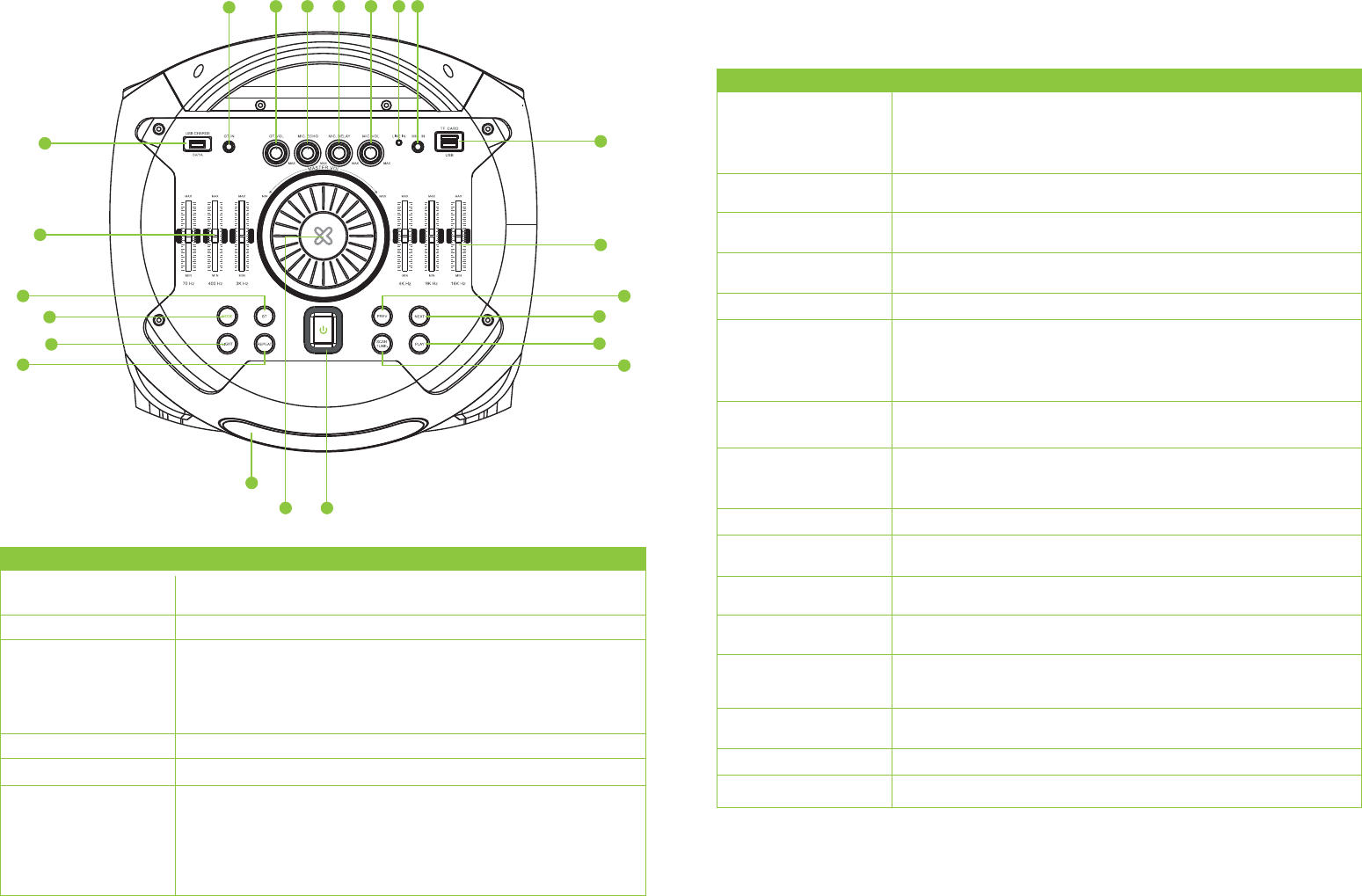
Top panel
Control Description
Control Description
1. LED display
2. BT button
3. Mode button
4. Light button
5. Repeat button
6. PREV button
This screen displays the selected input mode: Bluetooth
®
, USB, Aux, SD
TM
and tuner,
the volume level, the track being played, and the selected channel.
Press this button to select the BT mode.
Press this button briefly to toggle through the different audio sources available:
Bluetooth
®
, USB, SD
TM
, Line In and FM.
The corresponding mode symbol will be illuminated on the display when the
selected source is playing. As there is no default mode assigned, the system starts
playing automatically the last media source inserted.
Press this button to toggle among the five lighting effects available on the speaker.
In USB and SD
TM
modes, use it to repeat a single track or repeat all tracks.
In Bluetooth
®
, USB and SD™ mode, briefly press this button to select the previous
track.
In tuner mode, briefly press this button to go to the previous channel or song.
This feature is not available in auxiliary mode.
In Bluetooth
®
, USB and SD™ mode, briefly press this button to select the next track.
In tuner or Bluetooth
®
mode, briefly press this button to go to the next channel or song.
This feature is not available in auxiliary mode.
In tuner mode, press this button to go down to the previous channel. Press and
hold it to scan the different playing stations.
Press it to play and pause audio in the Bluetooth
®
, USB or SD™ modes. In tuner
mode press this button to go up to the next frequency.
Adjusts the treble (high) frequencies of the speaker.
Adjusts the bass (low) frequencies of the speaker.
Controls the overall audio level from all inputs. Turn it counterclockwise to lower
the volume, or clockwise to increase the audio coming from the speaker.
The volume can also be controlled directly from each of the sources connected to
the speaker.
Enables audio playback from MP3 and WMA music files stored in a USB memory
stick or SD
TM
card.
Use the built-in power bank to recharge your compatible devices.
Note: For this function the speaker has to be ON.
These stereo
¼inch jack accept the input from a guitar.
Once a guitar is connected to the guitar input jack, the user can adjust the volume
level coming from the speaker.
Adjust this knob to control how much of an echo effect is applied to the signal from
the microphone actively connected to the speaker.
Adjust this knob to control how much of a vocal delay is applied to the signal from
the microphone actively connected to the speaker.
Controls the audio level of the wireless and wired microphones actively connected
to the speaker. When adjusting the microphone volume, the CV indication appears
on the screen.
Connect a CD player, digital media player or other audio source to this stereo
3.5mm line-in connector.
These stereo
¼inch jack accept the input from a wired microphone.
Press and hold this button to turn the unit ON/OFF.
7. NEXT button
8. SCAN TUNE button
9. PLAY TUNE button
10. Equalizer (treble)
controls
11. Equalizer (bass) controls
12. MASTER VOLUME
control
13. MicroSD
TM
card
slot/USB port
14. USB charge port
15. GT input jacks
16. GT volume knob
17. MIC ECHO knob
18. MIC DELAY knob
19. MIC volume knob
20. LINE IN input
21. MIC 2 input
22. POWER button
Note: The unit has a built-in antenna to pick up the signal for the tuner.
1
22
15
16 17 18 19 20 21
12
2
5
3
11
4
6
8
7
13
10
14
9
Download manual in English (PDF, 0.94 MB)
(Consider the environment and only print this manual if it is really necessary)

Loading…

Rating

Let us know what you think about the Klip Xtreme KLS-700 Magno Speaker by leaving a product rating. Want to share your experiences with this product or ask a question? Please leave a comment at the bottom of the page.
Are you satisfied with the Klip Xtreme KLS-700 Magno Speaker?
Yes No
Be the first to rate this product
0 votes

Join the conversation about this product

Here you can share what you think about the Klip Xtreme KLS-700 Magno Speaker. If you have a question, first carefully read the manual. Requesting a manual can be done by using our contact form.

More about this manual

We understand that it’s nice to have a paper manual for your Klip Xtreme KLS-700 Magno Speaker. You can always download the manual from our website and print it yourself. If you would like to have an original manual, we recommend you contact Klip Xtreme. They might be able to provide an original manual. Are you looking for the manual of your Klip Xtreme KLS-700 Magno Speaker in a different language? Choose your preferred language on our homepage and search for the model number to see if we have it available.

Specifications

Brand Klip Xtreme
Model KLS-700 Magno
Category Speakers
File type PDF
File size 0.94 MB

All manuals for Klip Xtreme Speakers
More manuals of Speakers

Frequently Asked Questions about Klip Xtreme KLS-700 Magno Speaker

Our support team searches for useful product information and answers to frequently asked questions. If you find an inaccuracy in our frequently asked questions, please let us know by using our contact form.

I want to connect a speaker to my television with HDMI, which port should I use? Verified

You need to use the HDMI-ARC port, which is specifically made for connecting audio equipment.

This was helpful (1488) Read more

What do the frequencies say about my speaker? Verified

It indicates the range of frequencies that the speaker can produce. A bigger range of frequencies will provide a larger variation in sound en produce higher quality sound.

This was helpful (795) Read more

When is my music too loud? Verified

Sounds over 80 decibel (dB) can start to damage hearing. Sounds over 120 dB immediately damage hearing. The severity of the damage depens on how often and how long the sound is present.

This was helpful (477) Read more

Does bluetooth work through walls and ceilings? Verified

A bluetooth signal will work through walls and ceiling, unless these are made from metal. Depending on the thickness and the material of the wall the signal can lose in strength.

This was helpful (238) Read more

Up to what noise level is it safe for children? Verified

Children get their hearing damaged quicker than adults. Therefore it is important to never expose children to noise louder than 85dB. In the case of headphones there are special models for children. In case of speakers or other situations you have to be watchful the noise does not exceed that level.

This was helpful (212) Read more
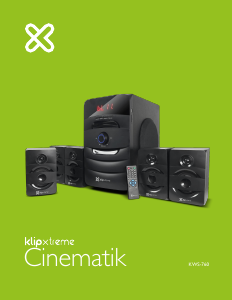
Manual Klip Xtreme KLS-700 Magno Speaker

Related products

Related categories

×
Download