Manual Karlsson KA6054GR Alarm Clock

Need a manual for your Karlsson KA6054GR Alarm Clock? Below you can view and download the PDF manual for free in English. This product currently has 0 frequently asked questions, 0 comments and has 0 votes. If this is not the manual you want, please contact us.

Is your product defective and the manual offers no solution? Go to a Repair Café for free repair services.

Manual

Loading…
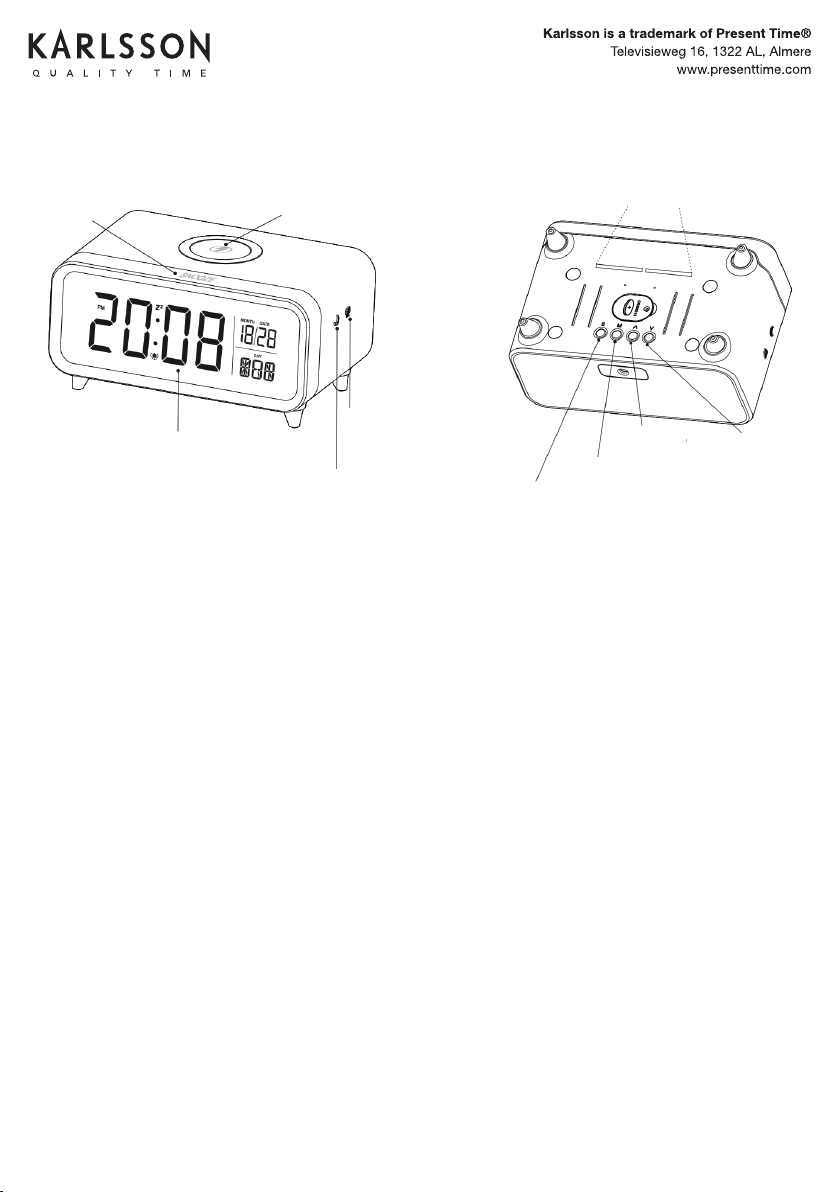
Power
Using a suitable adapter, connect it to the clock.
Note
Please use the original adapter.
If the light blinks randomly or the clock makes unusual noises, turn off the
power.
The original adapter is only to be used for this clock; do not use it with other
products.
Night light
Touch the button on the side of the clock to adjust the brightness.
The brightness levels: are High–Middle–Low–Off.
Back light
Touch the button on the side to adjust the brightness of the display panel.
The brightness levels are High–Middle–Low–Off.
Set
Press the “S” button (Set) to enter time setting mode. The adjustment order
is Hour > Minute > Year > Month > Day. Use the Up button to increase or the
Down button to decrease the values.
Alarm and Snooze Time Set
Press the “M” button (Mode) to enter the alarm setting mode. Use the Up or
Down button to enable or disable the alarm. The corresponding icon will appear
when the alarm is active.
To set the hour, minute, and snooze duration, press the “S” button (Set), then
adjust with Up to increase or Down to decrease.
INSTRUCTION MANUAL ALARM CLOCK CHUNKY KA6054
SNOOZE BUTTON
WIRELESS CHARGER
CLOCK & CALENDAR
NIGHT LIGHT BUTTON
BACKLIGHT
ADJUSTMENT
BUTTON
NIGHT LIGHT
SETTING
TURN DOWN
TURN UP
MODE
Alarm Function
When the alarm is sounding, press the “S”, “M”, “Up”, or “Down” buttons to stop
the alarm. If no action is taken, the alarm will automatically stop after 1 minute.
Snooze Function
When the alarm sounds, press the snooze button to activate snooze mode.
The snooze icon will light up.
12/24-Hour Format
In time mode, press the “^” (Up) button to toggle between the 12-hour and
24-hour formats.
Wireless Charging
Place electronic devices (compatible with wireless charging) on the center of the
clock for charging.
Note
When the device is charging, a red light will appear on the screen.
When fully charged, a green light will appear on the screen.
If charging fails or an anomaly occurs, the red light will blink.
Specifi cations
Product power: 18W ± 10%
Working temperature: 0 to 50°C
Adapter: 9V/2A
Wireless power rate: 10W
Dimensions: 17 x 11 x 7.35 cm
Download manual in English (PDF, 2.59 MB)
(Consider the environment and only print this manual if it is really necessary)

Loading…

Rating

Let us know what you think about the Karlsson KA6054GR Alarm Clock by leaving a product rating. Want to share your experiences with this product or ask a question? Please leave a comment at the bottom of the page.
Are you satisfied with the Karlsson KA6054GR Alarm Clock?
Yes No
Be the first to rate this product
0 votes

Join the conversation about this product

Here you can share what you think about the Karlsson KA6054GR Alarm Clock. If you have a question, first carefully read the manual. Requesting a manual can be done by using our contact form.

More about this manual

We understand that it’s nice to have a paper manual for your Karlsson KA6054GR Alarm Clock. You can always download the manual from our website and print it yourself. If you would like to have an original manual, we recommend you contact Karlsson. They might be able to provide an original manual. Are you looking for the manual of your Karlsson KA6054GR Alarm Clock in a different language? Choose your preferred language on our homepage and search for the model number to see if we have it available.

Specifications

Brand Karlsson
Model KA6054GR
Category Alarm Clocks
File type PDF
File size 2.59 MB

All manuals for Karlsson Alarm Clocks
More manuals of Alarm Clocks
Manual Karlsson KA6054GR Alarm Clock

Related products

Related categories

×
Download