
Karlsson is a trademark of Present Time®
Televisieweg 16, 1322 AL, Almere
www.presenttime.com
INSTRUCTION MANUAL ALARM CLOCK KA6035
Karlsson is a trademark of Present Time®
Televisieweg 16, 1322 AL, Almere
www.presenttime.com
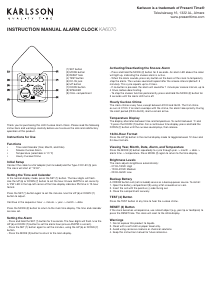
Functions:
• Display time, alarm with snooze, and dimmer.
• Two groups of alarms.
• Snooze time: 5 minutes.
• 12-hour display with PM/AM.
• Buttons: DIMMER, TIME SET, SNOOZE, AL1, AL2, HOUR, MIN.
• Power: 2 x AAA batteries (only for time memory, not included). Includes a DC 5V 1A USB cable.
• USB phone charging.
Setting the Time:
• Hold the TIME SET button and press the HOUR button to set the desired hour.
• Hold the TIME SET button and press the MIN button to set the desired minute.
• Release all buttons to save and exit the setting.
• To rapidly adjust the hour or minute, hold the TIME SET button and long-press the HOUR or MIN button.
Setting the Alarm:
• Hold the AL1 button and press the HOUR button to set the desired alarm hour.
• Hold the AL1 button and press the MIN button to set the desired alarm minute.
• Release all buttons to save and exit the alarm setting.
• Long-press AL1 for 2 seconds to display the AL1 time.
• Follow the same steps for AL2.
Using the Snooze Function:
• When the alarm sounds, press the SNOOZE button. The alarm will temporarily stop and resume after 5 minutes.
• To stop the alarm completely, press any button except the SNOOZE button. The alarm will stop but remain active for the next day.
Alarm On/Off:
• To turn the alarm on or off, press the AL1 or AL2 buttons.
• When the alarm is on, the alarm icon will appear on the screen.
Dimmer Function:
Press the DIMMER button to adjust the screen brightness. There are ve levels of brightness available.
INSTRUCTION MANUAL ALARM CLOCK KA6035
Functions:
• Display time, alarm with snooze, and dimmer.
• Two groups of alarms.
• Snooze time: 5 minutes.
• 12-hour display with PM/AM.
• Buttons: DIMMER, TIME SET, SNOOZE, AL1, AL2, HOUR, MIN.
• Power: 2 x AAA batteries (only for time memory, not included). Includes a DC 5V 1A USB cable.
• USB phone charging.
Setting the Time:
• Hold the TIME SET button and press the HOUR button to set the desired hour.
• Hold the TIME SET button and press the MIN button to set the desired minute.
• Release all buttons to save and exit the setting.
• To rapidly adjust the hour or minute, hold the TIME SET button and long-press the HOUR or MIN button.
Setting the Alarm:
• Hold the AL1 button and press the HOUR button to set the desired alarm hour.
• Hold the AL1 button and press the MIN button to set the desired alarm minute.
• Release all buttons to save and exit the alarm setting.
• Long-press AL1 for 2 seconds to display the AL1 time.
• Follow the same steps for AL2.
Using the Snooze Function:
• When the alarm sounds, press the SNOOZE button. The alarm will temporarily stop and resume after 5 minutes.
• To stop the alarm completely, press any button except the SNOOZE button. The alarm will stop but remain active for the next day.
Alarm On/Off:
• To turn the alarm on or off, press the AL1 or AL2 buttons.
• When the alarm is on, the alarm icon will appear on the screen.
Dimmer Function:
Press the DIMMER button to adjust the screen brightness. There are ve levels of brightness available.



Join the conversation about this product
Here you can share what you think about the Karlsson KA6035BK Alarm Clock. If you have a question, first carefully read the manual. Requesting a manual can be done by using our contact form.