
INSTRUCTION MANUAL | ALARM CLOCK HOUSE LED WOOD VENEER
KA5932
Karlsson is a trademark of Present Time®
Televisieweg 16, 1322 AL, Almere
www.presenttime.com
DISPLAY MODES AND FEATURES
DISPLAY MODES:
DP-1 automatically alternates between time, date, and
temperature, while DP-2 displays only the time.
CALENDAR:
Supports years 2000 to 2099.
SELECTABLE 12/24-HOUR FORMAT:
The initial mode is 24-hour (for example, January 1, 2016,
12:00).
ALARM SETTINGS:
There are three alarm settings available, and each alarm lasts
for one minute.
LUMINANCE ADJUSTMENT:
From 18:00 to 07:00, the display operates at half luminance.
Four brightness levels are available: L0, L1, L2, and L3.
POWER OPTIONS:
The clock can be powered by either 3× AAA batteries or DC
5V/500MA (batteries not included). It can also be powered
via USB (USB cable included). When using batteries, the
sound control function (power-saving mode) is set to ON by
default.
PACKING LIST
Digital wooden clock: 1 piece
User’s manual: 1 piece
1-meter USB cable: 1 piece
Setting Instructions
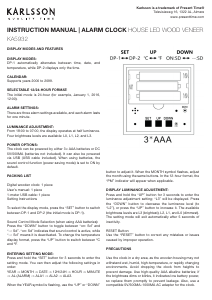
To select the display mode, press the “SET” button to switch
between DP-1 and DP-2 (the initial mode is DP-1).
Sound Control Mode Selection (when using AAA batteries):
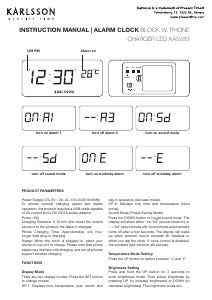
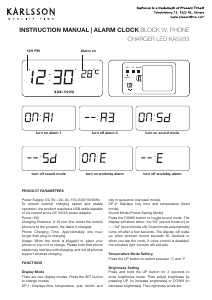
Press the “DOWN” button to toggle between “on: Sd” and
“--: Sd”. “on: Sd” indicates that sound control is active, while
“--: Sd” means it is deactivated. To change the temperature
display format, press the “UP” button to switch between ºC
and ºF.
ENTERING SETTING MODE:
Press and hold the “SET” button for 3 seconds to enter the
setting mode. You can then adjust the following settings in
order:
YEAR -> MONTH -> DATE -> 12H/24H -> HOUR -> MINUTE
-> AL (ALARM) -> ALA1 -> ALA2 -> ALA3.
When the YEAR symbol is ashing, use the “UP” or “DOWN”
button to adjust it. When the MONTH symbol ashes, adjust
the month using the same buttons. In the 12-hour format, the
“PM” indicator will appear when applicable.
DISPLAY LUMINANCE ADJUSTMENT:
Press and hold the “UP” button for 3 seconds to enter the
luminance adjustment setting; “L3” will be displayed. Press
the “DOWN” button to decrease the luminance level (to
“L2”), or press the “UP” button to increase it. The available
brightness levels are L3 (brightest), L2, L1, and L0 (dimmest).
The setting mode will exit automatically after 5 seconds of
inactivity.
RESET Button:
Use the “RESET” button to correct any mistakes or issues
caused by improper operation.
PRECAUTIONS
Use the clock in a dry area, as the wooden housing may not
withstand wet, humid, high-temperature, or rapidly changing
environments. Avoid dropping the clock from heights to
prevent damage. Use high-quality AAA alkaline batteries; if
the brightness dims or blinks, it indicates low battery power,
so replace them promptly to prevent leakage. Also, use a
compatible 5V/500MA–1000MA AC adapter for the clock.
INSTRUCTION MANUAL
ALARM CLOCK HOUSE LED WOOD VENEER
KA5932
EN
Karlsson is a trademark of Present Time
Televisieweg 16, 1322 AL, Almere
www.karlsson-clocks.com
Display modes:
DP-1: Time, date, and temperature automatically alternate.
DP-2: Only time displayed.
Calendar: Year 2000-2099.
Selectable 12/24H format: Initial mode is 24-hour; Example: January
1, 2016, 12:00.
Three alarm settings: Each alarm lasts for one minute
Luminance adjustment: From 18:00 to 07:00, half luminance; four
levels to set (L0 - L1 - L2 - L3).
Power options: Requires 3xAAA batteries or DC5V/500MA power
(batteries not included). Can also be powered via USB (USB cable
included). When using batteries, Sound control function is set to ON
by default.
Sound control mode (Power-saving mode).
Packing list:
Digital wooden clock: 1 piece
User’s manual: 1 piece
1-meter USB cable: 1 piece
Setting
To select display mode: Press “SET” to switch between DP-1 and
DP-2 (Initial mode: DP1).
Sound control mode selection (Power-saving mode on AAA batteries):
Press “DOWN”: “on: Sd” <--> “- -:Sd”.
“on: Sd” means sound control is active.
“--: Sd” means sound control is closed.
To change temperature display format: Press “UP” to switch between
ºC and ºF.
Setting mode: Press “SET” for 3 seconds to enter the setting mode.
You can set: YEAR -> MONTH -> DATE -> 12H/24H -> HOUR ->
MINUTE -> AL (ALARM) -> ALA1 -> ALA2 -> ALA3.
When YEAR symbol is ashing, use the “UP” or “DOWN” key to
adjust.
When MONTH symbol is ashing, use the “UP” or “DOWN” key to
adjust.
In the 12-hour format, the “PM” indicator is on.
Display luminance adjustment:
Press and hold “UP” key for 3 seconds to enter the setting item, “L3”
will be displayed.
Press “DOWN” key to decrease luminance level to “L2” display.
Press “UP” key for luminance enhancement.
There are four different levels: L3 (brightest) - L0 (dimmest).
After setting, it will exit setup after 5 seconds.
Button “RESET”:
Use the “RESET” button to rectify any mistakes or issues caused by
improper operation.
Precautions:
Please use the clock in a dry area, as wooden housing may not
withstand wet, humid, high-temperature, or rapidly changing
temperature environments.
Avoid dropping the clock from heights to prevent damage.
Use high-quality AAA alkaline batteries. If the brightness dims or blinks,
it indicates low battery; please replace them promptly to prevent
battery leakage.
Use a compatible 5V/500MA-1000MA AC adapter for the clock.


Join the conversation about this product
Here you can share what you think about the Karlsson KA5932DW Alarm Clock. If you have a question, first carefully read the manual. Requesting a manual can be done by using our contact form.