Manual JVC CU-VD10 DVD Player

Need a manual for your JVC CU-VD10 DVD Player? Below you can view and download the PDF manual for free in English. This product currently has 2 frequently asked questions, 0 comments and has 0 votes. If this is not the manual you want, please contact us.

Is your product defective and the manual offers no solution? Go to a Repair Café for free repair services.

Manual

Loading…
EN 7
If you think there is a malfunction, first check the following items. If you are still unable to solve the problem, consult your local JVC dealer.
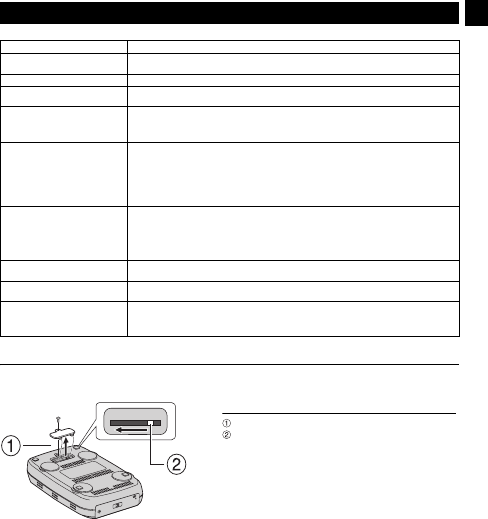
Force Eject Lever
If a disc cannot be ejected with the eject button because of a malfunction caused by a power cut or the burner being dropped, use this lever
to eject the disc.
Troubleshooting
Trouble Cause/Action
Cannot turn the power on. Make sure the AC adapter is connected properly.
Make sure the power switch is turned on.
The camera/PC is not recognized. Make sure the USB cable is connected properly.
The burner or AC adapter is hot. This is not a malfunction. If the burner is abnormally hot, remove the AC adapter and consult the
dealer from which you purchased the burner.
Cannot open the disc tray. A disc cannot be ejected by pressing the eject button if data is being written to the disc. Wait until
writing finishes.
If a disc cannot be ejected with the eject button because of a failure or a malfunction caused by,
for example, the burner being dropped, use the force eject lever to eject the disc. (See below.)
Writing fails. Make sure an appropriate disc is being used. ( pg. 3, 4)
Use discs recommended for the burner. ( pg. 4)
Insert the disc with the label facing up.
Make sure the writing surface of the disc is not damaged.
Make sure the disc tray is not dirty.
Writing to irregularly shaped discs such as heart-shaped discs or octagonal discs is not possible.
Check the writing speed of the disc being used.
Reading fails. Insert the disc with the label facing up.
Make sure the writing surface of the disc is not damaged.
Writing to irregularly shaped discs such as heart-shaped discs or octagonal discs is not possible.
Any CD recorded using the packet-write method cannot be played.
Any CD that does not comply with standards such as the CD-DA standard (copy-control CDs)
cannot be played.
Writing/reading at maximum speed
is not possible.
Reading at maximum speed may not be possible if a nonstandard disc is used.
Use discs recommended for the burner. ( pg. 4)
Commercial DVDs cannot be played
when the burner is connected to PC.
Check the region code. ( pg. 3)
It is impossible to dub the DVD discs,
which were written with this burner,
with DVD recorder with HDD.
Connect the burner to the camera, playback using [PLAY DVD] function of the camera, and dub
the DVD discs with the DVD recorder.
(Refer to “Connecting to a TV, VCR or DVD Recorder” or “Using a DVD Burner for Dubbing” in the
camera's manual.)
Proce
d
ure
Use a Phillips screwdriver to open the cover at the bottom.
Move the lever inside from the right to the left.
CU-VD10.book Page 7 Thursday, February 9, 2006 6:09 PM
Download manual in English (PDF, 21.2 MB)
(Consider the environment and only print this manual if it is really necessary)

Loading…

Rating

Let us know what you think about the JVC CU-VD10 DVD Player by leaving a product rating. Want to share your experiences with this product or ask a question? Please leave a comment at the bottom of the page.
Are you satisfied with the JVC CU-VD10 DVD Player?
Yes No
Be the first to rate this product
0 votes

Join the conversation about this product

Here you can share what you think about the JVC CU-VD10 DVD Player. If you have a question, first carefully read the manual. Requesting a manual can be done by using our contact form.

More about this manual

We understand that it’s nice to have a paper manual for your JVC CU-VD10 DVD Player. You can always download the manual from our website and print it yourself. If you would like to have an original manual, we recommend you contact JVC. They might be able to provide an original manual. Are you looking for the manual of your JVC CU-VD10 DVD Player in a different language? Choose your preferred language on our homepage and search for the model number to see if we have it available.

Specifications

Brand JVC
Model CU-VD10
Category DVD Players
File type PDF
File size 21.2 MB

All manuals for JVC DVD Players
More manuals of DVD Players

Frequently Asked Questions about JVC CU-VD10 DVD Player

Our support team searches for useful product information and answers to frequently asked questions. If you find an inaccuracy in our frequently asked questions, please let us know by using our contact form.

Can a DVD player also play CD's? Verified

Yes, almost all DVD players are capable of playing CD's.

This was helpful (199) Read more

Can I repair scratches on a DVD myself? Verified

Scratches prevent de laser from reading the disc correctly. When the scratches are only superficial it is possible to repair them yourself by polishing the disc with a slightly abrasive compound. Ideally you use a professional abrasive compound but it’s also possible to use regular toothpaste. After polishing the disc it needs to be washed and let to dry. There are specialised businesses that can do this.

This was helpful (92) Read more
Manual JVC CU-VD10 DVD Player

Related products

Related categories

×
Download