Manual Jenn-Air JMDFS24HM Microwave

Need a manual for your Jenn-Air JMDFS24HM Microwave? Below you can view and download the PDF manual for free in English. This product currently has 7 frequently asked questions, 0 comments and has 0 votes. If this is not the manual you want, please contact us.

Is your product defective and the manual offers no solution? Go to a Repair Café for free repair services.

Manual

Loading…
6
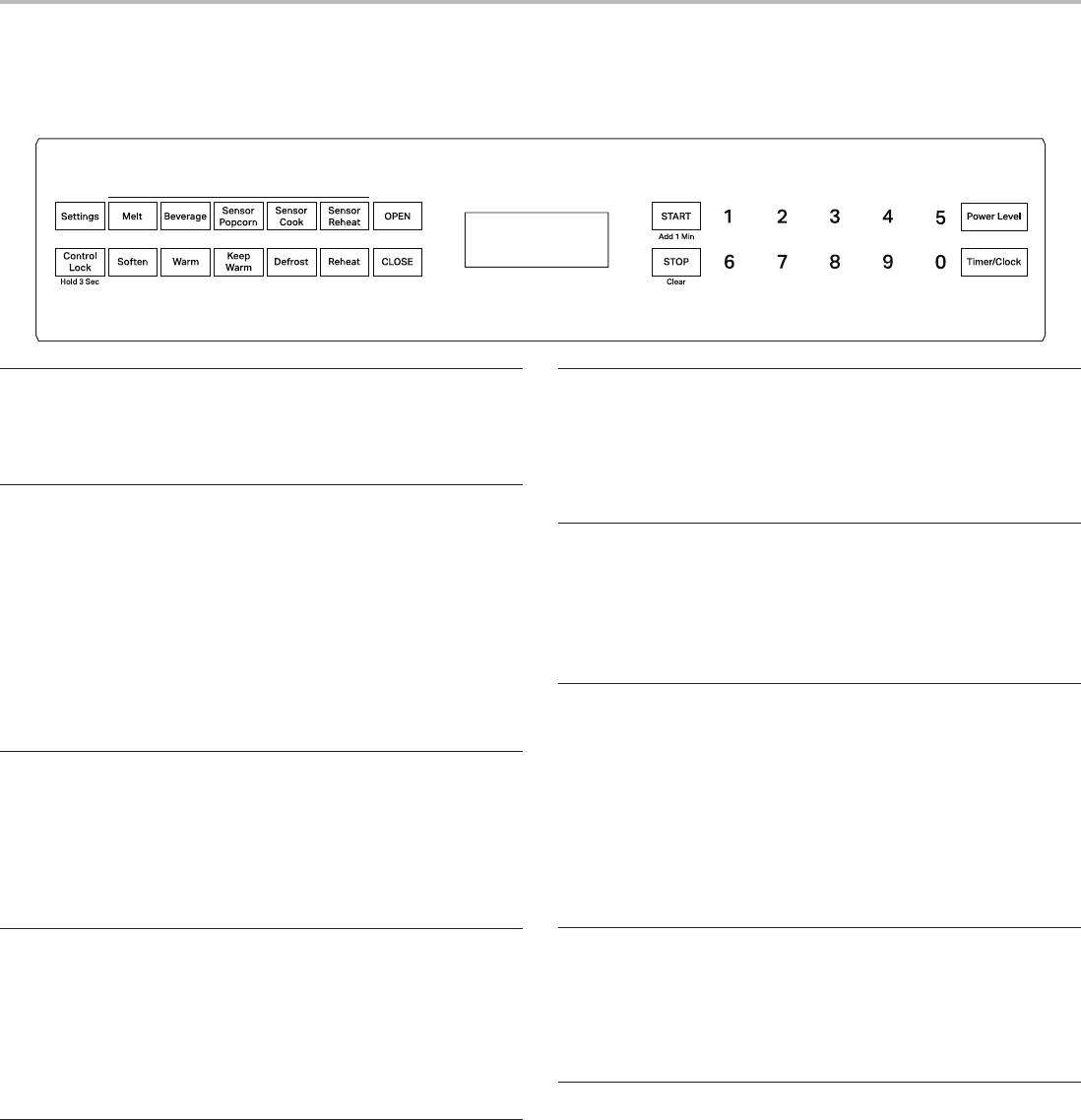
MICROWAVE DRAWER CONTROLS
This manual may cover several different models. The model you have purchased may have some or all of the features shown here. The
appearance of your particular model may differ slightly from the illustrations in this manual.
Display
When the microwave drawer is in use, the display shows cooking
power, quantities, weights, and/or prompts. When it is not in use,
the display shows the time of day.
Before First Use
When the microwave drawer is rst plugged in, the message
“Enjoy your microwave touch clear and touch clock” will scroll in
the display. You will need to clear the message to set the clock.
Clear display:
1. Touch STOP/CLEAR.
If the prompt “Enjoy your microwave touch clear and touch clock”
appears at any other time, a power failure has occurred. Clear the
display, and reset the clock.
NOTE: The microwave drawer can be programmed with the
drawer open except when using Start/Add 1 Min.
Clock
This is a standard 12-hour clock (12:00-11:59).
To Set Clock:
1. Touch TIMER/CLOCK, then number pad 2.
2. Enter time in hours and minutes.
3. Touch TIMER/CLOCK again to complete the setting.
Start
The Start control (Start/Add 1 Min) begins any cooking function.
If cooking is interrupted, touching START will resume the preset
non-sensor function.
NOTE: To avoid unintentional operation of the microwave drawer,
the Start control will work only if a cooking cycle has ended, the
drawer has been closed or Stop has been touched within the last
3 minutes.
Add 1 Min
The Add 1 Min control (Start/Add 1 Min) starts the microwave
drawer at 100% power for 1 minute. Each additional touch of the
control will add 1 minute of cook time.
Cook time may be added in 1-minute increments to a cooking
cycle at the current power level by touching ADD 1 MIN during
the cycle. The Add 1 Min function cannot be used during Reheat,
Defrost, or any sensor cycles.
NOTE: To avoid unintentional operation of the microwave drawer,
the Add 1 Min control will work only if a cooking cycle has ended,
the drawer has been closed, or Stop has been touched within the
past 3 minutes.
Stop/Clear
The Stop control (Stop/Clear) clears any incorrect command,
pauses cooking, and cancels most functions with one touch of
the control. Touch STOP twice to cancel a running cooking cycle.
The microwave drawer will also turn off when the drawer is opened.
Close the drawer, and touch START to resume the non-sensor cycle.
Open/Close
Touch the OPEN or CLOSE pad on the control panel to open or
close the drawer.
When opening or closing the drawer quickly, food in the microwave
drawer may be spilled. To clean, refer to the “General Cleaning”
section in “Microwave Drawer Care”.
Timer
The Timer can be set in minutes and seconds, and counts down
the set time.
NOTE: The Timer does not start or stop the microwave drawer.
To Set Timer:
1. Touch TIMER/CLOCK, then number pad 1.
2. Enter time in minutes and seconds.
3. Touch TIMER/CLOCK again to start Timer.
Timer may be canceled at any time by touching STOP/CLEAR.
Control Lock
The Control Lock shuts down the control panel pads to avoid
unintended operation of the microwave drawer. When the control
is locked, only the Control Lock control will function.
To Lock/Unlock Control: Touch and hold CONTROL LOCK for
3 seconds. The display will indicate the lock status.
Setup
The Setup control (Setup or Settings) provides access to the
following settings:
Tones: Sound off or on. See the “Tones” section.
Reminder tones: Reminder signal off or on. See the “Tones”
section.
Auto start: See the “Auto Start” section.
Demo Mode: Demo Mode on or off. See the “Demo Mode”
section.
Download manual in English (PDF, 0.82 MB)
(Consider the environment and only print this manual if it is really necessary)

Loading…

Rating

Let us know what you think about the Jenn-Air JMDFS24HM Microwave by leaving a product rating. Want to share your experiences with this product or ask a question? Please leave a comment at the bottom of the page.
Are you satisfied with the Jenn-Air JMDFS24HM Microwave?
Yes No
Be the first to rate this product
0 votes

Join the conversation about this product

Here you can share what you think about the Jenn-Air JMDFS24HM Microwave. If you have a question, first carefully read the manual. Requesting a manual can be done by using our contact form.

More about this manual

We understand that it’s nice to have a paper manual for your Jenn-Air JMDFS24HM Microwave. You can always download the manual from our website and print it yourself. If you would like to have an original manual, we recommend you contact Jenn-Air. They might be able to provide an original manual. Are you looking for the manual of your Jenn-Air JMDFS24HM Microwave in a different language? Choose your preferred language on our homepage and search for the model number to see if we have it available.

Specifications

Brand Jenn-Air
Model JMDFS24HM
Category Microwaves
File type PDF
File size 0.82 MB

All manuals for Jenn-Air Microwaves
More manuals of Microwaves

Frequently Asked Questions about Jenn-Air JMDFS24HM Microwave

Our support team searches for useful product information and answers to frequently asked questions. If you find an inaccuracy in our frequently asked questions, please let us know by using our contact form.

My microwave won't start when I press the start-button, what can I do? Verified

In many cases the door of the microwave hasn't closed properly. Open and close the door and try again.

This was helpful (3594) Read more

Can I use my microwave when the turntable doesn't work? Verified

The turntable makes sure the heat is distributed evenly. When it's not working, the microwave cannnot be properly used. Have it repaired.

This was helpful (2137) Read more

The microwave is on but is not working. Why is that? Verified

It's possible that the door does not close properly. To ensure safety a microwave will not workj until the door is completely closed. Sometimes this can be fixed by adjusting the door hinge.

This was helpful (1592) Read more

The mica/cardboard plate inside the microwave came off. Can I still use the microwave? Verified

No, absolutely not. The mica/cardboard plate is the waveguide that distributes the microwaves. Put it back or get a replacement.

This was helpful (1401) Read more

My microwave keeps making noise, even after it has finished. Is this normal? Verified

Yes, this is a normal sound. The fan cools the microwave after use. The duration depends on how long the microwave has operated.

This was helpful (1178) Read more

Can I boil water in the microwave? Verified

No, absolutely not. Water can get superheated. This means that the water can reach a temperature of above 100℃ without boiling. When this water then touchs any object it can instantly boil and splash up, causing burns.

This was helpful (904) Read more

Why can't I put metal in my microwave? Verified

Metal doesn't let the microwaves through but bounces them back. When these microwaves are bounced back at the same spot, this can cause sparks.

This was helpful (899) Read more
Manual Jenn-Air JMDFS24HM Microwave

Related products

Related categories

×
Download