Manual Insignia NS-PS06SC Paper Shredder

Need a manual for your Insignia NS-PS06SC Paper Shredder? Below you can view and download the PDF manual for free in English. This product currently has 2 frequently asked questions, 0 comments and has 0 votes. If this is not the manual you want, please contact us.

Is your product defective and the manual offers no solution? Go to a Repair Café for free repair services.

Manual

Loading…
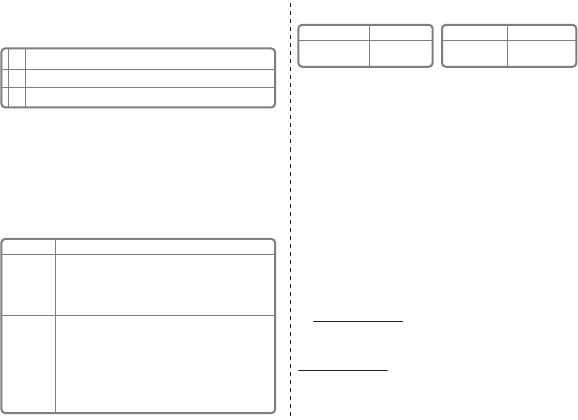
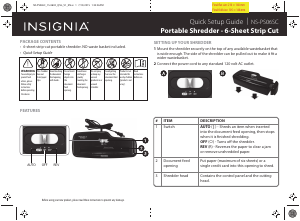
USING YOUR SHREDDER
Using the setting switch located on the unit, select one of the following
settings by sliding the switch either left or right.
Notes:
Never continuously run this shredder for more than two minutes. This can cause the
motor to overheat, which will make the thermal overload switch automatically shut
the power o. If this happens, move the setting switch to the o position for
20 minutes or more before continuing.
Never shred plastic, continuous forms, anything with adhesive including labels and
envelopes, newsprint, or any hard materials. While this shredder will shred staples, it
is recommended that you remove them whenever possible in order to extend the
life of your shredder.
Only shred credit cards by feeding them vertically within the designated area. Never
feed more than one credit card at a time.
TROUBLESHOOTING
SPECIFICATIONS
MAINTENANCE
We recommend you oil your shredder once a month with vegetable or cooking oil
(nothing petroleum based). Drizzle some oil on a few pieces of paper and feed
those pages through the shredder. Do not spray or keep any aersol products in or
around the shredder.
IMPORTANT SAFETY INFORMATION
RISK OF FIRE. NEVER dispose of ammable chemicals or materials that have come
into contact with ammable chemicals (for example, nail polish, acetone, gasoline)
in the shredder basket.
Always turn the shredder o and unplug the power cord from the AC outlet before
cleaning it, moving it, or emptying the wastebasket.
Never place the shredder near water or any heat source.
Never let the wastebasket become full. This will lead to shredded material being
pulled back up into the shredder and cause jams.
Never use any petroleum based or ammable oils or lubricants in or around the
machine as some oils can combust causing serious injury.
Never shred envelopes, labels, or anything with glue or any sticky substance as this
will lead to paper jams.
Do not use the shredder if the power cord is damaged in any way.
Do not attempt to service this product yourself as doing so may expose you to
sharp cutting blades and/or electricity and will void the manufacturers warranty.
Never try to clean/clear the shredder blade.
ONEYEAR LIMITED WARRANTY
Visit www.insigniaproducts.com for details.
CONTACT INSIGNIA:
For customer service, call 1-877-467-4289 (U.S. and Canada) or 01-800-926-3000
(Mexico)
www.insigniaproducts.com
INSIGNIA is a trademark of Best Buy and its aliated companies.
Distributed by Best Buy Purchasing, LLC
©2015 Best Buy. All rights reserved.
Made in China
V1 ENGLISH 15-0603
PROBLEM
The shredder does
not work at all.
The shredder runs
in REV mode but
not in AUTO mode.
SOLUTION
• Make sure that the unit is plugged in and that the outlet it is plugged into is in
good working order.
• In the event that the shredder is run continuously for too long and the motor
overheats, a thermal overload switch will automatically shut the power o. If this
happens, move the setting switch to the OFF position for 20 minutes or more
before continuing.
• While in AUTO mode, the motor will not start running until paper is inserted into
the feed slot. Set the unit to AUTO and insert paper to be shredded. It is normal for
the motor to run for a moment after setting it to AUTO but it should stop until
paper is inserted. The trigger that activates the shredder in AUTO mode is located
directly in the center of the slot. If the paper you are inserting is narrow, it may not
be hitting the trigger. It is possible that the trigger, which activates the shredder,
has become blocked with paper. Insert an index card, directly in the center of the
feed slot, and apply force. This will usually clear any paper blocking the switch and
force the switch closed.
| AUTO
0 OFF
R REV
This setting allows the shredder to be automatically started by inserting paper into the shred opening. Always feed
the paper in as straight as possible. When the paper has passed through, the shredder will stop.
This setting turns o all features of the shredder. For safety reasons, we recommend that you leave the shredder in
the OFF position whenever the shredder is unattended or not in use.
In the unlikely event of a paper jam, the reverse setting can be used to help clear the cutters of paper that has not
passed through. Never attempt to clear a jam by using the reverse function until you have emptied the wastebasket.
Credit card capacity
Sheet capacity
1 at a time
6 sheets
20 lb. bond paper
Paper shred size
Voltage
7/25" (0.7 cm) strips
120V-60Hz 1.2A
NS-PS06SC_15-0603_QSG_V1_EN.ai 2 7/15/2015 1:34:37 PMNS-PS06SC_15-0603_QSG_V1_EN.ai 2 7/15/2015 1:34:37 PM
Download manual in English (PDF, 0.2 MB)
(Consider the environment and only print this manual if it is really necessary)

Loading…

Rating

Let us know what you think about the Insignia NS-PS06SC Paper Shredder by leaving a product rating. Want to share your experiences with this product or ask a question? Please leave a comment at the bottom of the page.
Are you satisfied with the Insignia NS-PS06SC Paper Shredder?
Yes No
Be the first to rate this product
0 votes

Join the conversation about this product

Here you can share what you think about the Insignia NS-PS06SC Paper Shredder. If you have a question, first carefully read the manual. Requesting a manual can be done by using our contact form.

More about this manual

We understand that it’s nice to have a paper manual for your Insignia NS-PS06SC Paper Shredder. You can always download the manual from our website and print it yourself. If you would like to have an original manual, we recommend you contact Insignia. They might be able to provide an original manual. Are you looking for the manual of your Insignia NS-PS06SC Paper Shredder in a different language? Choose your preferred language on our homepage and search for the model number to see if we have it available.

Specifications

Brand Insignia
Model NS-PS06SC
Category Paper Shredders
File type PDF
File size 0.2 MB

All manuals for Insignia Paper Shredders
More manuals of Paper Shredders

Frequently Asked Questions about Insignia NS-PS06SC Paper Shredder

Our support team searches for useful product information and answers to frequently asked questions. If you find an inaccuracy in our frequently asked questions, please let us know by using our contact form.

Why does my paper shredder stop after a certain period? Verified

Paper shredders need to cool down after a while, to prevent overheating. The time that the device can work before needing to cool varies between different brands and models.

This was helpful (911) Read more

How often should I oil my paper shredder? Verified

With occasional use, oiling the paper shredder once every two months is sufficient. With (very) regular use you might notice that the machine has difficulty with shredding or that paper gets stuck easily. These are signs that the machine should be oiled.

This was helpful (568) Read more
Manual Insignia NS-PS06SC Paper Shredder

Related products

Related categories

×
Download