Manual Insignia NS-HBTSS116 Speaker

Need a manual for your Insignia NS-HBTSS116 Speaker? Below you can view and download the PDF manual for free in English. This product currently has 5 frequently asked questions, 0 comments and has 0 votes. If this is not the manual you want, please contact us.

Is your product defective and the manual offers no solution? Go to a Repair Café for free repair services.

Manual

Loading…

FIND YOUR USER GUIDE ONLINE!
Go to www.insigniaproducts.com, then click
Support & Service.
Enter NS-HBTSS116 in the box under Manual,
Firmware, Drivers & Product Information, then click .
QUICK SETUP GUIDE
Bluetooth
Shelf
Speakers
NSHBTSS116
RECONNECTING TO A PAIRED DEVICE
When your speaker is not paired to a device, the LED
blinks blue slowly.
PAIRING A BLUETOOTH DEVICE
SUPPORTING NFC
If your Bluetooth device supports Near Field
Communication (NFC), make sure that the NFC feature
is active. Touch the NFC area of your Bluetooth device
to the top of your NS-HBTSS116 speaker to
automatically pair.
Note: If your phone has NFC support but it is running an OS
below Android 4.1, you need to download an NFC Bluetooth
app from Google Play or a similar online store.
LISTENING TO MUSIC
1 Make sure that the speaker is paired with your
Bluetooth device (the LED indicator is solid blue).
2 Begin playback on your Bluetooth device.
3 Adjust the volume on your speaker by rotating the
Volume Standby/source knob, or pressing the + or
buttons on your remote control or your Bluetooth
device.
Note: Use the controls on your Bluetooth device or on
the remote control to control playback.
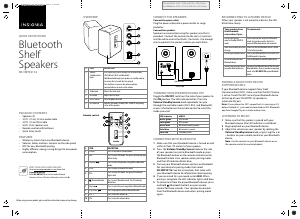
CONNECT THE SPEAKERS
Connect the power cable
Plug the power cable into a power outlet or surge
protector.
Connect the speakers
Speakers are connected using the speaker wire that is
provided. Connect the red wire to the red (+) terminals
and the white wire to the black (-) terminals. Use enough
wire to position the speakers where you want them.
TURNING YOUR SPEAKER ON AND OFF
Toggle the ON/OFF switch on the side of your speaker to
the ON position. The LED indicator blinks. Press the
Volume Standby/source knob repeatedly to cycle
through the available modes (AUX, RCA, and Bluetooth),
or press the button on the remote control to select the
mode you want.
CONNECTING WITH BLUETOOTH
1 Make sure that your Bluetooth device is turned on and
within 33 feet (10 meters) of your speaker.
2 Press the Volume Standby/source knob on the side
of your speaker to cycle to Bluetooth mode or press
the Bluetooth button on the remote control to enter
Bluetooth mode. Your speaker enters pairing mode
and the LED indicator blinks blue.
3 Turn on your Bluetooth device and turn on Bluetooth.
Set your device to pairing mode, then select
NS-HBTSS116. See the instructions that came with
your Bluetooth device for information about pairing.
4 If you are asked for a password, enter 0000. When
pairing is complete, the LED indicator lights solid blue.
5 To disconnect from the paired Bluetooth device, press
and hold (Bluetooth button) on your remote
control for three seconds. Your speaker disconnects
from the Bluetooth device and enters pairing mode
again.
OVERVIEW
Remote control
Your speaker loses
the Bluetooth
connection if you...
Turn o your speaker
or put in standby/AUX/RCA
mode
Move the Bluetooth device out
of range.
Turn o your Bluetooth device.
Turn o Bluetooth on your
Bluetooth device.
Connect your Bluetooth device
to another Bluetooth device.
To reconnect...
Turn on your speaker and cycle to Bluetooth
mode. Your speaker searches for the last
connected Bluetooth device and reconnects.
Make sure that your Bluetooth device is within
33 feet of your speaker.
Turn on your Bluetooth device, then make sure
that Bluetooth is turned on.
Turn on Bluetooth on your Bluetooth device.
Disconnect your Bluetooth device from the other
Bluetooth device, then set your device to pairing
mode. Select NS-HBTSS116 on your Bluetooth
device.
# ITEM
1 Volume
Standby/source
knob
2 Treble knob
3 Bass knob
4 On/O switch
5 LED Indicator
DESCRIPTION
Press repeatedly to cycle through the available modes
(AUX [default], RCA, and Bluetooth).
Hold down knob to put your speakers in standby mode or
to resume the last mode that was played.
Turn clockwise to increase the volume and turn
counterclockwise to decrease the volume.
Adjusts the treble level.
Adjusts the bass level.
Turns the power on or o.
Indicates the mode (Standby, AUX, and RCA) and pairing
status of the speakers.
POWER
MUTE
VOL
AUX
RCA
SOURCE
Before using your new product, please read these instructions to prevent any damage.
# ITEM
1 POWER
2 AUX
3 Previous
4 MUTE
5 RCA
6 Bluetooth button
7 Next
8 Play/Pause
9 VOL +
10 VOL -
DESCRIPTION
Press to turn on/o standby mode.
Press to enter AUX mode. The green LED indicator light
blinks slowly.
Press to select the previous song while in Bluetooth
mode.
Press to mute or unmute the sound.
Press to enter RCA mode. The green LED indicator
lights solid.
Press to enter Bluetooth mode. The LED indicator
blinks blue.
Press to select the next song while in Bluetooth mode.
Press to play/pause while in Bluetooth mode.
Press to turn the volume up.
Press to turn the volume down.
LED indicator
Blinks green
Solid green
Blinks blue
Solid blue
Solid red
MODE
AUX mode
RCA mode
Bluetooth pairing mode
Bluetooth is paired
Standby mode
Power cable
Speaker Wire
USB 5V 1A
120V~ 60Hz
0.6A
INPUT
L SPEAKER
OUTPUT
AUX
OUTPUT
SUB
L
R
RCA
NSHBTSS116RC
Standby/source
PACKAGE CONTENTS
• Speakers (2)
4.9 ft. (1.5 m) 3.5 mm audio cable
4.9 ft. (1.5 m) RCA cable
6.6 ft. (2 m) speaker wire
Remote control with batteries
Quick Setup Guide
FEATURES
Wirelessly stream from any Bluetooth device
Volume, treble, and bass controls on the side panel
NFC for easy Bluetooth pairing
Highly ecient, energy saving design for low power
consumption
Flat size (W×H): 16.58 × 11.69 in (421.22 × 296.93 mm.)
Final folded size: 4.145 × 11.69 in (105.305 × 296.93 mm.)
NS-HBTSS116_21-0353_QSG_V5_EN.ai 1 4/6/2021 11:08:53 AMNS-HBTSS116_21-0353_QSG_V5_EN.ai 1 4/6/2021 11:08:53 AM
Download manual in English (PDF, 0.23 MB)
(Consider the environment and only print this manual if it is really necessary)

Loading…

Rating

Let us know what you think about the Insignia NS-HBTSS116 Speaker by leaving a product rating. Want to share your experiences with this product or ask a question? Please leave a comment at the bottom of the page.
Are you satisfied with the Insignia NS-HBTSS116 Speaker?
Yes No
Be the first to rate this product
0 votes

Join the conversation about this product

Here you can share what you think about the Insignia NS-HBTSS116 Speaker. If you have a question, first carefully read the manual. Requesting a manual can be done by using our contact form.

More about this manual

We understand that it’s nice to have a paper manual for your Insignia NS-HBTSS116 Speaker. You can always download the manual from our website and print it yourself. If you would like to have an original manual, we recommend you contact Insignia. They might be able to provide an original manual. Are you looking for the manual of your Insignia NS-HBTSS116 Speaker in a different language? Choose your preferred language on our homepage and search for the model number to see if we have it available.

Specifications

Brand Insignia
Model NS-HBTSS116
Category Speakers
File type PDF
File size 0.23 MB

All manuals for Insignia Speakers
More manuals of Speakers

Frequently Asked Questions about Insignia NS-HBTSS116 Speaker

Our support team searches for useful product information and answers to frequently asked questions. If you find an inaccuracy in our frequently asked questions, please let us know by using our contact form.

I want to connect a speaker to my television with HDMI, which port should I use? Verified

You need to use the HDMI-ARC port, which is specifically made for connecting audio equipment.

This was helpful (1482) Read more

What do the frequencies say about my speaker? Verified

It indicates the range of frequencies that the speaker can produce. A bigger range of frequencies will provide a larger variation in sound en produce higher quality sound.

This was helpful (792) Read more

When is my music too loud? Verified

Sounds over 80 decibel (dB) can start to damage hearing. Sounds over 120 dB immediately damage hearing. The severity of the damage depens on how often and how long the sound is present.

This was helpful (474) Read more

Does bluetooth work through walls and ceilings? Verified

A bluetooth signal will work through walls and ceiling, unless these are made from metal. Depending on the thickness and the material of the wall the signal can lose in strength.

This was helpful (234) Read more

Up to what noise level is it safe for children? Verified

Children get their hearing damaged quicker than adults. Therefore it is important to never expose children to noise louder than 85dB. In the case of headphones there are special models for children. In case of speakers or other situations you have to be watchful the noise does not exceed that level.

This was helpful (211) Read more
Manual Insignia NS-HBTSS116 Speaker

Related products

Related categories

×
Download