Manual Hoover HPI430 AUS Hob

Need a manual for your Hoover HPI430 AUS Hob? Below you can view and download the PDF manual for free in English. This product currently has 3 frequently asked questions, 0 comments and has 0 votes. If this is not the manual you want, please contact us.

Is your product defective and the manual offers no solution? Go to a Repair Café for free repair services.

Manual

Loading…
E`efdgUf[a`e Xad NeW
U^[d j^[ fem[h _i im_jY^[Z ed1 j^[ Xkpp[h m_bb
Operating instructions
--
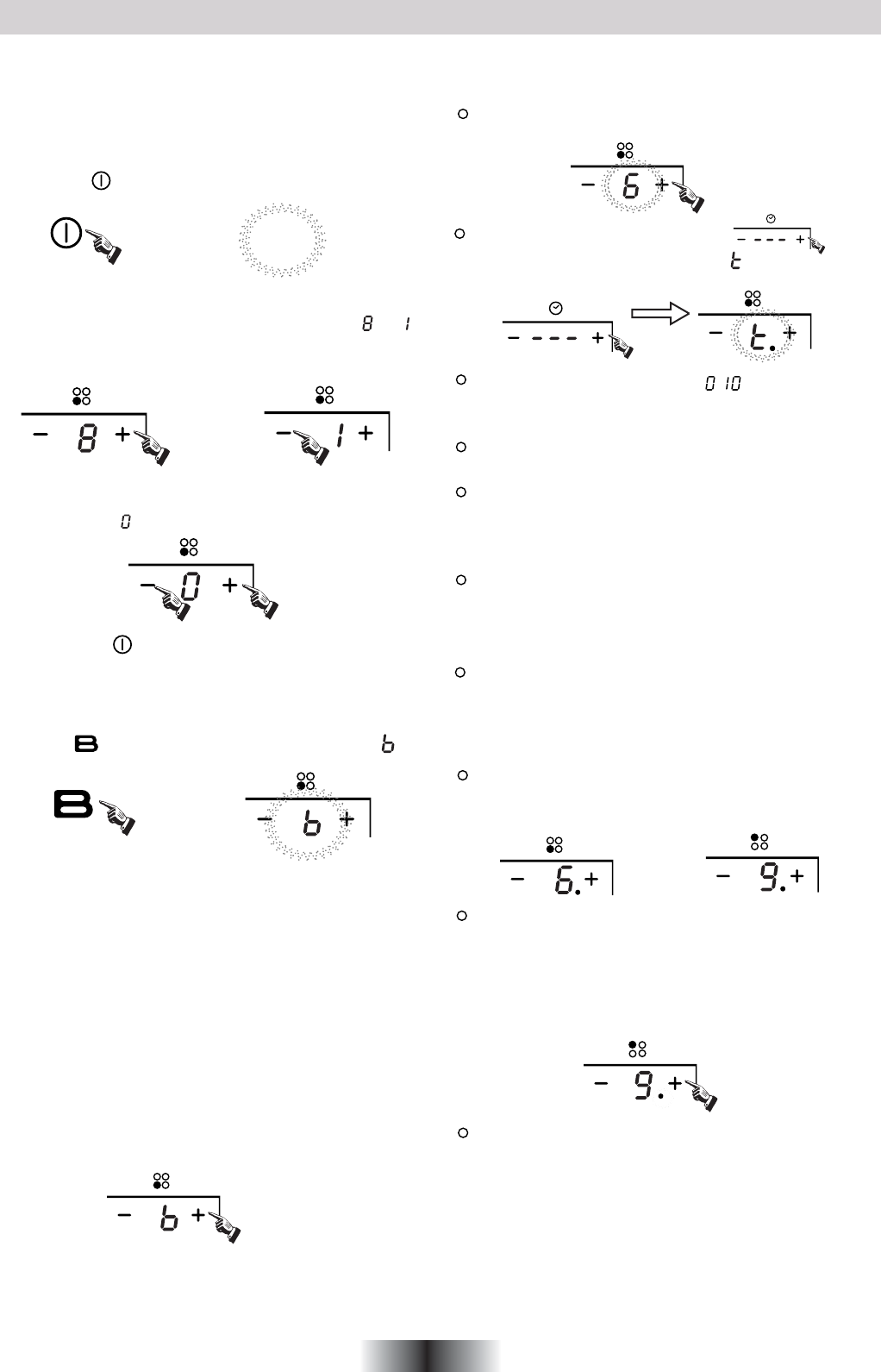
Boost function
Warning:
2. The boost function works on the all cooking zone.
Cancelling the "BOOST" mode
1.Press the " " key, all the indicators show "--".
Press the“ " key, the power level indicator showing " "
4 GB
iekdZ edY[
WdZ Wbb j^[ _dZ_YWjehi m_bb Yec[ ed
\eh ed[ i[YedZ WdZ j^[d
]e ekj3 R^[ ^eX _i dem
_d ijWdZXo ceZ[3
ObWY[ j^[ fWd _d
j^[
Y[djh[ e\ j^[ Yeea_d] ped[3
Select the power level by pressing the "+" or "-" key for the
relevant hotplate. To begin with the indicator shows" "or " "
by pressing the "+" or "-" key. Adjust up or down by pressing
the "+" or "-" key.
If you press the "+" and "-" keys simultaneously, the power
setting returns to" "and the cooking zone switches off.
NB : When the " " key is pressed, the induction hob returns
to standby mode if no other operation is carried out
within two minutes.
1. The boost function only operates for 5 minutes, after which
the cooking zone will revert to its original setting.
3. As the boost function of the 1st cooking zone is activated,
the 2nd cooking zone is limited under level 2 automatically,
vice versa. As the boost function of the 3rd cooking zone is
activated,the 4th cooking zone is limited under level 2
automatically, vice versa.
Cancel the "Boost" mode by pressing the "+" or "-" key of the
corresponding zone.
If more than 1 zone is switch on :
Press the "+" key once increases the time by one minute ;
hold down the "+" key increases the time by 10 minutes ;
Press the "-" key once decreases the time by one minute ;
hold down the "-" key decreases the time by 10 minutes ;
If the timer is set on more than 1 zone:
Timer function
Note:
1. When the timer is 0 minute, the timer is cancelled.
You can set the power level during the timer mode.
:
then press the " + " or " - " timer key power
activate the selected zone by pushing "+" or "-" key of that
zone,the corresponding digits will be flashing.
level indicator flashing and showing " " and the timer
indicator flashes
To begin with the indicator shows" ",set the time by
pressing the "+" or "-" key. After setting the time, you can
select the power level of the cooking zone.
Then set the time for between 1 minute and 9 hours 59
minutes by pressing the "+" or "-" key.
When the time exceeds 1 hour, hold down the "+" key
increases the time by 30 minutes .
When the time exceeds 2 hours, hold down the "-" key
decreases the time by 30 minutes .
Timer can be set on all 4 cooking zones. When you set the
time for several cooking zones simultaneously, decimal
dots of the relevant cooking zones are on.
on the timer display will be shown the timer than will expire
first. The dot of the corresponding zone will be on but
flashing.Once the countdown timer expires the
corresponding zone will be switch off. Then it will be shown
the new first expiring timer and the corresponding zone will
have the dot flashing.
If the timer is set but not active on any zone, it will work
simply as timer countdown.
2. When time elapses, the relevant cooking zone is switched
off.
3. After setting the timer, the timing indicator has been flashing
for 5 seconds, the set time will be automatically confirmed.
Download manual in English (PDF, 31.59 MB)
(Consider the environment and only print this manual if it is really necessary)

Loading…

Rating

Let us know what you think about the Hoover HPI430 AUS Hob by leaving a product rating. Want to share your experiences with this product or ask a question? Please leave a comment at the bottom of the page.
Are you satisfied with the Hoover HPI430 AUS Hob?
Yes No
Be the first to rate this product
0 votes

Join the conversation about this product

Here you can share what you think about the Hoover HPI430 AUS Hob. If you have a question, first carefully read the manual. Requesting a manual can be done by using our contact form.

More about this manual

We understand that it’s nice to have a paper manual for your Hoover HPI430 AUS Hob. You can always download the manual from our website and print it yourself. If you would like to have an original manual, we recommend you contact Hoover. They might be able to provide an original manual. Are you looking for the manual of your Hoover HPI430 AUS Hob in a different language? Choose your preferred language on our homepage and search for the model number to see if we have it available.

Specifications

Brand Hoover
Model HPI430 AUS
Category Hobs
File type PDF
File size 31.59 MB

All manuals for Hoover Hobs
More manuals of Hobs

Frequently Asked Questions about Hoover HPI430 AUS Hob

Our support team searches for useful product information and answers to frequently asked questions. If you find an inaccuracy in our frequently asked questions, please let us know by using our contact form.

Which pans can be used on an induction hob? Verified

In general all pans that are magnetic can be used on an induction hob. Almost all new pans are suited for induction.

This was helpful (1510) Read more

My hob has a power plug that doesn't fit a regular socket, what should I do? Verified

Many electric hobs (both ceramic and induction) have a different plug. This is because these appliances require a lot of power. Have the installation of the appliance done by a professional.

This was helpful (1497) Read more

Why does the ignition on my range make a clicking sound? Verified

If the range has ben cleaned with a lot of water, the knobs might have gotten wet, triggering the ignition. Let the knobs dry. If the problem persists you should contact the manufacturer.

This was helpful (1273) Read more
Manual Hoover HPI430 AUS Hob

Related products

Related categories

×
Download