Manual Honeywell HY-048 Fan

Need a manual for your Honeywell HY-048 Fan? Below you can view and download the PDF manual for free in English. This product currently has 2 frequently asked questions, 0 comments and has 0 votes. If this is not the manual you want, please contact us.

Is your product defective and the manual offers no solution? Go to a Repair Café for free repair services.

Manual

Loading…
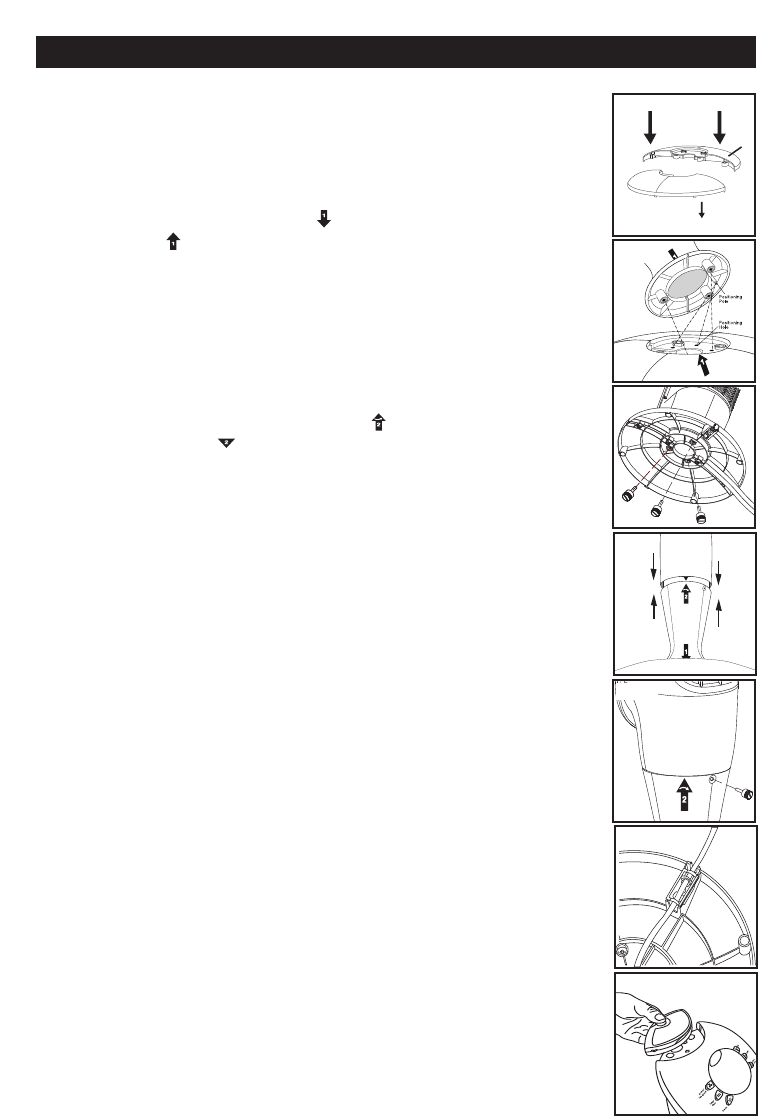
B. Base Assembly
Align the two portions of the circular base and snap together by
gently pushing the 4 round extrusions (Fig. 7, Item A) into the
adjacent circles of the connecting piece (Fig. 7, Item B)
C. Securing the Pedestal to the Base
Line up the arrow marked as on the pedestal with the arrow
marked as on the base. (Fig. 8) Align the 3 round extrusions
with the 3 holes in the base.
Secure the base assembly to the pedestal by inserting and
tightening the 3 thumb screws in the 3 holes located on the
bottom of the base. (Fig. 9)
D. Securing the Tower Fan to the Pedestal
Carefully turn the fan on its side. Place the power cord through
the center of the pedestal and base assembly.
Align the pedestal arrow marked as with the tower fan
arrow marked as . Firmly hold the base steady and rotate
the pedestal assembly clockwise to lock the tower fan in place.
(Fig. 10)
Secure the pedestal to the tower fan by inserting and tightening
1 thumb screw in the opening located near the top rear of the
pedestal assembly. (Fig. 11)
E. Securing the Cord to the Base
With the fan still on its side, locate the cord holding bracket on
the bottom of the base.
Gently pull any slack out of the power cord, place the power
cord securely in the holding bracket and secure the power cord
bracket over the power cord. (Fig. 12)
Return the tower fan to its upright position.
Note: Do not operate the tower fan unless it is in its proper,
upright position.
Note: Only one thumb screw is needed for the low height
option. Do not discard the additional screws as they will be
needed for Tall Height Option
F. Placing the Remote Control in the Storage Area
Locate the remote control that has been provided with the tower
fan.
Make sure that the remote control is not thrown out with
the packing materials.
Install batteries into the remote control battery compartment
(see
Batter
y Installation/Replacement Instr
uctions
).
Place the remote control in the recessed remote holder located
on the top of the fan. (Fig. 13)
Fig. 7
Fig. 8
Base Assembly
ASSEMBLY INSTRUCTIONS (cont’d)
Fig. 10
Fig. 12
Fig. 11
Fig. 9
A
B
Fig. 13
Download manual in English (PDF, 2.47 MB)
(Consider the environment and only print this manual if it is really necessary)

Loading…

Rating

Let us know what you think about the Honeywell HY-048 Fan by leaving a product rating. Want to share your experiences with this product or ask a question? Please leave a comment at the bottom of the page.
Are you satisfied with the Honeywell HY-048 Fan?
Yes No
Be the first to rate this product
0 votes

Join the conversation about this product

Here you can share what you think about the Honeywell HY-048 Fan. If you have a question, first carefully read the manual. Requesting a manual can be done by using our contact form.

More about this manual

We understand that it’s nice to have a paper manual for your Honeywell HY-048 Fan. You can always download the manual from our website and print it yourself. If you would like to have an original manual, we recommend you contact Honeywell. They might be able to provide an original manual. Are you looking for the manual of your Honeywell HY-048 Fan in a different language? Choose your preferred language on our homepage and search for the model number to see if we have it available.

Specifications

Brand Honeywell
Model HY-048
Category Fans
File type PDF
File size 2.47 MB

All manuals for Honeywell Fans
More manuals of Fans

Frequently Asked Questions about Honeywell HY-048 Fan

Our support team searches for useful product information and answers to frequently asked questions. If you find an inaccuracy in our frequently asked questions, please let us know by using our contact form.

What is the best place for a fan? Verified

If there is a source of cold air, like an air conditioner, a fan can be used to better and further distribute that cold air. If only the fan is used it's best to place it had head hight. The head is one of the body parts that transpires the most and the moving air helps dissipating the heat. This gives the maximum cooling effect.

This was helpful (224) Read more

Does a fan influence the room temperature? Verified

No, a fan only moves air, providing a cooling effect to the skin.

This was helpful (223) Read more
Manual Honeywell HY-048 Fan

Related products

Related categories

×
Download