Manual Hitachi 55HAK5450 LED Television

Need a manual for your Hitachi 55HAK5450 LED Television? Below you can view and download the PDF manual for free in English. This product currently has 12 frequently asked questions, 0 comments and has 0 votes. If this is not the manual you want, please contact us.

Is your product defective and the manual offers no solution? Go to a Repair Café for free repair services.

Manual

Loading…
English - 7 -
Do not place any heat sources such as electric
heaters, radiators, etc. near the TV set.
'RQRWSODFHWKH79RQWKHÀRRURULQFOLQHGVXUIDFHV
7RDYRLGGDQJHURIVXႇRFDWLRQNHHSSODVWLFEDJV
out of the reach of babies, children and domestic
animals.
Carefully attach the stand to the TV. If the stand is
SURYLGHGZLWKVFUHZV WLJKWHQWKHVFUHZV¿UPO\WR
prevent the TV from tilting. Do not over-tighten the
screws and mount the stand rubbers properly.
Do not dispose of the batteries in fire or with
KD]DUGRXVRUÀDPPDEOHPDWHULDOV
WARNING
Batteries must not be exposed to excessive heat
VXFKDVVXQVKLQH¿UHRUWKHOLNH
Excessive sound pressure from earphones or
headphones can cause hearing loss.
ABOVE ALL - NEVER let anyone, especially chil-
dren, push or hit the screen, push anything into
holes, slots or any other openings in the TV.
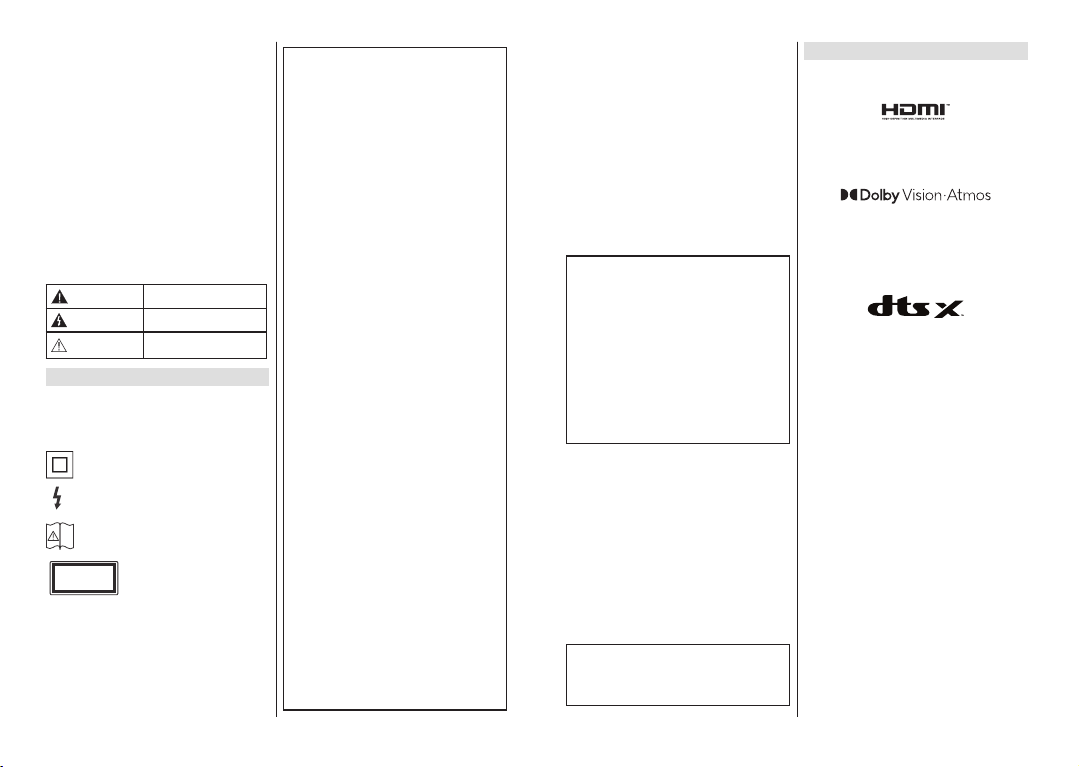
Caution
Serious injury or death risk
Risk of electric shock
Dangerous voltage risk
Maintenance
Important maintenance
component
Markings on the Product
The following symbols are used on the product as
a marker for restrictions and precautions and safety
instructions. Each explanation shall be considered
where the product bears related marking only. Note
such information for security reasons.
Class II Equipment: This appliance is
designed in such a way that it does not require
a safety connection to electrical earth.
Hazardous Live Terminal: The marked
terminal(s) is/are hazardous live under normal
operating conditions.
Caution, See Operating Instructions: The
marked area(s) contain(s) user replaceable
coin or button cell batteries.


Class 1 Laser Product: This
product contains Class 1 laser
source that is safe under reason-
ably foreseeable conditions of
operation.
WARNING
'RQRWඈQJHVWWKHEDWWHU\&KHPඈFDO%XUQ+D]DUG
7KඈVSURGXFWRUWKHDFFHVVRUඈHVVXSSOඈHGZඈWKWKH
SURGXFWPD\FRQWDඈQD FRඈQEXWWRQ FHOO EDWWHU\ ,I
WKHFRඈQEXWWRQFHOOEDWWHU\ඈVVZDOORZHGඈWFDQFD-
XVHVHYHUHඈQWHUQDOEXUQVඈQMXVWKRXUVDQGFDQ
lead to death.
.HHSQHZDQGXVHGEDWWHUඈHVDZD\IURPFKඈOGUHQ
If the battery compartment does not close secu-
UHO\VWRSXVඈQJWKHSURGXFWDQGNHHSඈWDZD\IURP
FKඈOGUHQ
,I\RXWKඈQNEDWWHUඈHVPඈJKWKDYHEHHQVZDOORZHG
RUSODFHGඈQVඈGHDQ\SDUWRIWKHERG\VHHNඈPPH-
GඈDWHPHGඈFDODWWHQWඈRQ
– – – – – – – – – – – –
A television may fall, causing serious personal injury
or death. Many injuries, particularly to children, can
be avoided by taking simple precautions such as;
ALWAYS use cabinets or stands or mounting
methods recommended by the manufacturer of
the television set.
ALWAYS use furniture that can safely support the
television set.
ALWAYS ensure the television set is not overhang-
ing the edge of the supporting furniture.
ALWAYS educate children about the dangers of
climbing on furniture to reach the television set
or its controls.
ALWAYS route cords and cables connected to
your television so they cannot be tripped over,
pulled or grabbed.
NEVER place a television set in an unstable
location.
NEVER place the television set on tall furniture
(for example, cupboards or bookcases) without
anchoring both the furniture and the television set
to a suitable support.
NEVER place the television set on cloth or other
materials that may be located between the tele-
vision set and supporting furniture.
NEVER place items that might tempt children
to climb, such as toys and remote controls, on
the top of the television or furniture on which the
television is placed.
The equipment is only suitable for mounting at
KHLJKWVP
If the existing television set is going to be retained
and relocated, the same considerations as above
should be applied.
– – – – – – – – – – – –
$SSDUDWXVFRQQHFWHGWRWKHSURWHFWඈYHHDUWKඈQJRI
WKHEXඈOGඈQJඈQVWDOODWඈRQWKURXJKWKH0$,16FRQQH-
FWඈRQRUWKURXJKRWKHUDSSDUDWXVZඈWKDFRQQHFWඈRQ
WRSURWHFWඈYH HDUWKඈQJ± DQGWR DWHOHYඈVඈRQ GඈVWUඈ-
EXWඈRQV\VWHPXVඈQJFRD[ඈDOFDEOHPD\ඈQVRPH
FඈUFXPVWDQFHVFUHDWHDIඈUHKD]DUG&RQQHFWඈRQWR
DWHOHYඈVඈRQGඈVWUඈEXWඈRQV\VWHPKDVWKHUHIRUHWREH
SURYඈGHGWKURXJKDGHYඈFHSURYඈGඈQJHOHFWUඈFDOඈVR-
ODWඈRQ EHORZ D FHUWDඈQ IUHTXHQF\ UDQJHJDOYDQඈF
ඈVRODWRU
English - 8 -
Using the special functions to change the size of the
displayed image (i.e. changing the height/width ratio)
for the purposes of public display or commercial gain
may infringe on copyright laws.
The LCD display panels are manufactured using an
extremely high level of precision technology; however,
sometimes some parts of the screen may be missing
picture elements or have luminous spots. This is not
a sign of a malfunction.
The set should be operated only from a 220-240 V
AC 50 Hz outlet. Ensure that the television is not
VWDQGLQJRQWKHPDLQVOHDG'RQRWFXWRႇWKHPDLQV
plug from this equipment, this incorporates a special
Radio Interference Filter, the removal of which will
impair its performance. It should only be replaced by
a correctly rated and approved type. IF IN DOUBT
PLEASE CONSULT A COMPETENT ELECTRICIAN.
WALL MOUNTING WARNINGS
Read the instructions before mounting your TV
on the wall.
The wall mount kit is optional. You can obtain from
your local dealer, if not supplied with your TV.
Do not install the TV on a ceiling or on an inclined
wall.
8VHWKHVSHFL¿HGZDOOPRXQWLQJVFUHZVDQGRWKHU
accessories.
7LJKWHQWKHZDOOPRXQWLQJVFUHZV¿UPO\WRSUHYHQW
the TV from falling. Do not over-tighten the screws.
Figures and illustrations in these operating
instructions are provided for reference only and
PD\ GLႇHU IURP WKH DFWXDO SURGXFW DSSHDUDQFH
3URGXFWGHVLJQDQGVSHFL¿FDWLRQVPD\EHFKDQJHG
without notice.
Licences
7KHWHUPV+'0,+'0,+LJK'H¿QLWLRQ0XOWLPHGLD,QWHUIDFH
and the HDMI Logo are trademarks or registered trademarks
of HDMI Licensing Administrator, Inc.
Dolby, Dolby Vision, Dolby Atmos, and the double-D symbol
are registered trademarks of Dolby Laboratories Licensing
Corporation. Manufactured under licence from Dolby
/DERUDWRULHV&RQ¿GHQWLDOXQSXEOLVKHG ZRUNV&RS\ULJKW
2012-2022 Dolby Laboratories. All rights reserved.
Google, Android, Android TV, Chromecast, Google Play and
YouTube are trademarks of Google LLC.
(**) For DTS patents, see http://patents.dts.com. Manufactured
under licence from DTS Licensing Limited. DTS, DTS:X,
Virtual:X, and the DTS:X logo are registered trademarks
or trademarks of DTS, Inc. in the United States and other
FRXQWULHV'76,QF$//5,*+765(6(59('
(**) The %OXHWRRWK
®
word mark and logos are registered
trademarks owned by the Bluetooth SIG, Inc. and any use
of such marks by Vestel Elektronik Sanayi ve Ticaret A.S. is
under licence. Other trademarks and trade names are those
of their respective owners.
DVB is a registered trademark of the DVB Project.
[1] EIA/CEA-861-D compliance covers the transmission
of uncompressed digital video with high-bandwidth digital
content protection, which is being standardised for reception
RIKLJKGH¿QLWLRQYLGHRVLJQDOV%HFDXVHWKLVLVDQHYROYLQJ
technology, it is possible that some devices may not operate
properly with the television.
This product contains technology subject to certain intellectual
property rights of Microsoft. Use or distribution of this
technology outside of this product is prohibited without the
appropriate licence(s) from Microsoft.
Content owners use Microsoft PlayReady™ content
access technology to protect their intellectual property,
including copyrighted content. This device uses PlayReady
technology to access PlayReady-protected content and/or
WMDRM-protected content. If the device fails to properly
enforce restrictions on content usage, content owners may
require Microsoft to revoke the device’s ability to consume
3OD\5HDG\SURWHFWHGFRQWHQW5HYRFDWLRQVKRXOGQRWDႇHFW
unprotected content or content protected by other content
access technologies. Content owners may require you to
upgrade PlayReady to access their content. If you decline an
upgrade, you will not be able to access content that requires
the upgrade.
The “CI Plus” Logo is a trademark of CI Plus LLP.
This product is protected by certain intellectual property
rights of Microsoft Corporation. Use or distribution of such
technology outside of this product is prohibited without a
licence from Microsoft or an authorised Microsoft subsidiary.
(**) Limited Models Only
Download manual in English (PDF, 4.98 MB)
(Consider the environment and only print this manual if it is really necessary)

Loading…

Rating

Let us know what you think about the Hitachi 55HAK5450 LED Television by leaving a product rating. Want to share your experiences with this product or ask a question? Please leave a comment at the bottom of the page.
Are you satisfied with the Hitachi 55HAK5450 LED Television?
Yes No
Be the first to rate this product
0 votes

Join the conversation about this product

Here you can share what you think about the Hitachi 55HAK5450 LED Television. If you have a question, first carefully read the manual. Requesting a manual can be done by using our contact form.

More about this manual

We understand that it’s nice to have a paper manual for your Hitachi 55HAK5450 LED Television. You can always download the manual from our website and print it yourself. If you would like to have an original manual, we recommend you contact Hitachi. They might be able to provide an original manual. Are you looking for the manual of your Hitachi 55HAK5450 LED Television in a different language? Choose your preferred language on our homepage and search for the model number to see if we have it available.

Specifications

Brand Hitachi
Model 55HAK5450
Category LED Televisions
File type PDF
File size 4.98 MB

All manuals for Hitachi LED Televisions
More manuals of LED Televisions

Frequently Asked Questions about Hitachi 55HAK5450 LED Television

Our support team searches for useful product information and answers to frequently asked questions. If you find an inaccuracy in our frequently asked questions, please let us know by using our contact form.

How do I connect a universal remote control to my television? Verified

To connect your universal remote control, you need the model number and brand name of both the remote control and the television. There is a list of codes for brands and model numbers in the manual of the remote control .

This was helpful (5072) Read more

I want to connect a speaker to my LED television with HDMI, which port should I use? Verified

You need to use the HDMI-ARC port, which is specifically made for connecting audio equipment.

This was helpful (2361) Read more

Does it matter to which HDMI port I connect my device? Verified

In general you can connect a device like a blu-ray player or game console to any HDMI port. The device can then be used by selecting the corresponding HDMI channel on your television.

This was helpful (1186) Read more

How do I measure the inches of my LED television? Verified

Measuring the inches on your LED television is done by measuring the diagonal distance between for example the upper left corner and the lower right corner of the screen (not the edge). One inch equals 2,54 centimeter, so when you measure 99 centimeter, this means your LED television is 39 inches.

This was helpful (941) Read more

Will my remote control also work on other television models of the same brand? Verified

Often a remote control of a television will also work on similar models of the same brand. However, it is unusual that it will work on all models of that brand. Universal remote controls are more suited to do this.

This was helpful (666) Read more

What is the difference between LCD and LED? Verified

Both techniques use an LCD screen that emits no light by itself. The difference is in the lighting behind the screen. With LCD screens this is done by CCFL (cold-cathode fluorescent lamp) and LED makes use of LED lights.

This was helpful (531) Read more

What does HDMI stand for? Verified

HDMI stands for High-Definition Multimedia Interface. HDMI is a connection to send high quality video and audio from one device to another.

This was helpful (456) Read more

Can I repair a dead pixel myself? Verified

There is a difference between a dead pixel and a stuck pixel. A stuck pixel is still coloured and might be fixed by applying light pressure exactly onto the pixel until it restores itself. A dead pixel is always black or white and can't be repaired by yourself.

This was helpful (424) Read more

What is the contrast ratio? Verified

The contrast ratio tells how far the whitest white is from the blackest black. A contrast ratio of for example 400:1 means that the blackest black on screen is 400 times darker than the whitest white. A high contrast ratio contributes to the sharpness of the image.

This was helpful (402) Read more

What is the optimal viewing distance for my television? Verified

This partially depends on personal preference, but as a rule of thumb the optimal viewing distance is about 3x the diagonal screen size of the television. For a television of 60 inch (152cm) the optimal viewing distance would be 180 inch or about 4.5 meter.

This was helpful (353) Read more

How can I properly clean my LED television? Verified

Turn off the television and wipe dust and dirt off the screen with a microfiber cloth. Do not use paper, this can cause scratches. Do not apply too much pressure or you might cause damage to pixels. Use a specialized detergent or make one by mixing 1 part vinegar with 1 part water. Moisten the cloth with the detergent and clean the screen. Make sure the cloth is not too wet. Remove stains by making rotating movements. Dry the screen with a second microfiber cloth to prevent stripes.

This was helpful (352) Read more

Why are there letters next to the numbers on the remote control? Verified

Certain television settings may require you to enter letters. There are usually three letters or other characters on a button. When letter input is required, you can press that button once for the first letter, press twice for the second letter and press 3 times for the third letter. This way, text can be written with a minimum number of buttons.

This was helpful (352) Read more
Manual Hitachi 55HAK5450 LED Television

Related products

Related categories

×
Download