www.hamletcom.com
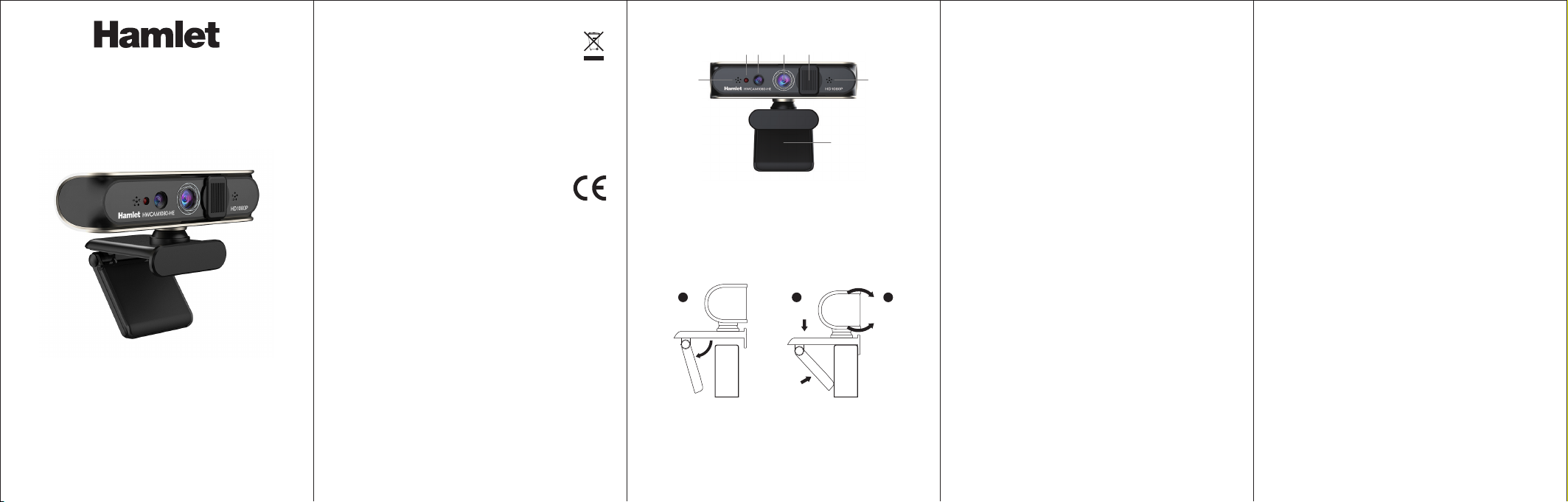
FULL HD WEBCAM
User Manual
HWCAM1080-HE
USB IR Webcam 1080p Full HD
Windows Hello Compatible
Dear Customer,
thanks for choosing an Hamlet product. Please
carefully follow the instructions for its use and
maintenance and, once this item has run its life span,
we kindly ask You to dispose of it in an environmen-
tally friendly way, by putting it in the separate bins for
electrical/electronic waste, or to bring it back to your retailer
who will collect it for free.
We inform You this product is manufactured with materials
and components in compliance with RoHS Directives
2011/65/EU & 2015/863/EU, WEEE Directive 2002/96/CE,
2003/108/CE Italian Legislative Decree 2005/151 and EMC
Directive 2014/30/EU for the following standards:
EN 55032: 2015 + A1: 2020
EN IEC 61000-3-2: 2019 + A1: 2021
EN 61000-3-3: 2013 + A1: 2019 + A2:2021
EN 55035: 2017 + A11: 2020
EN 61000-4-2: 2009
EN IEC 61000-4-3: 2020
EN 61000-4-4: 2012
EN 61000-4-5: 2014 + A1: 2017
EN IEC 61000-4-6: 2022
EN 61000-4-8: 2010
EN IEC 61000-4-11: 2020
The complete CE declaration of conformity of the product
can be obtained by contacting Hamlet at info@hamlet-
com.com.
Visit www.hamletcom.com for complete information on all
Hamlet products and to access downloads and technical
support.
All trademarks and company names mentioned in this
manual are used for description purpose only and remain
property of their respective owners.
The material in this document is for information only.
Contents, specifications and appearance of the product are
indicative and may change without notice.
Imported by: CARECA ITALIA SPA - Scandiano (RE) . Italy.
PRODUCT OVERVIEW
1. Infrared light
2. Infrared Camera
3. Color Camera
4. Privacy cover
5. Microphone (2x)
6. Foldable clip/stand
1 2 3 4
55
6
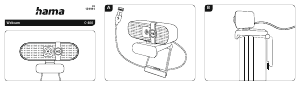
PLACE THE WEBCAM ON MONITOR
Open the clip base of the webcam as shown and place it
onto the screen making sure the foot on the clip base is
folded in contact with the back of your monitor.
PLACE THE WEBCAM ON DESKTOP
The foldable stand can be used to place the webcam on the
desktop or other objects. Adjust the angle of the webcam
horizontally or vertically to obtain the best viewing angle.
21
3
INSTALLATION AND USE
1. Connect your Webcam to the computer
Plug your webcam’s USB cable into USB port of your
computer. Wait for about 1 minute, the webcam will be
recognized and installed automatically by the operating
system. No driver is required for installation.
2. Start using your Webcam
Your webcam is now ready for use. Just open your favourite
communication software like Skype, Zoom, Microsoft Teams
etc. and start your video call.
3. Set up Windows Hello
The HWCAM1080-HE webcam is compatible with the
Windows Hello facial recognition system.
To configure Windows Hello go to Settings > Accounts >
Sign-in options and then follow the instructions of the
wizard.
Remember that in order to set up Windows Hello, a
password must be set first.
If the webcam is not recognized as compatible with
Windows Hello, it is recommended to proceed as follows.
Run Windows Update
Run Windows Update to make any updates and restart the
computer if required.
Install the FaceDriver files
There are a few files inside the FaceDriver folder in the
system which need to be installed on the system to allow the
correct functioning of the facial recognition.
Here are the steps on how to install the files in the FaceDri-
ver folder.
1. Press the Windows and E keys together to open File
Explorer.
2. Type the following path in the address bar and press
Enter key.
C:\Windows\System32\WinBioPlugIns\FaceDriver
3. Once you have reached the FaceDriver folder, right-click
on the HelloFace.inf setup file and click Install from the
context menu.
4. When this is done, you can restart the system.
FAQs
How do I know if my camera is recognized by the
operating system?
Once the camera is connected to the computer, to ensure
the camera has been installed correctly, check that
“Windows Hello CAM” item appears in the “Device
Manager” window.
It is always recommended to check the product FAQs on the
website www.hamletcom.com.
SPECIFICATIONS
• Video resolution 1920 x 1080 @ 30 frames per sec.
• 2 Megapixel 1/4" optical sensor
• 3.4 mm autofocus lens
• Wide 74° field of view
• IR camera for face recognition
• Compatible with Windows Hello
• Built-in sliding privacy cover
• Works even in low light conditions
• Automatic white balance
• USB 2.0 interface (480 Mbps)
• IR filter: 650 ±10 nm
• Plug & Play USB Driverless connection
(No Driver required in Windows 10 and 11)
• Built-in dual microphone with suppression of ambient
background noise
• Adjustable stand for use on desk or onto LCD monitor
• Webcam with 360° rotation
• Dimensions: 109,3 x 56,8 x 47,8 mm
• USB Cable length: 1.5 m
• Weight: 125 g
PACKAGE CONTENTS
• USB IR Webcam 1080p
• User manual
MAN.rev.2023-03



Join the conversation about this product
Here you can share what you think about the Hamlet HWCAM1080-HE Webcam. If you have a question, first carefully read the manual. Requesting a manual can be done by using our contact form.