Manual Glamox 62169 Thermostat

Need a manual for your Glamox 62169 Thermostat? Below you can view and download the PDF manual for free in English. This product currently has 2 frequently asked questions, 0 comments and has 0 votes. If this is not the manual you want, please contact us.

Is your product defective and the manual offers no solution? Go to a Repair Café for free repair services.

Manual

Loading…
Adax AS - Norway
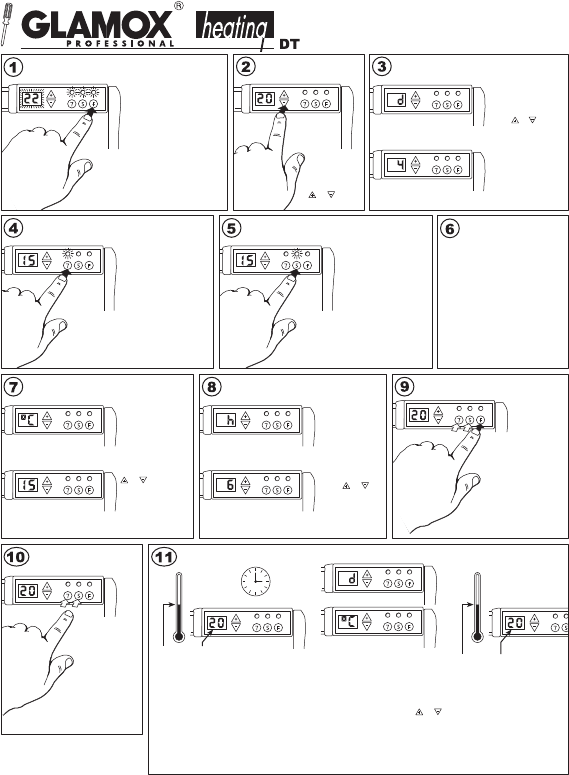
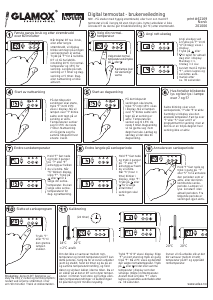
When putting Digital DT into
operation or after a lengthy
power cut, the display will
flash, showing that no
temperature reduction
programme is active.
Press “F” to reset and DT
will revert to the default
settings: 22°C for normal
temperature and 15°C for
reduced temperature. The
duration of temperature
reduction is 7 hours at night
and 5 hours during the day.
Temperature reduction is
not activated.
First time use and after power cuts
of over 60 minutes
print # 62169 Uk
31012005
Select the normal
temperature setting
Choose the
desired normal
temperature
by pressing
or .
Set the correct day of the week
Set the correct week-
day by pressing ”F”
until ”d” (d=day) is
shown in the display.
Press or until the
appropriate figure is
displayed.
Monday = 1, tues-
day = 2 etc. Store the
setting by pressing
”F”, or allow it to be
stored automatically
after approx. 30
seconds.
Start Night Time temperature reduction
At the time you wish
temperature reduction to
start, press ”7” until 15ºC
is displayed. The lamp
over ”7” will now flash
slowly to indicate that
temperature reduction is
active. The temperature
is lowered to 15ºC for the
next 7 hours. This will
now be repeated at the
same time every night.
Start daytime temperature reduction
What do flashing lights
and steady lights over
7 and 5 indicate?
Slow flashing shows that a
temperature reduction period, ”7”
or ”5” is ongoing. At the same
time the display will show the
temperature setting. A steady light
over ”7” eller ”5” shows that DT
is programmed for temperature
reduction, but that it is not
currently in an active period.
Change the temperature
reduction setting
Hold down on ”F”
and press 3 times
on ”7” eller ”5”
depending on which
you wish to change.
When ”ºC” flashes
in the display,
release ”F”. Press
or to choose
your desired
temperature. You
can select different
daytime and night
time settings.
Alter the duration of temperature
reduction
Hold down on ”F”
and press twice
on ”7” or ”5”
depending on
which you wish
to alter. When ”h”
(hour) flashes
in the display,
release ”F”.
Press or to
choose the
number of hours
you wish
temperature
reduction to last.
Hold down on ”F” and
press once on ”7” or ”5”
to override the current
active period, or the
next period of
temperature reduction.
The lamp is lit steadily
for the period in
question. Temperature
reduction will resume
as usual from the
following period.
Annul a period of temperature
reduction
Delete a period of
temperature reduction
Press ”7”
or ”5” until
the green
lamp goes
out.
18°C
= 2°C deviation
(24 hours)
Calibration
Should the actual room temperature and the
DT’s setting not correspond, DT should be
calibrated. First, let the heater work steadily
at the same temperature setting, preferably
for at least 24 hours, keeping doors and
windows closed. This makes sure that the
DT is controlling room temperature. Sudden,
big changes in outdoor temperature will affect
calibration, making it less precise.
Press “F” until “d” is displayed.
Release ”F” for a moment - then
press it once more. ºC will be
displayed and then the setting for
normal temperature. Press
or
until the display shows the same as
the actual measured room
temperature. Store by pressing
“F” or let the new setting be
automatically stored after approx.
30 seconds.
The heater will now work with
the temperature displayed by DT
matching the actual temperature
attained in the room.
20°C
20°C 20°C
Digital thermostat
Produced by
At the time you wish
temperature reduction to
start, press “5” until 15ºC
is displayed. The lamp
over “5” will now flash
slowly to indicate that
temperature reduction is
active. The temperature
is lowered to 15ºC for the
next 5 hours. This will now
be repeated at the same
time from Monday to
Friday, leaving Saturday
and Sunday unaffected.
Download manual in English (PDF, 0.37 MB)
(Consider the environment and only print this manual if it is really necessary)

Loading…

Rating

Let us know what you think about the Glamox 62169 Thermostat by leaving a product rating. Want to share your experiences with this product or ask a question? Please leave a comment at the bottom of the page.
Are you satisfied with the Glamox 62169 Thermostat?
Yes No
Be the first to rate this product
0 votes

Join the conversation about this product

Here you can share what you think about the Glamox 62169 Thermostat. If you have a question, first carefully read the manual. Requesting a manual can be done by using our contact form.

More about this manual

We understand that it’s nice to have a paper manual for your Glamox 62169 Thermostat. You can always download the manual from our website and print it yourself. If you would like to have an original manual, we recommend you contact Glamox. They might be able to provide an original manual. Are you looking for the manual of your Glamox 62169 Thermostat in a different language? Choose your preferred language on our homepage and search for the model number to see if we have it available.

Specifications

Brand Glamox
Model 62169
Category Thermostats
File type PDF
File size 0.37 MB

All manuals for Glamox Thermostats
More manuals of Thermostats

Frequently Asked Questions about Glamox 62169 Thermostat

Our support team searches for useful product information and answers to frequently asked questions. If you find an inaccuracy in our frequently asked questions, please let us know by using our contact form.

What is the dead zone of a thermostat? Verified

Many modern thermostats have a dead zone. If the temperature deviates less than 4°C from the set temperature, the system will not heat or cool. This so called dead zone of the thermostat prevents the system from turning on and off too often, saving energy.

This was helpful (1756) Read more

What is the best place to mount a thermostat? Verified

The best place for a thermostat is approximately 1,5 meter above the ground. Never place the thermostat nead a radiator or other heat emitting equipment or in direct sunlight. Choose a room that is used often. In most cases this is the living room.

This was helpful (1127) Read more
Manual Glamox 62169 Thermostat

Related products

Related categories

×
Download